# Introduction

<figure><img src="https://3277765323-files.gitbook.io/~/files/v0/b/gitbook-x-prod.appspot.com/o/spaces%2FStOwhwvhAvs3L45w42Xw%2Fuploads%2FETMAlKEh3QKjlpZy08K8%2FSliceimg.png?alt=media&amp;token=cb63b7c2-3068-47b7-838b-8dafea273415" alt=""><figcaption></figcaption></figure>

## What Is Pulse Domains?

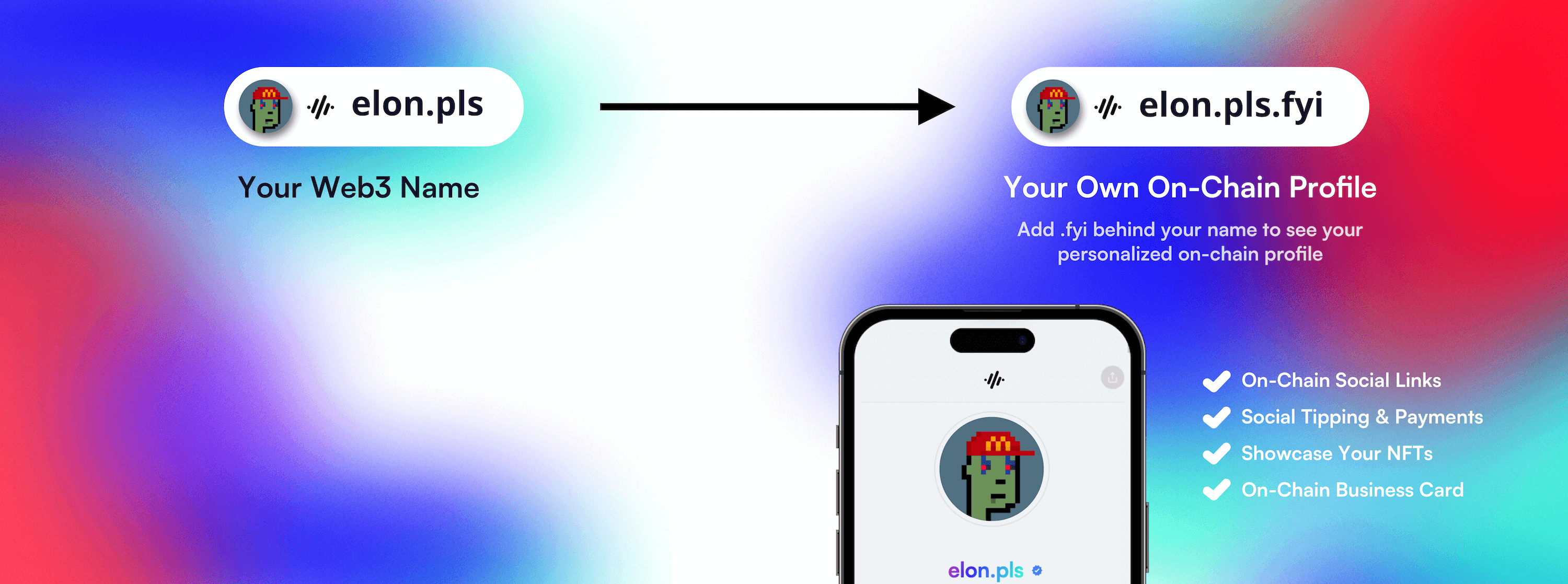
Pulse Domains, the PulseChain Naming Service (PNS), is meant to bring adoption and utility to the Pulsechain Ecosystem, namely, by allowing public addresses to have a human-readable, memorable link. Everyone is encouraged to interact with the protocol as they are permissionless contracts on the PulseChain blockchain.

\
What is PNS?

PulseChain Name Service (PNS) has a main utility to map human-readable names (ex. ‘alex.pls’) to machine-readable identifiers such as PulseChain addresses, other cryptocurrency addresses, content hashes, and metadata.

<figure><img src="https://3277765323-files.gitbook.io/~/files/v0/b/gitbook-x-prod.appspot.com/o/spaces%2FStOwhwvhAvs3L45w42Xw%2Fuploads%2FXKf0OgxyZVKcS00QXJU8%2FExample_1%20(1).png?alt=media&amp;token=eeca9383-8282-4267-a339-33e17c55bb0a" alt=""><figcaption><p>Example of a 0x Public Address being converted to PNS</p></figcaption></figure>

PNS has similar goals to DNS, the internet’s Domain Name Service, but has a significantly different architecture due to the capabilities--and constraints--provided by EVM blockchains. Similarly, like DNS, PNS operates on a system of dot-separated hierarchical names called domains, with the owner of a domain having full control over subdomains.

Top-level domains (‘.pls’) are owned by smart contracts called registrars, which specify rules governing the allocation of their subdomains. Anyone may, by following the rules imposed by these registrar contracts, obtain ownership of a domain for their own use. PNS also supports importing in DNS names already owned by the user for use on PNS.

<figure><img src="https://3277765323-files.gitbook.io/~/files/v0/b/gitbook-x-prod.appspot.com/o/spaces%2FStOwhwvhAvs3L45w42Xw%2Fuploads%2Fh8hSgxDOIMo1MDaeeaz2%2FExample2%20(1).png?alt=media&amp;token=1c497121-2d5d-442c-8529-f8fa3c09064b" alt=""><figcaption><p>Sub Domain Example</p></figcaption></figure>

Because of the hierarchical nature of PNS, anyone who owns a domain at any level may configure subdomains - for themselves or others - as desired. For instance, if Alex owns 'alex.pls' he can create 'pay.alex.pls' and configure it as he wishes.

## Quick links

{% content-ref url="/pages/3pt8B8qMnNnbxoMl5cms" %}
[Registration FAQ](/registration-faq)
{% endcontent-ref %}

## Get Started

We've put together some helpful guides for you to get started.

{% content-ref url="/pages/jglqArCd04sqY1Mhd7Cl" %}
[Domain Registration](/guides/domain-registration)
{% endcontent-ref %}

{% content-ref url="/pages/oddx5MUnm1j6bEbqvraU" %}
[Updating Your Profile](/guides/updating-your-profile)
{% endcontent-ref %}


# Registration FAQ

<figure><img src="https://3277765323-files.gitbook.io/~/files/v0/b/gitbook-x-prod.appspot.com/o/spaces%2FStOwhwvhAvs3L45w42Xw%2Fuploads%2FXpWIuMgUoCtcMzEFLdf6%2FExample%209%20(1).png?alt=media&amp;token=f8e7f49b-7294-423c-abf2-0efe4f940653" alt=""><figcaption></figcaption></figure>

## What is the minimum length of a name I can register?

Names cannot be less than 3 characters.

## Can names have emojis?

Yes! 🙃

## What does it cost to register a .pls domain?

Currently, registration costs are set at the following prices:

* 5+ character .pls names: $5 in PLS per year.
* 4 character .pls names: $169 in PLS per year.
* 3 character .pls names $555 in PLS per year.

3 and 4 character names have higher pricing to reflect the small number of these names available.

## What happens if a name expires?

After your name expires there is a 30-days grace period in which the owner can't edit the records, but can still re-register the name. The grace period is a key feature in Pulse Domains designed to prevent accidental loss of domain names due to missed renewals, allowing owners to maintain control over their domains before they become available for public registration (calendar reminders are available on the Pulse Domains site). Once the grace period ends domain names are released for sale at temporary premiums.

## Implementation of Temporary Premium

After the grace period the name is released with a temporary premium charge for anyone to register. This premium starts at $100,000, reducing it gradually over a 21 day period to its default pricing ([see above](#what-does-it-cost-to-register-a-.pls-domain)).&#x20;

The released name continues to resolve your PLS address until the new owner overwrites it.

## What is a PNS profile?

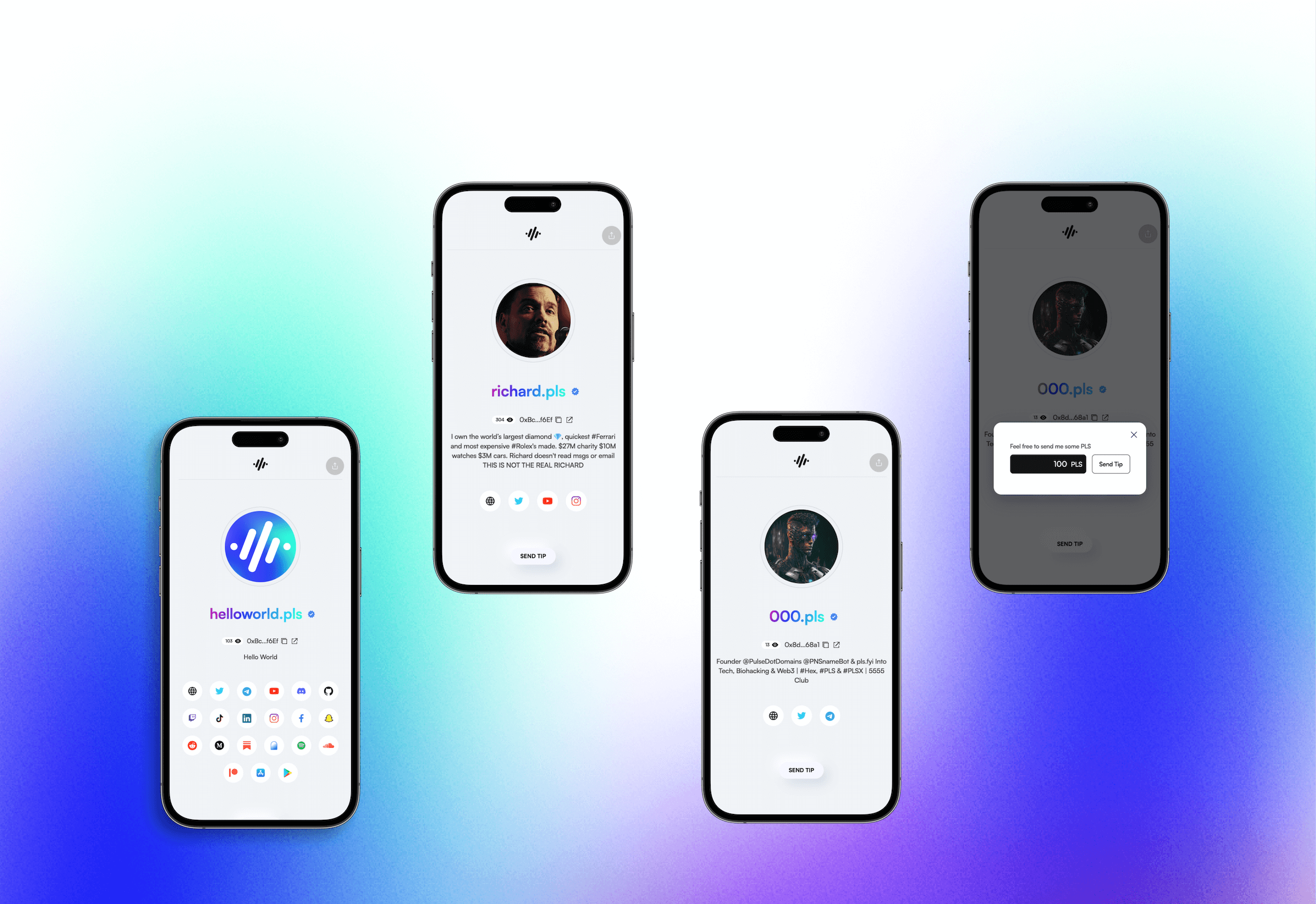
PNS profiles are a collection of pre-defined records, which are used by other dApps. Creating your profile with the [PNS Manager](https://app.pulse.domains/) allows you to have a single source for your profile information across the Web3 ecosystem.

<figure><img src="https://3277765323-files.gitbook.io/~/files/v0/b/gitbook-x-prod.appspot.com/o/spaces%2FStOwhwvhAvs3L45w42Xw%2Fuploads%2FdsOsTlHl8nWMdeleVh9T%2Fexample_3.png?alt=media&amp;token=5c6b2069-9244-41bf-9fa2-dadda32406fd" alt=""><figcaption><p>PNS Profile Example</p></figcaption></figure>

## Quick links

{% content-ref url="/pages/jglqArCd04sqY1Mhd7Cl" %}
[Domain Registration](/guides/domain-registration)
{% endcontent-ref %}

{% content-ref url="/pages/oddx5MUnm1j6bEbqvraU" %}
[Updating Your Profile](/guides/updating-your-profile)
{% endcontent-ref %}


# Terminology

### Domain Name / PNS Name or Name

Domain names in the PulseChain Name Service (PNS) serve as the foundation for your presence and identity on the PulseChain blockchain. These domain names translate complex addresses into easy-to-remember names, simplifying transactions and interactions within the PulseChain ecosystem. The main domain is critical as it represents the primary identifier for individuals or organizations on the blockchain.

1. **Personal Identity**: Replace complex  addresses with a simple, memorable name like `alex.pls`, streamlining transactions and DApp interactions.
2. **Business Branding**: Businesses can use branded PNS domains like `apple.pls` to enhance their visibility and credibility in the blockchain space, making customer interactions more straightforward.
3. **DAOs**: A DAO can use a domain like `communitydao.pls` as its primary address for all transactions and interactions, boosting brand cohesion.
4. **Digital Art and NFTs**: Artists or NFT platforms can use domains like `digitalart.pls` to host galleries or marketplaces, simplifying access for collectors.
5. **Event Organization**: Use domains such as `blockchainconference.pls` for centralizing event-related activities like registrations and information.
6. **Educational Resources**: Domains like `cryptoeducation.pls` can host educational content and resources, making them easily accessible.
7. **Community Platforms**: Create online forums or social platforms with domains like `cryptoforum.pls` for crypto-related discussions.

### Subdomain / Subname

Subdomains in PNS function similarly to subdomains in traditional DNS (Domain Name System). They allow the owner of a primary PNS domain to create additional, more specific addresses that still fall under the umbrella of their main domain. This feature is particularly useful for organizations or individuals looking to establish a clear and organized online presence within the PulseChain ecosystem.

Here are some examples of how subdomains can be used:

1. **Personal Branding and Identity**: If you own `alex.pls`, you can create subdomains like `wallet.alex.pls` for your wallet, `blog.alex.pls` for your personal blog, and `contact.alex.pls` for your contact information. This helps in establishing a personal brand and makes sharing different aspects of your digital identity easier.
2. **Business and Organizational Use**: A company with the domain `apple.pls` can create subdomains for different departments or services, such as `finance.apple.pls`, `support.apple.pls`, or `projectx.apple.pls`. This not only organizes the company's online presence but also lends credibility and ease of access to various services.
3. **Community and DAOs**: For decentralized autonomous organizations (DAOs) or online communities, subdomains can facilitate member identification and roles. For example, `member1.community.pls` or `admin.community.pls` can be used to distinguish between different members and their roles within the community.
4. **NFTs and Digital Art Galleries**: Artists or collectors can use subdomains to showcase their work or collections. If you have a domain like `artgallery.pls`, you can create specific subdomains for each artist or collection, like `monet.artgallery.pls` or `modern.artgallery.pls`.
5. **Event Management**: For events, subdomains can be used for various purposes, such as `tickets.event.pls` for ticketing, `schedule.event.pls` for the event schedule, and `speakers.event.pls` for information about speakers.

### Owner

The individual or entity with ultimate control over a .pls domain name. They have the authority to transfer ownership, change the Manager, and manage other critical aspects of the domain.

### Manager

A role designated to manage specific aspects of a domain or subdomain. The Manager can modify the resolver, edit records, update profile information, and upload avatars, but does not have the complete authority that an Owner possesses

### Owner / Manager Example

A company called web3consulting bought the domain name web3consulting.pls. The CEO made the purchase with his/her address and is now the ***Owner*** of the domain name. The CEO decides to create subdomains for all employees. John received his subdomain, john.web3consulting.pls. John is now the ***Manager*** of that subdomain. Allowing him to update his profile information, change the avatar, and include other records in his subdomain.

### Label

A segment or component of a domain name, such as 'alex' in 'alex.pls'. Understanding labels is key to grasping the hierarchical structure of domain names within the Pulse Domains system.

### Labelhash

The cryptographic hash of a label, which plays an important role in the technical operations and security of the Pulse Domains. It's akin to a unique identifier for each label within the domain name.

### Namehash

The algorithm used to process a PNS name and return a cryptographic hash uniquely identifying that name. Namehash takes a name as input and produces a *node*.

### Node

A cryptographic hash that uniquely identifies a name in the Pulse Domains system. It is the outcome of the Namehash process and is used internally for identifying and managing names.

### Registrar

A contract in Pulse Domains responsible for allocating subdomains. It operates under specific rules and guidelines to ensure fair and secure distribution of subdomains.

### Registry

The core contract of Pulse Domains, maintaining a mapping from domain names to owners, resolvers, and other essential data. It serves as the central database for all domain and subdomain registrations.

### Resolver

A smart contract in the Pulse Domains that maps names to resources, such as cryptocurrency addresses or content hashes. It is essential for linking human-readable names to their corresponding machine-readable information.

### Registration

A concept that could refer to the record of a user's ownership of a name within the Pulse Domains system, distinct from the owner's status. It may include details like registration date, expiry date, and associated fees.

### Registrant

A role that could be relevant in Pulse Domains, referring to the individual or entity that holds a registration. This role may involve responsibilities like transferring the registration and managing associated settings.

&#x20;

&#x20;

<br>


# Domain Registration

Step-by-Step Guide on Registering a .pls Domain Name

<figure><img src="https://3277765323-files.gitbook.io/~/files/v0/b/gitbook-x-prod.appspot.com/o/spaces%2FStOwhwvhAvs3L45w42Xw%2Fuploads%2FW6qmrsJgG1r2vfalSfL2%2FExample_6%20(1).png?alt=media&amp;token=8e31aba3-195b-4eac-9b8a-614cc73ac7fd" alt=""><figcaption></figcaption></figure>

## How to Register an PNS Domain

This guide will give you step-by-step instructions on how to register a new .pls domain name with the [Pulse Domain Manager App.](https://app.pulse.domains/)

{% hint style="info" %}
Watch our 4 min how-to video or follow the steps below.
{% endhint %}

{% embed url="<https://www.loom.com/share/39376f2c1fa64b51a225389cc2b2a774?sid=21ffa8c0-5bbc-4c0e-971c-430289885217>" %}

### Step 1: Make sure you have an EVM-enabled Wallet &#x20;

If you are on a **desktop** we recommend [MetaMask](https://metamask.io/), which is compatible with the Chrome, Firefox or [Brave](https://brave.com/) browser. Here's a [beginner's guide on how to setup your MetaMask wallet](https://www.youtube.com/watch?v=tw-tQD0jztE) on a desktop device.

If you are on a **mobile** phone we recommend [MetaMask Mobile](https://metamask.io/), [TrustWallet](https://trustwallet.com/), or [Rainbow](https://rainbow.me/) wallet. All of these work on iOS or Android device.

{% hint style="info" %}
For advanced users, you can also purchase your domain name via a hardware wallet like [Ledger](https://www.ledger.com/) or [Trezor](https://trezor.io/).
{% endhint %}

This guide will assume you are using MetaMask on a desktop browser, but other browsers and wallets should work very similarly.

### Step 2: Navigate to the Pulse Domains App

* Visit our official site [app.pulse.domains](https://app.pulse.domains/)
* Connect your wallet.

<figure><img src="https://3277765323-files.gitbook.io/~/files/v0/b/gitbook-x-prod.appspot.com/o/spaces%2FStOwhwvhAvs3L45w42Xw%2Fuploads%2FtGPuUPrAAGeNbIoF7CQK%2FScreenshot%202022-11-29%20at%209.33.47%20PM.png?alt=media&amp;token=42ebf44d-b5aa-43b6-b125-5d567d138dfc" alt=""><figcaption></figcaption></figure>

### Step 3: Enter your desired domain name&#x20;

* .pls domains must be 3 characters or longer.
* Keep in mind you can also select emojis 🙃

<figure><img src="https://3277765323-files.gitbook.io/~/files/v0/b/gitbook-x-prod.appspot.com/o/spaces%2FStOwhwvhAvs3L45w42Xw%2Fuploads%2FS9Rtqi597rRSnUazMvOw%2FScreenshot%202022-11-29%20at%209.40.10%20PM.png?alt=media&amp;token=2a849f89-dd85-4db3-bc28-e66ddb80fd7d" alt=""><figcaption></figcaption></figure>

###

### Step 4: Select the ownership length

* .pls domain names start at $5/year paid in PLS, however on testnet they are below 1 tPLS
* .pls domain names can be owned indefinitely, as long as this annual fee is paid.

<figure><img src="https://3277765323-files.gitbook.io/~/files/v0/b/gitbook-x-prod.appspot.com/o/spaces%2FStOwhwvhAvs3L45w42Xw%2Fuploads%2FSdbJUdC3mmkI1Ieg8y1R%2FScreenshot%202022-11-29%20at%209.45.02%20PM.png?alt=media&amp;token=4b64b534-450d-4254-96b8-ea7b9ca9681e" alt=""><figcaption></figcaption></figure>

###

### Step 5: Update your profile&#x20;

* You can include as much or as little information about yourself or your online identity. Check out our [Preserving Your Privacy](/guides/preserving-your-privacy) guide if you are uncertain about what information you might want to include.
* Keep in mind you can always update your profile after you purchased your .pls domain.

<figure><img src="https://3277765323-files.gitbook.io/~/files/v0/b/gitbook-x-prod.appspot.com/o/spaces%2FStOwhwvhAvs3L45w42Xw%2Fuploads%2FJkaTpBri63tkWyo42Q90%2FScreenshot%202022-11-29%20at%209.46.51%20PM.png?alt=media&amp;token=84ffb209-cfc7-4623-ba98-6c748a367089" alt=""><figcaption></figcaption></figure>

### Step 6: Finalize your domain purchase

* To ensure no one claims a name at the same time, there is a waiting period of 60 seconds required.
* You will be signing a total of 2 transactions to finalize a purchase. The first transaction is to set the timer and the second transaction is to initiate the payment.

<figure><img src="https://3277765323-files.gitbook.io/~/files/v0/b/gitbook-x-prod.appspot.com/o/spaces%2FStOwhwvhAvs3L45w42Xw%2Fuploads%2Fzsljyw5yTie67X9AjJdQ%2FScreenshot%202022-11-29%20at%209.51.53%20PM.png?alt=media&amp;token=26159d8a-340a-4bb2-89d0-a7950722d4d2" alt=""><figcaption></figcaption></figure>

###

### Step 7. Congrats you are now the proud owner of a .pls domain name 🥳

* Congrats! Now navigate to "View Name" to update your profile or register another .pls name.

<figure><img src="https://3277765323-files.gitbook.io/~/files/v0/b/gitbook-x-prod.appspot.com/o/spaces%2FStOwhwvhAvs3L45w42Xw%2Fuploads%2FV4bZU4vlExZtGAqLFVUW%2FScreenshot%202022-11-29%20at%209.54.10%20PM.png?alt=media&amp;token=ecc1d381-3987-414a-a71e-69910cb066bf" alt=""><figcaption></figcaption></figure>

## Quick links

{% content-ref url="/pages/oddx5MUnm1j6bEbqvraU" %}
[Updating Your Profile](/guides/updating-your-profile)
{% endcontent-ref %}

{% content-ref url="/pages/605PXFdratCQo66r5pMG" %}
[Creating Subdomains](/guides/creating-subdomains)
{% endcontent-ref %}

{% content-ref url="/pages/qkV4IajwqHOj5vgAno8Z" %}
[Domain Transfer](/guides/domain-transfer)
{% endcontent-ref %}


# Updating Your Profile

Step-by-Step Guide on Updating Your Profile

<figure><img src="https://3277765323-files.gitbook.io/~/files/v0/b/gitbook-x-prod.appspot.com/o/spaces%2FStOwhwvhAvs3L45w42Xw%2Fuploads%2Fl3OZNBovqUEiHRKXUGeK%2Fexample_7%20(1).png?alt=media&amp;token=4b1bc697-e233-459e-be74-abdded39fef5" alt=""><figcaption></figcaption></figure>

Alright, you got yourself a brand new .pls domain name, congrats! Now let's update it.

{% hint style="info" %}
Watch our 5 min how-to video or follow the steps below.
{% endhint %}

{% embed url="<https://www.loom.com/share/4b614a53a4184a3d9dad9602286f2c1d?sid=c4394fea-26a7-4261-bbe5-cf7e05452d55>" %}

## Step 1: Navigate to the Names Tab

* Go to your [Names Tab](https://app.pulse.domains/my/names)
* On this page you can see all of the domain names that are associated with your address
* Select the domain name that you like to update&#x20;

<figure><img src="https://3277765323-files.gitbook.io/~/files/v0/b/gitbook-x-prod.appspot.com/o/spaces%2FStOwhwvhAvs3L45w42Xw%2Fuploads%2FgsoDr0TZ7DaCqgzA8P24%2FScreenshot%202022-11-29%20at%2011.02.55%20PM.png?alt=media&amp;token=85e3bfe0-1d62-401c-bcbd-7ac516cded7f" alt=""><figcaption></figcaption></figure>

## Step 2: Click on the "Edit Profile" button to start editing

<figure><img src="https://3277765323-files.gitbook.io/~/files/v0/b/gitbook-x-prod.appspot.com/o/spaces%2FStOwhwvhAvs3L45w42Xw%2Fuploads%2FgSnhQHSUuaCnnkbXOdjx%2FScreenshot%202022-11-29%20at%2011.06.10%20PM.png?alt=media&amp;token=55f726dc-464b-4abf-8f89-51ceb945ce17" alt=""><figcaption></figcaption></figure>

## Step 3: Update your info

There are a couple of attributes you can associate with your .pls domain name, here's each section is broken down.

### General Info

This information will be shown on your .pls profile.&#x20;

* Nickname&#x20;
* Website URL (make sure to include: https\://)
* Location&#x20;
* Short Bio&#x20;

<figure><img src="https://3277765323-files.gitbook.io/~/files/v0/b/gitbook-x-prod.appspot.com/o/spaces%2FStOwhwvhAvs3L45w42Xw%2Fuploads%2FUjupzmCZ0lsy5EVlyCpB%2FScreenshot%202022-11-29%20at%2011.57.58%20PM.png?alt=media&amp;token=7edd1a24-934c-4297-84c5-85ae5764132b" alt=""><figcaption></figcaption></figure>

### Profile Picture

You can update your profile picture with an NFT that you hold, or upload an image. Unlike the NFT your uploaded profile picture is hosted with Cloudflare.

* Supported image files are .png and .jpeg
* Updating your profile image requires a single gas-less transaction.

<figure><img src="https://3277765323-files.gitbook.io/~/files/v0/b/gitbook-x-prod.appspot.com/o/spaces%2FStOwhwvhAvs3L45w42Xw%2Fuploads%2FJlfrFrABEtyCtBFm7JJx%2FScreenshot%202022-11-30%20at%2012.06.41%20AM.png?alt=media&amp;token=ae79319c-aac2-409e-8eda-99baef7e10fb" alt=""><figcaption></figcaption></figure>

### **Accounts**

Support for up to 15+ additional platforms is coming soon on mainnet. As of now, you can post the following platforms to your profile.

* Twitter
* Github
* Discord&#x20;

<figure><img src="https://3277765323-files.gitbook.io/~/files/v0/b/gitbook-x-prod.appspot.com/o/spaces%2FStOwhwvhAvs3L45w42Xw%2Fuploads%2FzOcWq7bd5M1azNL3vVo2%2FScreenshot%202022-11-30%20at%2012.16.19%20AM.png?alt=media&amp;token=e95025ec-0c0f-4869-9115-3d787f17f5cf" alt=""><figcaption></figcaption></figure>

### Address

Here you can add, and store, up to 100 blockchain addresses. If you use your .pls domain name as a donation address, others can pay you in PLS, BTC, DOGE, or any other digital assets. All of your addresses are stored on the PulseChain blockchain and are immutable.

<figure><img src="https://3277765323-files.gitbook.io/~/files/v0/b/gitbook-x-prod.appspot.com/o/spaces%2FStOwhwvhAvs3L45w42Xw%2Fuploads%2FmgUey8xOncDH2L3bYSJq%2FScreenshot%202022-11-30%20at%2012.17.18%20AM.png?alt=media&amp;token=12f3afa3-31c7-4f7f-97ad-99f516bdc111" alt=""><figcaption></figcaption></figure>

### Decentralized Website&#x20;

Store your decentralized website with [IPFS](https://ipfs.tech/), [Swarm](https://www.ethswarm.org/), [Skynet](https://skynetlabs.com/), and more.

<figure><img src="https://3277765323-files.gitbook.io/~/files/v0/b/gitbook-x-prod.appspot.com/o/spaces%2FStOwhwvhAvs3L45w42Xw%2Fuploads%2FAWXQqBSIIR9HOwhQP1XC%2FScreenshot%202022-11-30%20at%2012.19.35%20AM.png?alt=media&amp;token=d54a607d-d1d0-4603-b858-1458f4acc22b" alt=""><figcaption></figcaption></figure>

## Step 4: Confirm changes

<figure><img src="https://3277765323-files.gitbook.io/~/files/v0/b/gitbook-x-prod.appspot.com/o/spaces%2FStOwhwvhAvs3L45w42Xw%2Fuploads%2F4JJPFz3MKLgHOMRRJtdD%2FScreenshot%202022-11-30%20at%2012.01.49%20AM.png?alt=media&amp;token=7a6ddaac-8aa0-4f8b-ad60-6b37216ba83d" alt=""><figcaption></figcaption></figure>

* All the changes will be written onto your .pls domain name recorded and stored on the PulseChain blockchain.&#x20;

## Step 5: Review your profile 🥳

* Yay, we made it. I mean, you made it! Congrats on creating your first .pls domain name
* You can update your profile records as often as you want, it will always require a single transaction to do so.

<figure><img src="https://3277765323-files.gitbook.io/~/files/v0/b/gitbook-x-prod.appspot.com/o/spaces%2FStOwhwvhAvs3L45w42Xw%2Fuploads%2FSlN5jy8JFxzwAcp70zR9%2FScreenshot%202022-11-30%20at%201.46.00%20AM.png?alt=media&amp;token=2db0a2a5-4bb0-4ad9-8d21-6b7bb3cf139e" alt=""><figcaption></figcaption></figure>

## Quick links

{% content-ref url="/pages/605PXFdratCQo66r5pMG" %}
[Creating Subdomains](/guides/creating-subdomains)
{% endcontent-ref %}

{% content-ref url="/pages/qkV4IajwqHOj5vgAno8Z" %}
[Domain Transfer](/guides/domain-transfer)
{% endcontent-ref %}


# Preserving Your Privacy

<figure><img src="https://3277765323-files.gitbook.io/~/files/v0/b/gitbook-x-prod.appspot.com/o/spaces%2FStOwhwvhAvs3L45w42Xw%2Fuploads%2FcMVwPPmSSAKwu6mgQyZb%2FExample_52%20(1).png?alt=media&amp;token=59b334b1-17c7-4318-aad5-39616269f9dd" alt=""><figcaption></figcaption></figure>

With the success of ENS names on the Ethereum Blockchain. We see more and more Twitter users updating their name with a ".eth" handle e.g. vitalik.eth, barmstrong.eth and Fallon.eth&#x20;

We anticipate the same within the PulseChain community, and we would like to remind you of some privacy practices to mitigate the full transparency of your wallet(s).

Once you purchase a .eth or .pls name and make it public(Twitter, telegram profile etc.), others have a complete view of your wallet, as your .eth or .pls name is connected to your address and is visible on the blockchain.

**For many, this is fine as they like to publicly showcase their NFT collection and token holdings or use a .pls domain that is not tied to their public persona.**

However, if you like to own your .pls domain name and not show off your entire holdings, we recommend following the steps below.

## Steps in Preserving Your Privacy (PulseChain Testnet)

* Create a new account address within your wallet (See guides: [Metamask](https://metamask.zendesk.com/hc/en-us/articles/360015289452-How-to-create-an-additional-account-in-your-wallet), [Ledger](https://support.ledger.com/hc/en-us/articles/4404389482641-Add-your-accounts?docs=true) or [Trezor](https://wiki.trezor.io/User_manual:Using_multiple_accounts#:~:text=Creating%20a%20new%20account%20is,can%20work%20with%20both%20accounts.))
* Request 10 tPLS (testnet PLS) from the official [PulseChain Testnet Faucet](https://faucet.v4.testnet.pulsechain.com/)
* Go to [Pulse Domains](https://v4.app.pulse.domains/) and purchase a .pls domain name

## Steps in Preserving Your Privacy (PulseChain Mainnet)

* Create a new account address within your wallet (See guides: [Metamask](https://metamask.zendesk.com/hc/en-us/articles/360015289452-How-to-create-an-additional-account-in-your-wallet), [Ledger](https://support.ledger.com/hc/en-us/articles/4404389482641-Add-your-accounts?docs=true) or [Trezor](https://wiki.trezor.io/User_manual:Using_multiple_accounts#:~:text=Creating%20a%20new%20account%20is,can%20work%20with%20both%20accounts.))
* Transfer ETH or PLS from a centralized exchange to your new wallet.&#x20;
* Purchase your desired domain name on [Pulse Domains](https://app.pulse.domains/) with PLS.

##

## Quick links

{% content-ref url="/pages/jglqArCd04sqY1Mhd7Cl" %}
[Domain Registration](/guides/domain-registration)
{% endcontent-ref %}

{% content-ref url="/pages/605PXFdratCQo66r5pMG" %}
[Creating Subdomains](/guides/creating-subdomains)
{% endcontent-ref %}

{% content-ref url="/pages/qkV4IajwqHOj5vgAno8Z" %}
[Domain Transfer](/guides/domain-transfer)
{% endcontent-ref %}


# Creating Subdomains

Step-by-Step Guide on Creating .pls Subdomains

Subdomains offer great flexibility for building on top of .pls domains. If you are a company, such as Piteas, and want to issue all your employees a piteas.pls subdomains, this is very easy to do. This section will cover both creating subdomains on a domain you own and unique ways of allowing others to buy subdomains on a domain you own.

{% hint style="info" %}
Watch our 3-minute how-to video or follow the steps below.
{% endhint %}

{% embed url="<https://www.loom.com/share/103bd8d71a1741f58bc99c6385ffaeeb?sid=94fc4382-2a67-4c72-9838-12a05011e14f>" %}

## Step 1: Navigate to your profile page

* Access your profile page [here](https://app.pulse.domains/my/names).
* Click View Details&#x20;

<figure><img src="https://3277765323-files.gitbook.io/~/files/v0/b/gitbook-x-prod.appspot.com/o/spaces%2FStOwhwvhAvs3L45w42Xw%2Fuploads%2FVywzzsrdEE4lGFAioRNR%2FScreenshot%202022-11-30%20at%2012.58.13%20AM.png?alt=media&amp;token=c6da3724-0221-45c8-8177-81eb0bbd3854" alt=""><figcaption></figcaption></figure>

## Step 2: Create a New Subdomain / Subname

<figure><img src="https://3277765323-files.gitbook.io/~/files/v0/b/gitbook-x-prod.appspot.com/o/spaces%2FStOwhwvhAvs3L45w42Xw%2Fuploads%2FClk2JifVwFx9eVLoMhuH%2FScreenshot%202022-11-30%20at%201.25.24%20AM.png?alt=media&amp;token=4b2ee777-c33b-467f-9d3d-c51e566f82e5" alt=""><figcaption></figcaption></figure>

## Step 2: Enter a name

<figure><img src="https://3277765323-files.gitbook.io/~/files/v0/b/gitbook-x-prod.appspot.com/o/spaces%2FStOwhwvhAvs3L45w42Xw%2Fuploads%2F9jtfZhDijzrzInaWbtvz%2FScreenshot%202022-11-30%20at%201.50.26%20AM.png?alt=media&amp;token=613f24bf-0048-4d2f-bbaa-4982ed16a388" alt=""><figcaption></figcaption></figure>

## Step 3: Confirm subdomain creation

* This will also take one single transaction to complete

<figure><img src="https://3277765323-files.gitbook.io/~/files/v0/b/gitbook-x-prod.appspot.com/o/spaces%2FStOwhwvhAvs3L45w42Xw%2Fuploads%2FMjf0EtjCsnwRv9Njn7t8%2FScreenshot%202022-11-30%20at%201.51.08%20AM.png?alt=media&amp;token=54874428-07ed-4678-908e-612c997219e8" alt=""><figcaption></figcaption></figure>

## Step 4: Review & update your Subdomain

* Similar to your top-level domain e.g. alex.pls you can edit your subdomain pay.alex.pls. This includes updating your avatar and various profile records.

<figure><img src="https://3277765323-files.gitbook.io/~/files/v0/b/gitbook-x-prod.appspot.com/o/spaces%2FStOwhwvhAvs3L45w42Xw%2Fuploads%2FJCt57hlII1UJ0t0taD95%2FScreenshot%202022-11-30%20at%201.54.06%20AM.png?alt=media&amp;token=2d74d2b2-44db-4779-bc7b-7ab299fcc434" alt=""><figcaption></figcaption></figure>

{% hint style="info" %}
Fun tip: Did you know you can create a sub, sub, sub, subdomain? Don't believe me? Check out the sub sub subdomain 🥳
{% endhint %}

<figure><img src="https://3277765323-files.gitbook.io/~/files/v0/b/gitbook-x-prod.appspot.com/o/spaces%2FStOwhwvhAvs3L45w42Xw%2Fuploads%2FcpA3o0DIkEM4f9evIYiP%2FScreenshot%202022-11-30%20at%201.58.06%20AM.png?alt=media&amp;token=748b1a91-295e-4b74-b26d-b288e691f8fb" alt=""><figcaption><p>Sub Sub Subdomain </p></figcaption></figure>

## Quick links

{% content-ref url="/pages/jglqArCd04sqY1Mhd7Cl" %}
[Domain Registration](/guides/domain-registration)
{% endcontent-ref %}

{% content-ref url="/pages/oddx5MUnm1j6bEbqvraU" %}
[Updating Your Profile](/guides/updating-your-profile)
{% endcontent-ref %}

<br>


# Domain Transfer

Step-by-Step Guide on Transferring .pls Domains and Subdomains

### Locate the domain name you like to transfer

* You can see a list of all of your available [here](https://app.pulse.domains/my/names).

<figure><img src="https://3277765323-files.gitbook.io/~/files/v0/b/gitbook-x-prod.appspot.com/o/spaces%2FStOwhwvhAvs3L45w42Xw%2Fuploads%2FZKzXopMcUJ6bkjXnVfrA%2FScreenshot%202024-01-20%20at%207.27.41%E2%80%AFPM.png?alt=media&amp;token=9a5095b0-fe15-468c-926f-4dcf673c0a99" alt=""><figcaption></figcaption></figure>

### Click into the Ownership Tab

* Click on "View Details" to transfer see the transfer function

<figure><img src="https://3277765323-files.gitbook.io/~/files/v0/b/gitbook-x-prod.appspot.com/o/spaces%2FStOwhwvhAvs3L45w42Xw%2Fuploads%2Fu901PijmuFmWgzS2nsp5%2FScreenshot%202024-01-20%20at%207.28.39%E2%80%AFPM.png?alt=media&amp;token=6f6e5662-990c-4d93-89f7-7bf162181839" alt=""><figcaption></figcaption></figure>

### Press "Send" button&#x20;

<figure><img src="https://3277765323-files.gitbook.io/~/files/v0/b/gitbook-x-prod.appspot.com/o/spaces%2FStOwhwvhAvs3L45w42Xw%2Fuploads%2F00WH7N9VjMp0xgehHJXw%2FScreenshot%202024-01-20%20at%207.30.36%E2%80%AFPM.png?alt=media&amp;token=38a591fd-28fd-4c30-ad40-4f704aee1423" alt=""><figcaption></figcaption></figure>

### Enter Address or PNS address

* Please make sure to double-check any address that you enter. Once you send a domain or subdomain to someone, this transaction cannot be reverted.

<figure><img src="https://3277765323-files.gitbook.io/~/files/v0/b/gitbook-x-prod.appspot.com/o/spaces%2FStOwhwvhAvs3L45w42Xw%2Fuploads%2FVOLHTqdWaQuzTzqv44n5%2FScreenshot%202024-01-20%20at%207.31.56%E2%80%AFPM.png?alt=media&amp;token=1df28860-b1eb-4b46-ab96-91f1cdb46dd6" alt=""><figcaption></figcaption></figure>

### Enter Address or PNS address

<figure><img src="https://3277765323-files.gitbook.io/~/files/v0/b/gitbook-x-prod.appspot.com/o/spaces%2FStOwhwvhAvs3L45w42Xw%2Fuploads%2FiK6kDc5gV1WQhqGMQz8Z%2FScreenshot%202024-01-20%20at%207.32.28%E2%80%AFPM.png?alt=media&amp;token=6693ab72-1020-4d91-ba26-dedf66e188e6" alt=""><figcaption></figcaption></figure>

{% hint style="warning" %}
If you are sending a domain name that was modified e.g. profile name, bio, profile pic, etc. was edited or changed, you have two options:

1. "Reset Profile" which will reset the entire profile and initiate a send.
2. Go to "Edit Roles" -> "Change Owner" and enter the recipient's address or .pls name. This will ensure that all information associated with that domain will remain intact and will be transferred.&#x20;
   {% endhint %}

## Transferring a Subname / Sub Domain

Transfering your Subname or Sub Domain works the same way as transferring your top level domain name.&#x20;

Click into your Subname -> Ownership -> Send -> Enter Address / .pls address -> Send&#x20;

<figure><img src="https://3277765323-files.gitbook.io/~/files/v0/b/gitbook-x-prod.appspot.com/o/spaces%2FStOwhwvhAvs3L45w42Xw%2Fuploads%2FY8cKKbRQmsJPSNs9tKXb%2FScreenshot%202024-01-20%20at%207.43.47%E2%80%AFPM.png?alt=media&amp;token=774bb6a7-9993-4442-8226-d7e0ac660098" alt=""><figcaption></figcaption></figure>


# DNS Domain Setup

Step-by-Step Guide to Importing a DNS Domain Name to PNS

<figure><img src="https://3277765323-files.gitbook.io/~/files/v0/b/gitbook-x-prod.appspot.com/o/spaces%2FStOwhwvhAvs3L45w42Xw%2Fuploads%2FoJJwRsWvFWujxGDWXDfl%2FExample%2010-min.png?alt=media&amp;token=51b855b2-57e9-4a85-9505-32a69113ba49" alt=""><figcaption></figcaption></figure>

This guide will give you step-by-step instructions of how to import a DNS domain name (.com, .net, .xyz etc.) you already own into PNS.

{% hint style="info" %}
You must own the DNS name and have access to the DNS settings in order to import your DNS name.
{% endhint %}

\
Step 1: Connect Your Wallet&#x20;
---------------------------------

* Visit our official site [app.pulse.domains](https://app.pulse.domains/)
* Connect your wallet.
* If you have difficulties connecting, please follow the steps in our Domain Registration Guide below.

{% content-ref url="/pages/jglqArCd04sqY1Mhd7Cl" %}
[Domain Registration](/guides/domain-registration)
{% endcontent-ref %}

<figure><img src="https://3277765323-files.gitbook.io/~/files/v0/b/gitbook-x-prod.appspot.com/o/spaces%2FStOwhwvhAvs3L45w42Xw%2Fuploads%2F4uIJ5RvvJnz7LQCjDzS2%2FScreenshot%202022-11-29%20at%209.33.47%20PM.png?alt=media&amp;token=74ccd47e-6e1e-4c7e-a402-039c3dab6b8a" alt=""><figcaption></figcaption></figure>

## Step 2: Search for Your DNS Name

* Please keep in mind to include the full DNS domain name with its registrar e.g. example.com, example.net, example.xyz etc.

<figure><img src="https://3277765323-files.gitbook.io/~/files/v0/b/gitbook-x-prod.appspot.com/o/spaces%2FStOwhwvhAvs3L45w42Xw%2Fuploads%2Fsmkvtd2GJxmRWomDfpnW%2FScreenshot%202022-12-01%20at%204.10.38%20PM.png?alt=media&amp;token=6054d118-3ea5-485b-92e4-8cf4a6a1b4b3" alt=""><figcaption></figcaption></figure>

## Step 3: Enable DNSSEC

* You’ll need to visit your domain registrar to enable DNSSEC. Once enabled, click 'Check' to move to the next step.
* Here's a list of all major registrar and how to locate your DNSSEC setting. This example uses Namecheap for demonstration purposes.
  * [Namecheap](https://www.namecheap.com/support/knowledgebase/article.aspx/9722/2232/managing-dnssec-for-domains-pointed-to-custom-dns/)
  * [Domain.com](https://manage.vip.domain.com/kb/answer/1909)
  * [Google Domains](https://support.google.com/domains/answer/6387342)
  * [Dreamhost](https://help.dreamhost.com/hc/en-us/articles/219539467-DNSSEC-overview)
  * [Hover](https://help.hover.com/hc/en-us/articles/217281647-DNSSEC-services)
  * [GoDaddy](https://www.godaddy.com/help/enable-dnssec-on-my-domain-6420)
  * [Bluehost](https://cp.cn.bluehost.com/kb/answer/1909)
  * [HostGator](https://www.hostgator.com/help/article/resellerclub-dnssec-domain-name-system-security-extensions)

<figure><img src="https://3277765323-files.gitbook.io/~/files/v0/b/gitbook-x-prod.appspot.com/o/spaces%2FStOwhwvhAvs3L45w42Xw%2Fuploads%2F8QKdEhzkLbSkTIomCpTp%2FScreenshot%202022-12-01%20at%204.33.26%20PM.png?alt=media&amp;token=ca35d328-1729-4096-8997-9fd697f2c8be" alt=""><figcaption></figcaption></figure>

<figure><img src="https://3277765323-files.gitbook.io/~/files/v0/b/gitbook-x-prod.appspot.com/o/spaces%2FStOwhwvhAvs3L45w42Xw%2Fuploads%2F3ViFRDiYxtXcG99QNHKV%2FScreenshot%202022-12-01%20at%204.44.13%20PM.png?alt=media&amp;token=252163d4-e23a-49f0-b5e6-9beea6a45f59" alt=""><figcaption><p>Namecheap DNSSEC Example</p></figcaption></figure>

{% hint style="info" %}
Depending on your DNS registrar it may take up to 24h for DNSSEC to be recognized. However, usually it takes 5-30 min.
{% endhint %}

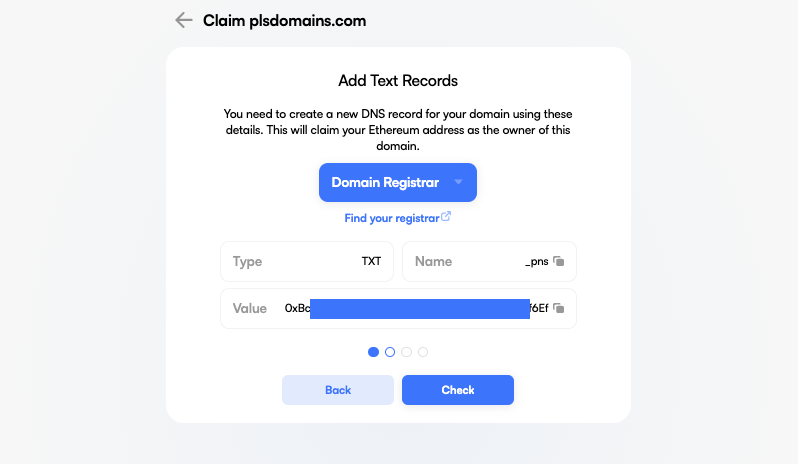
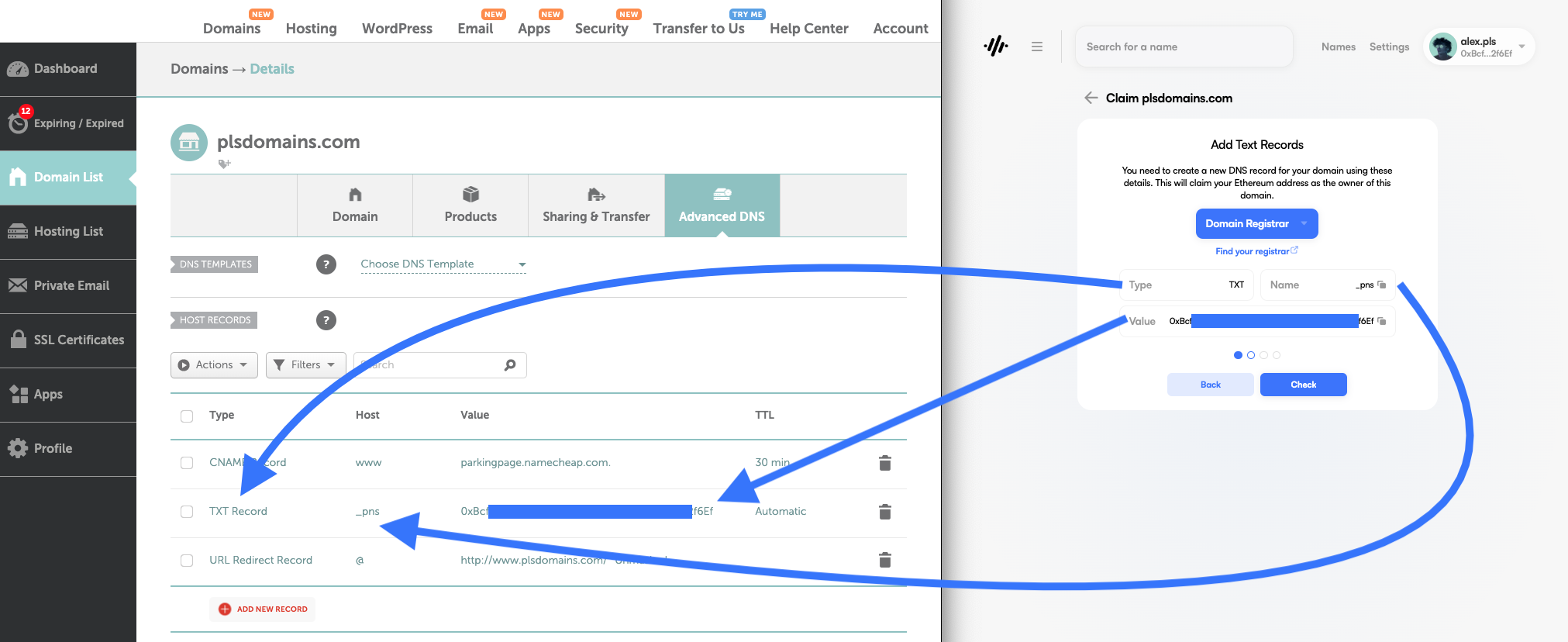
## Step 4: Add Text Records

* You need to create a new DNS record for your domain using these details. This will claim your PulseChain address as the owner of this domain.
* Here are the list of all major registers and their instructions on how to update your TXT records. The below example uses Namecheap.com for illustrative purposes.
  * [Namecheap](https://www.namecheap.com/support/knowledgebase/article.aspx/317/2237/how-do-i-add-txtspfdkimdmarc-records-for-my-domain/)
  * [Domain.com](https://www.domain.com/help/article/dns-management-how-to-update-txt-spf-records)
  * [Google Domains](https://support.google.com/domains/answer/3290350?hl=en)
  * [Dreamhost](https://help.dreamhost.com/hc/en-us/articles/360035516812-Adding-custom-DNS-records)
  * [Hover](https://help.hover.com/hc/en-us/articles/217282457-Managing-DNS-records-)
  * [GoDaddy](https://godaddy.com/help/manage-dns-records-680)
  * [Bluehost](https://www.bluehost.com/help/article/dns-management-add-edit-or-delete-dns-entries)
  * [HostGator](https://www.hostgator.com/help/article/changing-dns-records)

<figure><img src="https://3277765323-files.gitbook.io/~/files/v0/b/gitbook-x-prod.appspot.com/o/spaces%2FStOwhwvhAvs3L45w42Xw%2Fuploads%2FLWqtq8siBYxu0oKxTt9x%2FScreenshot%202022-12-01%20at%204.39.22%20PM.png?alt=media&amp;token=854c14e4-d318-4200-a548-a478a020ca12" alt=""><figcaption><p> </p></figcaption></figure>

<figure><img src="https://3277765323-files.gitbook.io/~/files/v0/b/gitbook-x-prod.appspot.com/o/spaces%2FStOwhwvhAvs3L45w42Xw%2Fuploads%2Fa1r9Y0L5fcQhqw40UdRE%2FScreenshot%202022-12-01%20at%204.47.17%20PM.png?alt=media&amp;token=32d53820-966c-4452-9dee-9c4deada7fea" alt=""><figcaption><p>Namecheap TXT Example</p></figcaption></figure>

{% hint style="info" %}
Depending on your DNS registrar it may take up to 24h for the TXT record to be recognized. However, usually it takes 30 - 180 min. Keep checking back in and clicking the "Check" button.
{% endhint %}

## Step 4: Claim & Confirm the Transaction

* Claiming your DNS name is free of charge and you only pay the network fee for the claiming transaction.

<figure><img src="https://3277765323-files.gitbook.io/~/files/v0/b/gitbook-x-prod.appspot.com/o/spaces%2FStOwhwvhAvs3L45w42Xw%2Fuploads%2FP6eBBZ6OgMSOTji9EcXv%2FScreenshot%202022-11-29%20at%2012.21.29%20PM.png?alt=media&amp;token=5410ddaa-aa67-42a0-a3f3-85674cc1946a" alt=""><figcaption></figcaption></figure>

## Step 5: Setup Your Profile

* Similar to any other .pls domain you can modify your profile to your liking, as well as set it as your primary name in the PNS registery.
* Keep in mind when you claim your DNS name you are assigned as the Owner, but rather as the Manager.&#x20;

<figure><img src="https://3277765323-files.gitbook.io/~/files/v0/b/gitbook-x-prod.appspot.com/o/spaces%2FStOwhwvhAvs3L45w42Xw%2Fuploads%2FU7xj37a6vutS9yBuslmc%2FScreenshot%202022-12-01%20at%207.25.47%20PM.png?alt=media&amp;token=b3bf9628-c683-4144-81ee-e35577652be0" alt=""><figcaption></figcaption></figure>

## FAQ

### Can I register any DNS domains through the PNS app?

At this stage we support about 90% of all Top Level Domain names, this includes TDLs such as .com, .net, .org, .co, .us, .gov, .edu, .info, .xyz, .ly, .site, .me, au, etc.

### If I own example.com DNS name, can I claim for example.pls

Nope, .pls domain names are managed completely separately.

### Once I register the domain, how can I transfer or delete ownership?&#x20;

Unlike . pls permanent registrar, there is no notion of "registrant" which can transfer the ownership of the controller. If you want to transfer the ownership to any address other than the currently registered address, please update the corresponding DNS record from your DNS manager and click "Transfer" from our PNS manager.&#x20;

We currently haven't enabled the ability to delete the ownership. Having said that, you can achieve the same effect if you set the owner record to `a= 0x0000000000000000000000000000000000000000` then click "Transfer" from the PNS manager.

### Can I register my DNS subdomain?

No. DNSSEC registration is only enabled for the second level domain (eg: example.xyz). If you want to create `subdomain.example.xyz`, then click "Subdomains" tab of our manager and create it from the PNS manager just like other subdomains under .pls.

## Quick links

{% content-ref url="/pages/jglqArCd04sqY1Mhd7Cl" %}
[Domain Registration](/guides/domain-registration)
{% endcontent-ref %}

{% content-ref url="/pages/oddx5MUnm1j6bEbqvraU" %}
[Updating Your Profile](/guides/updating-your-profile)
{% endcontent-ref %}

{% content-ref url="/pages/nGsXt5sVj2Mhsxt6ooF7" %}
[Terminology](/terminology)
{% endcontent-ref %}


# Brand Guidelines

Welcome to Pulse Domain's Brand Guidelines page. Our brand is more than just a logo; it's a representation of our identity, values, and mission. We've created these guidelines to help ensure consistency and clarity when our brand is represented. Whether you're a partner, a collaborator, or a member of our team, we ask that you follow these guidelines to maintain the integrity of our brand.

### Brand Book, Logos & Fonts

<figure><img src="https://3277765323-files.gitbook.io/~/files/v0/b/gitbook-x-prod.appspot.com/o/spaces%2FStOwhwvhAvs3L45w42Xw%2Fuploads%2FZW8aSkywgcbXeLncx70X%2FScreenshot%202023-11-01%20at%204.58.04%E2%80%AFPM.png?alt=media&amp;token=fd39646c-8094-4fa7-9e08-4e4532df04bd" alt=""><figcaption></figcaption></figure>

**Download the brand book, logos, and fonts** [**here**](https://drive.google.com/drive/folders/10dQeJgm7SlxTVTD9gOWI7ja15eqmJoV0?usp=sharing) **or download the zip file below.**

{% file src="/files/BlqgjnJTXBG4lRRw1wmn" %}

### Download Assets Individually

Here, you'll find all the necessary assets to represent our brand correctly. Please ensure you've reviewed our brand guidelines before using any of these assets.

#### Primary Logos

<figure><img src="https://3277765323-files.gitbook.io/~/files/v0/b/gitbook-x-prod.appspot.com/o/spaces%2FStOwhwvhAvs3L45w42Xw%2Fuploads%2FEpOGOLSkPrYQLpUlIYak%2FPNS_Full_Black.png?alt=media&amp;token=a178f49c-9ec9-4d51-ad32-9f0717992135" alt=""><figcaption><p>Pulse Domains Logo on white background</p></figcaption></figure>

<figure><img src="https://3277765323-files.gitbook.io/~/files/v0/b/gitbook-x-prod.appspot.com/o/spaces%2FStOwhwvhAvs3L45w42Xw%2Fuploads%2FXAjoz849XjtoUJ9gesG6%2FPNS_Full_White.png?alt=media&amp;token=70444fc0-e73d-4622-8261-a035a4560f6b" alt=""><figcaption><p>Pulse Domains Logo on black background</p></figcaption></figure>

#### Secondary Logos

<div align="center"><figure><img src="https://3277765323-files.gitbook.io/~/files/v0/b/gitbook-x-prod.appspot.com/o/spaces%2FStOwhwvhAvs3L45w42Xw%2Fuploads%2F3Wl8knDnGGxkQna7vRNW%2FPNS_Logo_Colored.png?alt=media&amp;token=48530e55-6ac3-4130-8c34-a8538412eb02" alt="" width="375"><figcaption><p>Pulse Domains Logo Colored</p></figcaption></figure></div>

<figure><img src="https://3277765323-files.gitbook.io/~/files/v0/b/gitbook-x-prod.appspot.com/o/spaces%2FStOwhwvhAvs3L45w42Xw%2Fuploads%2FGogBj1XbCepbEe3SAJkj%2FPNS_Logo_Black.png?alt=media&amp;token=45a43896-e413-4bf7-bf10-3c509e89d153" alt="" width="375"><figcaption><p>Pulse Domains Logo Black</p></figcaption></figure>

<figure><img src="https://3277765323-files.gitbook.io/~/files/v0/b/gitbook-x-prod.appspot.com/o/spaces%2FStOwhwvhAvs3L45w42Xw%2Fuploads%2F8W1KYhpVtx9KMYpHBGHj%2FPNS_Logo_White.png?alt=media&amp;token=bd7a40ae-e52c-44a5-94b7-badbd8749b9b" alt="" width="375"><figcaption><p>Pulse Domains Logo White</p></figcaption></figure>

###

#### Fonts

<figure><img src="https://3277765323-files.gitbook.io/~/files/v0/b/gitbook-x-prod.appspot.com/o/spaces%2FStOwhwvhAvs3L45w42Xw%2Fuploads%2FfucdoVr5KMisyWE0ODZ7%2FScreenshot%202023-11-01%20at%204.43.49%E2%80%AFPM.png?alt=media&amp;token=9da58131-9e8b-4d11-8e1d-3f1c2c2bb89e" alt=""><figcaption><p>Font Example</p></figcaption></figure>

Download fonts [here](https://drive.google.com/drive/folders/1-42wD8YWubljtbqfPoSjJM1rOO1TRsVJ?usp=sharing).


# Referrals

Get 10% on every friend you refer with PNS

## How it works

To create a referral code:&#x20;

* Get your .pls name&#x20;
* Visit your [PNS profile](https://v4.app.pulse.domains/)
* Navigate to the "More" tab to access your unique referral code

<figure><img src="https://3277765323-files.gitbook.io/~/files/v0/b/gitbook-x-prod.appspot.com/o/spaces%2FStOwhwvhAvs3L45w42Xw%2Fuploads%2FExbXkJ2kxBIsOcoq25wG%2FScreenshot%202023-04-28%20at%207.16.10%20AM.png?alt=media&amp;token=8d1eaf5d-3421-4389-a905-3dec1c700aae" alt=""><figcaption><p>PNS Profile Page</p></figcaption></figure>

<figure><img src="https://3277765323-files.gitbook.io/~/files/v0/b/gitbook-x-prod.appspot.com/o/spaces%2FStOwhwvhAvs3L45w42Xw%2Fuploads%2FopytEyWqf7J1ZvfgBE7H%2FScreenshot%202023-04-28%20at%207.17.09%20AM.png?alt=media&amp;token=80101f0d-cbf1-449b-988d-ef8aff92c1a6" alt=""><figcaption><p>PNS Referral URL</p></figcaption></figure>

Note that referral codes are case-sensitive and follow the following format:

* **<https://app.pulse.domains?ref=\\>\<your\_pns\_name>.pls**

Here is an example of our "Hello World" name:

* **<https://app.pulse.domains?ref=helloworld.pls>**

You can share this link on any platform, e.g. Twitter, Telegram. When a user clicks on your link, and mints a .pls domain name, you receive 10% of the amount that was paid.

**All payouts happen in real-time and "on-chain" when the referred user mints a .pls name.**&#x20;

\- 5+ character **.pls** names: $5 **- Get $0.50 in PLS**\
\- 4 character **.pls** names: $169 **- Get $16.9 in PLS**\
\- 3 character **.pls** names $555 **- Get $55.50 in PLS**

{% hint style="info" %}
Using a contract address as your referrer can increase the risk of transaction failure. We advise choosing a standard wallet address as your referrer to avoid failed registrations and no payouts.
{% endhint %}

## Registration Widget

If you are a website owner you can also improve the user experience by using the [PNS Widget](/guides/registration-widget) directly on your site. This too allows you to have your referral link embedded into the widget.

<figure><img src="https://3277765323-files.gitbook.io/~/files/v0/b/gitbook-x-prod.appspot.com/o/spaces%2FStOwhwvhAvs3L45w42Xw%2Fuploads%2FhVDiTmF6ad8OuHO3QLLj%2FReferal%20Widget.png?alt=media&amp;token=4f4857a9-c949-4695-a75a-24e5a76a9380" alt=""><figcaption></figcaption></figure>

Please note that the referral program is subject to change, we may decide to increase or decrease the percentage payout at any time. We will announce any modifications to our referral program publicly before implementing them. You are free to promote your link through any lawful methods; however, be advised that any observed misuse could lead to permanent blacklisting.


# Whitelist & Claims

Embrace the Future of Web3 Identity with .pls domains

We've meticulously whitelisted an array of unique domain names for claiming by eligible individuals and brands, recognizing their significance in the Web3 world.&#x20;

Additionally, we celebrate users who have claimed their names early. For those seeking rarity and exclusivity, select domains will be available through exciting auctions. Dive into this unique opportunity and carve your digital identity on PulseChain!

{% hint style="info" %}
If you want want to claim your .pls that is present in the below lists, please [DM us on X](https://twitter.com/PulseDomains_)
{% endhint %}

PNS Claim Address: [claims.pns.pls](https://app.pulse.domains/0x9360B8D341923Ae9771Cf15cC8816c56D752F8b8)<br>

<details>

<summary>PNS Name Claimers</summary>

*Celebrating the pioneers! A list of users who have already secured their online persona and/or brand with .pls domains. Your .pls name will be sent to the wallet address you provided us on day one of the PNS launch.*

```
zuka
coreygeary
deficryptoalliance
thothschild
ciphersechs
pulsecats
spectralmana
grumpy
unifyer
freedomswap
ophir
ophircrypto
zztestco
cryptoheartbeat
texantoken
texan
schwa
primevibe
hexpulsewin
tobiwan
toby
hexfire
chrispyman
yourkeysyourcrypto
proofofnowork
hexfireio
btcupload
internetmoney
brotherkdg
donmontoya
money
kg💰
martinaxelart
hex_tangent
tangent
yacht
dillydao
hexicangirl
djcryptomatic
dbcooper
coreycosta123
coreycosta
corey_costa
cryptoorange
diamondhands
nichitarussu
markwild_369
tbird
tbirdhex
justice
scottishdave
imscottishdave
charitychain
jexxa
j_jexxa
bradshawknox
tobiwan_hexobi
tobiwanhexobi
davidjames
sommi
yourfriendsommi
garywoods
garywoodswin
fundinggym
fundingym
hexpassiveincome
cryptocoffee
cryptocoffee369
sandybeach
sandybeach_369
bro
okari
sportsbooks
brian
quattrocinco
phamous
hexproperty
fxnction
gammadevops
optimuskevtron
poseidon5555
poseidon
defioracle
nutmeghash
rolandocryptos
mando
superstake
cryptovince369
cryptovince
hans
effortless
tortoisejohnny
tortoisejohnny🐢
iceman
cryptoscout24
timepaysme
mati
matiallin
mrpulse
bretep
mithoo
lolz
stakehex5555
diamondatlasc
dac
diamondatlas
justaskjesse
powercity
hodldog
hodldogofficial
memecoinmafia
hexmackenzie
mackenzie
ejhodl
thestakerclass
vetsinkrypto
toshiflo
lit
mylifeisawesome
lit_gains
cryptoisawesome
bullish0x
pulsechaintour
blakchexican
pulsechad
loz
lozuk
mellow
michael
tribinger
liquidloans
liquidloansio
0xbistroio
0xstakehouse
mcr369
magiccarpetride369
kryptopanda
aztro
abit_hex
jori_hex
abithex
abit
jorihex
jori
moneygangcrypto
rg3privateer
rg3
discoursesyndicate
cwc
hexican
hexicans
katieepcrypto
katieep
gerardo
gerawrdog
mintra
lookintohex
wallrus
wallrusofficial
thatamishkid
securityfundtoken
crypty
cryptygirl
davidfeder
devjuyoung
nosignal
timetopulse
pulsepuzzles
ztaylor231
cryptochrissyuk
thepulsetube
pulsetube
pulsechainlive
elmyre
ellmyre
cryptoprnr
hines
_freddiequotes_
freddiequotes
awildsj
kevin
calibreftw
bwells888
davied
lookintohedron
slothdds
cryptosloth
jjcrypto
winwin
hyperburn
boomer
soup
player1taco
pulsepunks
richardsbrother
b9opsec
papahboehner
boehnerpapah
papah
tunai
stefan
d3f4ult
surpassinggoogle
hexmac
sprackburger
cryptohexplained
cabanacrypto
cabana
cabana_crypto
yellowcake
topgunhexadian
pulsepiplus
cryptokindness
phanesnetwork
griffden
iamdiarrhoea
betterhumanz
wannabegodminnow
gazza
tezzums
rakkcrypto
dipslayer
sammychica
whalesonly1
whalesonly
dreamchaserzw
mayo
hanke
brandon
maringa
0xcryptomag
coinhobo
rodgers
donthexme
kyle
crypto-hub
gopulse
therock
trevonjames
jacob
pulsepot
claire
wrs
pulsechainhexican
rugmeharder
axisalive
axisalive5555
axis
quigly
toospooky
twerk
hexalert
pulsealerts
🍊🍊🍊
roborhapsody
fullycroisened
ted
mana
igloobamboo
pussy
orangegrove
orangepeelme
thanksinadvance
gamesys
havok
walletport
pulsicansio
thatbodymechanic
rhmaximalist
rhmax
cashew
identityblock
vivek
mega 
degengemhunter
kryptokoolaid
kryptokoolaidoffical
koolaid
hexographer
cryptoclaz
0xhashbrown
bobbieh
bobbiehexnews
```

</details>

<details>

<summary>PNS Name Claimers Pending</summary>

*Almost there! If your name's here, you have 3 months to claim your .pls domain before it goes to auction. Reach out to us via* [*X/Twitter DM*](https://twitter.com/PulseDomains_)*.*

```
kopibacan
justalesh
nug
fashioncoder
robbie
cryptocrazy
crypto_crazy
quatrocinconews
blexyhex
thetwinfather
mooshiehex5555
abujasher42
coreyaninvestor
mracq
nrdgrl007
nrdgri007
nerdgirl007
jessez
unclekevinhex
hextrovert
kryptosparbuch
ksbtv
hexmeridius369
pulseape
revelatioassests
freepulse
freepulseio
bitsurfer
stickerguywin
stickerguy
444th
```

</details>

<details>

<summary>Single Pulsemoji (1,346 Available)</summary>

*Express yourself with True Single Emojis! These unique PNS names are gearing up for an exciting auction.*

**View the**[ **full list** ](https://ens.vision/categories/single-ethmoji?regState=all\&buyout=all)**of available Single Emojies**

```
🤾🏼‍♂️
🙎🏻‍♀️
💇🏼‍♀️
🏄🏾‍♀️
🏋🏾‍♂️
👩🏽‍💼
💆🏼‍♀️
🏊🏾‍♀️
🧑🏾‍🎤
🤸🏽‍♀️
& more
```

</details>

<details>

<summary>Rare Base Pulsemoji (219 Available)</summary>

*Gold & Unique Single Emojis - the rarest and most coveted! Get ready for the exclusive auction of these byte-sized treasures.*

**View the** [**full list** ](https://ens.vision/categories/base-single-ethmoji?regState=all\&buyout=all)**of available Base Emojies**

```
🙅‍♂️
🧑‍⚕️
🚣‍♀️
💆‍♀️
👱‍♀️
🦹‍♀️
🚵‍♀️
🐕‍🦺
🧗‍♀️
🦸‍♀️
& more
```

</details>

<details>

<summary>Staker / Crypto Leagues (38 Available)</summary>

*Exclusive list of rare PNS names for the crypto elite. Watch out for the upcoming auction!*

```
poseidon🔱
prosperousposeidon🔱
prosperousposeidon
winningwhale
winningwhale🐳
winningwhale🐋
whale
whale🐳
whale🐋
godwhale
supershark🦈
shark🦈
supershark
shark
dabblingdolphin
dabblingdolphin🐬
dolphin🐬
dolphin
swiftysquid
squid
swiftysquid🦑
squid🦑
tinkeringturtle
turtle
tinkeringturtle🐢
turtle🐢
coolcrab
crab
coolcrab🦀
crab🦀
shyshrimp🦐
shrimp🦐
shyshrimp
shrimp
silentshell
shell
silentshell🐚
shell🐚
```

</details>

<details>

<summary>Richard Heart / HEX / PulseChain Related Terms</summary>

*Reserved for 99 years! These terms are set aside for the rightful entities in the PulseChain universe.*

```
pulsechain
pulsechaine
pulschain
pulsechane
pulschian
pulsechein
hex
h3x
hecks
hax
hekx
hexx
pulse
puls
pulce
pluse
puls3
pulese
richard
richerd
richrd
richar
rihcard
ricard
richardheart
richardhert
richrdheart
richardhart
richartheart
richardheert
richardheartwin
richardheartwinn
richardheartwine
richardhartwin
richrdheartwin
richardheertwin
plsx
plsc
plsx1
plsxx
plsxe
plx
pulsescan
pulsecan
pulsiscan
pulseskan
puls3scan
pulsezscan
pulseblockchain
pulseblockchin
pulsblockchain
pulseblokchain
pulseblockchian
pulseblockchane
rlchard
rlcharclheart
rlcharclheartwin
pulsechaln
gohex
gobridge
gopulsebridge
golaunchpad
goscan
gopulsescan
gopulsex
bridge
scan
goethhex
```

</details>

<details>

<summary>Crypto Influencers' PulseChain Invite </summary>

Over the next year, crypto influencers are invited to deepen their Web3 journey with PulseChain by claiming their .pls domain. Pulsicans, we need your help to spread this message! Encourage influencers to join our vibrant community. A simple DM to us is all it takes for them to claim their name and be a part of PulseChain's exciting future.

```
logan
loganpaul
elon
elonmusk
MarkCuban
Garyvee
alexbecker
ivanontech
CZBinance
VitalikButerin
MichaelSaylor
CoinBureau
AnthonyPompliano
SamBankman-Fried
CharlesHoskinson
BarrySilbert
AndreasAntonopolous
SheldonEvans
EllioTrades
Ellio
LayahHeilpern
PeterMcCormack
NischalShetty
CamilaRusso
Ignas
MrBeast
JakePaul
AndrewTate
markzuckerberg
tate
vitalik
```

</details>

<details>

<summary>Alexa Top Websites &#x26; Brands (2,420)</summary>

*Claim your brand's digital real estate! Available for free within the next 365 days, post which they enter the PNS auction.*

```
facebook
google
youtube
twitter
instagram
linkedin
apple
microsoft
wikipedia
googletagmanager
wordpress
youtu
play
github
vimeo
maps
goo
plus
docs
adobe
amazon
blogspot
player
itunes
mozilla
apps
macromedia
drive
whatsapp
yahoo
europa
tumblr
reddit
flickr
gravatar
policies
amazonaws
nytimes
apache
miit
soundcloud
medium
cloudflare
forms
forbes
beian
spotify
baidu
tiktok
sourceforge
open
office
wixsite
tools
who
paypal
bbc
developers
issuu
nginx
sciencedirect
weebly
cdc
httpd
live
web
tinyurl
reuters
washingtonpost
accounts
oracle
imdb
youtube-nocookie
doi
harvard
bloomberg
mit
php
wikimedia
wsj
weibo
bing
wiley
nature
msn
businessinsider
gnu
stanford
researchgate
wpa
ibm
springer
list-manage
wix
outlook
nasa
slideshare
cpanel
shopify
time
dailymail
eventbrite
gov
page
usatoday
telegraph
cnet
cloudfront
wired
amzn
blogger
ebay
addtoany
unsplash
surveymonkey
mysql
googleusercontent
webmd
loc
berkeley
myspace
commons
linktr
independent
pubmed
techcrunch
behance
debian
huffingtonpost
sedo
aboutads
ietf
latimes
podcasts
prnewswire
washington
oup
twitch
yelp
telegram
themeforest
theverge
stackoverflow
sina
tandfonline
theatlantic
fda
nationalgeographic
mailchimp
goodreads
launchpad
squarespace
baike
tripadvisor
princeton
huffpost
hubspot
samsung
nbcnews
kickstarter
hbr
networkadvertising
mailchi
britannica
scribd
unesco
allaboutcookies
investopedia
statcounter
business
livejournal
quora
bitly
whitehouse
skype
pixabay
youku
usda
bandcamp
netflix
healthline
marriott
epa
usnews
redhat
taobao
economist
change
rfc-editor
foxnews
cambridge
hugedomains
worldbank
booking
aol
calendly
indiatimes
pbs
mayoclinic
sharepoint
umich
buzzfeed
wikihow
columbia
about
eepurl
academia
psu
state
fandom
psychologytoday
sciencedaily
plos
typepad
vice
jotform
theconversation
sitemaps
weforum
deviantart
mashable
xinhuanet
deloitte
upenn
gouv
sciencemag
cbc
cisco
fortune
zdnet
mckinsey
dribbble
digg
bmj
jimdo
giphy
nypost
indeed
arcgis
zendesk
umn
ieee
biomedcentral
canva
godaddy
sohu
abc
intel
apa
uci
youronlinechoices
pewresearch
oreilly
ubuntu
sun
fastcompany
newyorker
arxiv
yandex
aliyun
gofundme
upload
wpengine
feedburner
plesk
apnews
oecd
example
typeform
vox
wisc
tripod
android
newsweek
mdpi
geocities
alibaba
disqus
pexels
arnebrachhold
trustpilot
steampowered
scholar
stumbleupon
frontiersin
ftc
dev
gizmodo
addthis
stripe
engadget
scientificamerican
elsevier
entrepreneur
patreon
dell
science
xing
perfectdomain
constantcontact
webs
ucla
jhu
docker
intuit
nps
guardian
feeds
meetup
gitlab
form
irs
elegantthemes
pnas
openstreetmap
anchor
fao
python
thelancet
walmart
googleapis
jstor
motosale
people
utexas
salesforce
news
uchicago
jigsaw
huawei
wiktionary
azurewebsites
medicalnewstoday
themeisle
bls
arstechnica
photobucket
jamanetwork
slate
sfgate
census
gartner
microsoftonline
uiuc
acs
aboutcookies
ikea
bizjournals
chicagotribune
bbb
eff
miitbeian
indiegogo
howstuffworks
gob
freepik
hilton
livescience
mirror
doubleclick
senate
postgresql
globenewswire
usgs
getpocket
hhs
shutterstock
box
windows
thesun
trello
fc2
domainmarket
aliexpress
stackexchange
nyu
variety
thetimes
purdue
barnesandnoble
unicef
mitre
kiev
canada
substack
coursera
politico
nvidia
withgoogle
smh
govt
techtarget
rollingstone
gotowebinar
itu
usc
talk
appspot
elpais
nejm
aljazeera
w3schools
slack
kernel
admin
spiegel
pcmag
googleblog
teamviewer
vkontakte
thoughtco
venturebeat
espn
duke
airbnb
ssrn
force
getbootstrap
history
naver
cutt
vmware
earthlink
ufl
newscientist
archives
service
msu
mixcloud
northwestern
freebsd
acm
gallup
timeanddate
evernote
hollywoodreporter
pwc
mediafire
enable-javascript
thehill
bitnami
express
proofpoint
iana
moodle
scmp
umd
illinois
dropcatch
chinadaily
slashdot
nydailynews
dictionary
hatena
today
smithsonianmag
buydomains
lww
theglobeandmail
siemens
techradar
ning
chron
ucdavis
apachefriends
dot
utoronto
arizona
udemy
fool
vic
energy
amazon-adsystem
woocommerce
privacyshield
weather
phys
euronews
nike
lifehacker
metro
bigcartel
parallels
cbslocal
fcc
nymag
instructables
technologyreview
medlineplus
nikkei
thedailybeast
cancer
snapchat
economictimes
lemonde
rutgers
imf
java
qualtrics
sakura
automattic
brookings
webex
libsyn
perl
playstation
virginia
dmoz
target
digitaltrends
angelfire
kde
joomla
thebalancemoney
bund
ubc
fedoraproject
fbcdn
moz
faqs
boston
verisign
jquery
thefreedictionary
ucl
osu
lnkd
fbi
uspto
fiverr
theregister
nasdaq
thenai
treasury
miibeian
insider
foursquare
microfocus
gutenberg
letsencrypt
icann
tmall
wiki
heart
telegra
rakuten
accenture
schneier
uber
nsw
mail
army
podbean
cell
twimg
tamu
digital
zend
khanacademy
sap
prweb
urbandictionary
naturalhomeliving
dol
att
semanticscholar
wufoo
dhs
over-blog
opensource
mlb
cpan
bostonglobe
salon
clevelandclinic
steamcommunity
novell
ndtv
usembassy
medscape
houzz
consumerreports
lenovo
themegrill
aarp
wustl
herokuapp
bitbucket
haxx
lonelyplanet
cygwin
mapquest
gamespot
yolasite
undp
crunchbase
uol
hootsuite
duckduckgo
eurekalert
vogue
ilo
nba
nyc
globo
fifa
texas
glassdoor
ethz
vanityfair
ncsu
voanews
flic
thestar
rs6
coe
utah
cctv
gmail
zoho
greenpeace
thenextweb
verywellmind
iheart
500px
discovery
garmin
pitt
last
livestream
pcworld
hyatt
git-scm
navy
indiana
tufts
cosmopolitan
symantec
verizon
pastebin
icio
ucsb
zillow
france24
sba
billboard
usps
broadcom
nokia
globalnews
spb
computerworld
unl
georgetown
ipcc
openldap
nobelprize
asus
del
seekingalpha
accuweather
istockphoto
caniuse
irishtimes
lefigaro
ihg
lego
esquire
seattletimes
mercurynews
ameblo
ustream
liveabout
wpastra
com
wunderground
hrw
answers
orcid
americanexpress
patch
goodhousekeeping
axios
ohchr
deadline
jpost
colorlib
speedtest
businessweek
bestbuy
securityfocus
gettyimages
hopkinsmedicine
visualstudio
accor
hindustantimes
osha
foodnetwork
cia
oxfordjournals
smugmug
kaspersky
findlaw
prestashop
ctvnews
lua
lh3
disney
sony
ovhcloud
fedex
snopes
feedly
man7
timeout
ups
indianexpress
clinicaltrials
trendmicro
bustle
space
digitalocean
foxbusiness
umass
redcross
douban
alexa
hubpages
washingtontimes
csdn
amd
upwork
1drv
caltech
panasonic
netdna-ssl
nhk
wipo
semrush
miamiherald
ibb
mpg
fema
phpbb
brown
pinimg
udel
msnbc
yumpu
isc
techrepublic
wireshark
coindesk
rottentomatoes
tableau
worldometers
ibtimes
nodejs
homedepot
ssa
howtogeek
narod
cuny
elle
vatican
gatech
japantimes
fliphtml5
vanderbilt
ourworldindata
esa
calameo
360
square
bell-labs
ycombinator
ampproject
reference
urldefense
secureserver
mcgill
lifewire
oregonstate
envato
uga
uiowa
deezer
wetransfer
mediawiki
nielsen
stitcher
redbull
iastate
amnesty
list-manage1
thehindu
gimp
gumroad
stuff
thawte
squareup
npmjs
squid-cache
popularmechanics
asahi
rochester
hindawi
philips
rsc
thomsonreuters
boutell
foreignpolicy
gwu
iubenda
wikisource
netlify
wikibooks
tesla
flipboard
bankrate
buzzfeednews
akamaihd
defense
welt
repubblica
olympics
csmonitor
edx
justia
startribune
biblegateway
popsugar
cwi
treehugger
ntp
purl
ehow
denverpost
unep
dropboxusercontent
worldcat
diigo
dallasnews
webflow
colostate
sfu
xkcd
scoop
staticflickr
wampserver
genius
zlib
pbase
neilpatel
china
refinery29
searchengineland
toutiao
kpmg
atlasobscura
wsu
azcentral
filesusr
groups
eia
curl
qld
unfccc
pcre
hbs
thespruce
libpng
allrecipes
lifehack
sketchfab
asso
memcached
usf
liveinternet
uscourts
doxygen
spreaker
verywellhealth
athemes
discogs
upi
gzip
homestead
tinypic
bluehost
cvent
mcafee
videolan
mtv
unhcr
wikidot
insiderintelligence
spglobal
nationalpost
timesofisrael
lin
infogram
nzherald
hardened-php
redbubble
sophos
ford
iea
inquirer
mega
mac
gpo
ama-assn
routledge
heise
ec-lyon
macrumors
openoffice
penguinrandomhouse
mentalfloss
flipsnack
xmlsoft
hatenablog
nfl
githubusercontent
webdav
nbc
observer
makeuseof
eater
linksynergy
thebalance
faa
freetype
knowyourmeme
chat
biglobe
shutterfly
campaign-archive
norton
unsw
nerdwallet
codepen
home
uwaterloo
business-standard
itv
cointelegraph
mass
baltimoresun
boredpanda
rice
peatix
thinkwithgoogle
nber
msdn
enlightenment
instructure
epicgames
sueddeutsche
fsu
avast
straitstimes
hpe
everydayhealth
warnerbros
serverwatch
fastcgi
brightcove
rsasecurity
anu
000webhostapp
searchenginejournal
cms
ovh
onlamp
byu
blackberry
travelandleisure
suntimes
hulu
counterpane
flaticon
cdninstagram
hotjar
sleepycat
raspberrypi
modsecurity
softpedia
self
nsf
tiny
nap
boingboing
polygon
waw
eonline
thestreet
channel4
livestrong
justgiving
dartmouth
wassenaar
ijg
starbucks
gstatic
logitech
freep
menshealth
chinanews
gmu
domaintools
proquest
aka
medicinenet
buzzsprout
psychcentral
iqiyi
aclu
sch
padlet
marthastewart
thingiverse
pdflib
michigan
wixstatic
legislation
elmundo
freetds
investing
jiathis
barrons
jetbrains
fontawesome
delicious
nintendo
webthing
apache-ssl
fas
digitaljournal
britishcouncil
moma
wattpad
faz
matomo
sandiegouniontribune
missouri
ticketmaster
ajc
hbo
specbench
uoregon
ahrefs
lothar
iplanet
wikiquote
arduino
motherjones
mimecast
hwg
corriere
royalsocietypublishing
shrm
livechatinc
biography
cern
fujitsu
audible
uky
namebright
examiner
apachetutor
shareasale
mhlw
archdaily
buffalo
jetpack
ria
smashingmagazine
theage
livemint
ora
hexun
alicdn
post-gazette
theintercept
lulu
dhl
hotels
gingerall
uic
4shared
onelink
kotaku
sputniknews
visa
opaque
mastercard
dreamstime
uefa
womenshealthmag
centos
lnk
kidshealth
strava
xda-developers
ons
netperf
chinaz
nhl
emarketer
harpersbazaar
ywspj
apachehaus
cronolog
golux
pku
klarna
documentcloud
safety
freewebs
buffer
cbssports
hud
emory
dmca
mlive
haaretz
rebrand
imagemagick
chromium
scholastic
translate
ytimg
samhsa
eclipse
lycos
custhelp
theepochtimes
qcloud
alipay
blizzard
manchester
olympic
timeweb
discordapp
lastpass
scotsman
jst
unimelb
cleveland
artstation
medrxiv
monster
business2community
youradchoices
vulture
duolingo
tunein
uscis
cnil
pressreader
9to5mac
supremecourt
nhtsa
rand
bcg
cloudwaysapps
notion
unity
ucsc
breitbart
discovermagazine
dreamhost
webnode
ohio
pcgamer
bild
mcdonalds
biorxiv
liebertpub
bleepingcomputer
dyndns
dezeen
sbs
ubisoft
catchthemes
fivethirtyeight
sleepfoundation
sfchronicle
awin1
uconn
timesonline
technorati
icloud
lowes
thenation
bleacherreport
grammarly
apachetoday
aliyuncs
test
wistia
wallpapers
cio
encyclopedia
codecademy
cafepress
francetvinfo
fws
livechat
benzinga
collegeboard
aps
aap
forrester
wto
sbnation
mariadb
expedia
glamour
washingtonexaminer
fr-fr
igvita
copyright
newatlas
tutsplus
tampabay
pypi
news24
ucr
nme
waze
govinfo
utk
americanbar
threebit
tsinghua
unixtools
nationalreview
wbur
e-recht24
gfycat
govdelivery
hgtv
honeywell
whiterabbitpress
filezilla-project
screenrant
zapier
realsimple
ebscohost
sacbee
gla
bankofamerica
cisa
health
usmagazine
medicalxpress
channelnewsasia
warwick
googleadservices
informer
u-tokyo
aaa
gao
oregon
leparisien
unicode
lavanguardia
nghttp2
vrbo
leeds
tass
tomsguide
comcast
c212
gnome
000webhost
codeplex
theaustralian
brainyquote
syr
site123
newegg
asos
ask
gsu
rtve
newsday
redis
virtualbox
cbs
rfi
ezinearticles
macworld
alz
ocregister
cbp
azureedge
airtable
goethe
anrdoezrs
groupon
drugs
abb
tieba
nationalarchives
thespruceeats
aappublications
wakelet
appleinsider
demon
thenationalnews
altavista
cnblogs
artnet
c-span
nbcsports
thecut
kff
freshdesk
cfr
timeshighereducation
jimdosite
statnews
thrillist
mcusercontent
ncsl
gulfnews
asana
gmw
unwomen
emerald
infoworld
messenger
minecraft
bloglovin
helpguide
wikispaces
vine
newrepublic
googlepages
maine
edublogs
study
meta
freedesktop
unm
handle
windy
pearltrees
jsonline
theonion
qodeinteractive
gamesradar
cnrs
indiewire
t-mobile
bartleby
northeastern
marca
rit
ibiblio
tradingeconomics
storify
videojs
oecd-ilibrary
nfpa
curbed
complex
skysports
indiatoday
ancestry
ghost
coub
helsinki
rei
livedoor
windowsphone
cnki
wordstream
producthunt
chronicle
foxsports
ewg
degruyter
louvre
euractiv
kqzyfj
instapaper
nato
kriesi
reliefweb
rbc
ucoz
asm
visual
cri
orlandosentinel
formstack
nrdc
bhphotovideo
speakerdeck
nus
elitedaily
tvtropes
stlouisfed
hostgator
xs4all
termsfeed
ucalgary
bigcommerce
pewinternet
marvel
apartmenttherapy
cpsc
allmusic
blurb
alltrails
discuz
bufferapp
cntraveler
7-zip
httpwg
lbl
insidehighered
worldwildlife
adidas
radissonhotels
yorku
cntv
citrix
arte
ko-fi
uio
hackernoon
univie
nami
miami
gawker
dedecms
torproject
businessnewsdaily
sns
fitbit
plusone
cookieyes
campaign-archive1
tradedoubler
financialpost
aafp
temple
rpi
tudelft
rackcdn
diabetes
usaid
kremlin
depositphotos
kcl
theculturetrip
sendgrid
list-manage2
rambler
clickbank
zdf
dailystar
nla
visualcapitalist
oprah
strikingly
zippyshare
chrome
rte
epfl
nola
inverse
cryoutcreations
macys
architecturaldigest
mindbodygreen
redfin
handelsblatt
west
campaign-archive2
moe
autoblog
metacafe
ucf
yoast
unity3d
acer
adp
focus
liveleak
xrea
nordstrom
myanimelist
fourseasons
heylink
foodandwine
gesetze-im-internet
afr
stltoday
mathworks
globaltimes
wolframalpha
splashthat
huanqiu
archlinux
philly
gsmarena
firstpost
orange
thekitchn
gale
cargocollective
ubereats
britishmuseum
emptyhammock
real
exblog
doodle
gotomeeting
swissinfo
thewrap
dzone
sproutsocial
owasp
uva
payscale
caranddriver
wyndhamhotels
esri
metacritic
dpreview
parents
walgreens
laweekly
socialmediatoday
goal
angel
usp
cloudinary
posterous
wellsfargo
rferl
medicare
fed
springerlink
sapo
news18
consumerfinance
bbcgoodfood
blogtalkradio
toptal
usdoj
pfizer
smallbiztrends
starwars
packagist
ultimate-guitar
pitchfork
liberation
informationweek
unodc
yellowpages
countryliving
towardsdatascience
wolterskluwer
csiro
eset
kansascity
dnb
networkworld
rumble
iata
topuniversities
gitbook
dailydot
made-in-china
brides
financialexpress
newstatesman
msk
pingdom
fsf
bigthink
ala
yomiuri
peta
pinneytalfourd
cdbaby
porsche
inews
springeropen
myportfolio
archive-it
panda
themeansar
libreoffice
mensjournal
clemson
reason
law
nypl
lexisnexis
morningstar
acast
opensuse
openlibrary
reviewjournal
androidauthority
lsu
ingentaconnect
zenodo
geekwire
virustotal
ggpht
sydney
opentable
homeadvisor
heritage
costco
bonappetit
parade
theweek
energystar
fiu
pearson
usu
thinkific
iaea
phpmyadmin
html5up
emojipedia
careerbuilder
ifixit
ryanair
pin
laravel
recode
dummies
sitepoint
politifact
chsi
idnes
epicurious
idaho
rug
drugabuse
americanprogress
quizlet
pantheonsite
thediplomat
bostonherald
esy
rapidshare
wordreference
bnf
eurogamer
tagesspiegel
pagesix
tawk
kqed
thesaurus
dan
yamaha
auctollo
tudou
canalblog
boeing
canon
alaska
akc
postimg
tagesschau
superbthemes
icrc
myftpupload
britishairways
uvic
jdoqocy
zerohedge
r-project
mainichi
bfmtv
scielo
vcu
scitation
outsideonline
jooble
foreignaffairs
intensedebate
queensu
kommersant
ets
mynavi
headspace
oclc
malwarebytes
hc360
ipsos
cuhk
streamable
jianshu
wmo
india
uvm
sltrib
syfy
123rf
tkqlhce
one
skillshare
guidestar
haproxy
bangkokpost
tfl
fordham
uni-muenchen
jalopnik
freeprivacypolicy
impress
ncl
ontario
provenexpert
unctad
tsa
meti
manchestereveningnews
houstonchronicle
wwd
afp
computerweekly
wikiwand
nbcnewyork
unh
abebooks
sendinblue
uni-heidelberg
andersnoren
pbworks
designboom
deseret
christies
powerbi
lesechos
nicovideo
nolo
unt
edmunds
edweek
simonandschuster
ansa
sephora
pornhub
dailyrecord
worldatlas
tokyo
seriouseats
qualcomm
creativebloq
active
freelancer
contently
988lifeline
wikileaks
windowscentral
dpbolvw
lovetoknow
skyrock
infobae
openedition
newswire
sdsu
nottingham
yourdictionary
akamai
symfony
beaxy
wholefoodsmarket
wildapricot
geeksforgeeks
b-cdn
mofcom
clck
iol
sas
teenvogue
united
getty
futurism
cjb
wikimapia
extremetech
bravesites
collider
dailycaller
ready
adelaide
abril
12377
paris
hostinger
freecodecamp
lenta
smarturl
bgr
ballotpedia
boe
on24
studiopress
zol
annualreviews
babycenter
icq
famethemes
yadi
healthychildren
css-tricks
mattel
note
slides
azure
docdroid
weddingwire
mic
flippingbook
worldpopulationreview
capterra
hypebeast
searchenginewatch
mercola
smartsheet
mofa
marieclaire
york
dailykos
easyjet
ssl-images-amazon
geocaching
tutorialspoint
parliament
dafont
american
presscustomizr
eastmoney
digitalspy
ispconfig
scopus
seagate
mindtools
tennessean
wfp
moneycontrol
cato
namecheap
ouest-france
mastodon
ahrq
infoplease
carrd
southampton
thedrum
nngroup
iucn
elementor
pewtrusts
battle
orf
krakow
mcmaster
sqlite
greenend
datingranking
csis
repec
spring
delaware
harpercollins
nwsource
which
sportingnews
newsobserver
ushmm
bloomberglaw
cancerresearchuk
clarin
indystar
delish
gsa
hse
jigsy
vam
flightradar24
hotmail
tum
viglink
ranker
sav
monash
info
dispatch
runnersworld
doaj
pantone
cgtn
amap
fdic
tapatalk
codeproject
heavy
tasteofhome
mediaroom
simplesite
cafe24
vancouversun
verywellfit
spiceworks
sheknows
kyoto-u
chicago
itemfix
commondreams
zomato
wonderhowto
gatesfoundation
marketplace
bts
mlit
alberta
thedrive
realclearpolitics
themoscowtimes
honda
cityu
disneyplus
gigaom
lufthansa
investors
gopro
inkscape
charlotteobserver
dailytelegraph
nhm
audacy
backlinko
golang
plosone
myworkdayjobs
avclub
gitee
georgia
sxsw
chase
acuityscheduling
lviv
bookdepository
ralf-kuenzel
tcd
spectator
bayern
yle
walesonline
zappos
alamy
wri
inria
formula1
getcomposer
ada
buymeacoffee
oxforddictionaries
figma
daum
ziprecruiter
auburn
themuse
fineartamerica
arabnews
libguides
pandora
alarabiya
wayfair
aspca
photoshelter
siteground
bookshop
digitaloceanspaces
main
computer
libero
ndr
kiplinger
anandtech
wikitravel
amnh
signupgenius
metoffice
statesman
seattlepi
phoca
squidoo
lmgtfy
list
patagonia
japanpost
bundesregierung
uwo
rediff
motorola
crunchyroll
overstock
twilio
gq-magazine
zotero
ritzcarlton
connect
nar
tu-dresden
alternet
umontreal
instyle
kuleuven
ilsole24ore
pastemagazine
uschamber
unige
exeter
letterboxd
ntu
manta
thebalancesmb
texastribune
templatemonster
the-sun
esteri
tau
nationaltrust
techspot
abc7
gab
commonsensemedia
chaturbate
iyfubh
etonline
csoonline
daaz
stern
motortrend
recaptcha
haveibeenpwned
similarweb
jezebel
checkpoint
hsforms
roku
desmoinesregister
cincinnati
kit
messefrankfurt
adafruit
volvocars
plannedparenthood
nikkeibp
nybooks
bodybuilding
cas
penzu
artsy
toyota
gucci
authorstream
jpmorgan
openculture
timesunion
goldmansachs
govtrack
okstate
sheffield
clickfunnels
naturalnews
androidpolice
viki
tesco
so-net
zimbra
sketchup
suicidepreventionlifeline
consumeraffairs
ohio-state
devpost
kaggle
thunderbird
petapixel
capgemini
wtop
vecteezy
reverso
besthookupwebsites
bain
wizards
ifttt
mynewsdesk
karger
doodlekit
fidelity
justpaste
agoda
techopedia
gap
courant
liu
gridserver
usgbc
elsevierhealth
omny
wdr
doe
findagrave
service-public
ucar
odnoklassniki
mercedes-benz
magento
theodysseyonline
hackaday
hollywood
bayer
icims
seesaa
amp
nice
utm
kiva
uzh
amebaownd
kakao
slashgear
uab
electrek
uptodate
aepd
inhabitat
siteorigin
aweber
feedproxy
fortinet
kobo
city-data
macmillan
ornl
acpjournals
hrc
intechopen
theathletic
dawn
audubon
vercel
folkd
thebalancecareers
farfetch
baylor
netvibes
beget
futurelearn
bristol
xerox
opensecrets
xfinity
bundestag
myfitnesspal
grist
thenational
michelin
radiofrance
cnr
comicbook
greatist
aip
qiita
thermofisher
heraldsun
villagevoice
googlecode
webfx
emirates
markmonitor
netcraft
ojp
uni-hamburg
cocolog-nifty
superuser
publishersweekly
djangoproject
wbs-law
lanacion
askubuntu
mix
uproxx
fox
airbus
syracuse
taleo
southernliving
puma
20minutos
uwa
angi
kayak
uniqlo
pixnet
verywellfamily
ucsusa
couchsurfing
bedbathandbeyond
panoramio
fmprc
daringfireball
bitdefender
getresponse
iflscience
ulule
democracynow
proboards
cbn
gog
nouvelobs
opencart
pagesperso-orange
clarivate
doc
lung
hasbro
boardgamegeek
gameinformer
informa
elespanol
res
vocabulary
shorturl
trulia
digiday
gnupg
scirp
findarticles
rwth-aachen
transparency
tilda
tulane
pennlive
thoughtcatalog
gencat
mongabay
joinmastodon
ocn
shape
hrsa
ecfr
yougov
morganstanley
pymnts
ubs
poynter
pscp
lastampa
smu
housebeautiful
uib
quantcast
cision
milb
workable
rijksoverheid
simplecast
tistory
wisconsin
zippia
netdna-cdn
plala
bplaced
opendemocracy
utwente
familysearch
fotolia
paho
kbb
sierraclub
wral
lexology
sothebys
podomatic
doordash
askmen
autonews
thepaper
awwwards
techtimes
smartinsights
steemit
unibo
dnaindia
csic
yna
soton
termly
thehindubusinessline
spoti
hellomagazine
amtrak
studentaid
accorhotels
ktla
kth
tripsavvy
wvu
rsf
oberlo
inquisitr
sendspace
jpn
freeimages
cloud
etherscan
imore
href
cinemablend
cloudways
chosun
belfasttelegraph
rutube
marxists
bestwestern
notepad-plus-plus
tvguide
docomo
unece
techsmith
99brides
humanesociety
comodo
lexpress
newindianexpress
elconfidencial
jnj
afthemes
blip
tenor
deccanherald
datingreviewer
qmul
einnews
cracked
gothamist
lyft
pdx
wbs
financesonline
douyin
spacex
gandi
poznan
blossomthemes
grammy
natlawreview
thriveglobal
khaleejtimes
ndrc
masslive
androidcentral
project-syndicate
basf
eugdpr
regulations
nzz
tue
aad
nationalinterest
thalesgroup
cbinsights
usask
hookupwebsites
diabetesjournals
mymodernmet
europapress
bestlifeonline
viator
gtmetrix
reactjs
europeana
megaupload
obsproject
ucm
mhanational
mongodb
kaltura
healthaffairs
iom
techdirt
motor1
vermont
chanel
vuejs
econsultancy
cbr
ugent
ipsnews
law360
jdsupra
wanadoo
choicehotels
themezee
louisvuitton
versace
cocochanel
prada
dior
fendi
balenciaga
```

</details>

<details>

<summary>Crypto Terms &#x26; Companies </summary>

For the next 365 days, we're inviting entities linked to crypto terms and companies to claim their .pls domains. After this period, unclaimed domains will enter the PNS auction.

```
chainalysis
uniswap
kraken
opensea
coinbase
binance
bitcoin
ethereum
ripple
cardano
stellar
dogecoin
litecoin
polkadot
chainlink
binancecoin
vechain
tron
bitcoincash
eos
solana
aave
compound
maker
synthetix
ren
balancer
kybernetwork
curve
sushiswap
bancor
augur
gnosis
enjin
decentraland
thegraph
oceanprotocol
arweave
filecoin
ipfs
handshake
namecoin
zcash
monero
dash
bitcoinsv
neo
ontology
waves
nem
iota
vechainthor
kusama
cosmos
tezos
algorand
elrond
harmony
zilliqa
cardstarter
rarible
cryptopunks
boredapeyachtclub
axieinfinity
decentralgames
thesandbox
cryptokitties
godsunchained
chainguardian
brave
metamask
geth
parity
mist
myetherwallet
trustwallet
ledger
trezor
keepkey
bittrex
bitstamp
huobi
okex
gemini
bitfinex
poloniex
bitmex
ftx
bybit
deribit
coinmarketcap
coingecko
nomics
messari
cryptocompare
blockfolio
cointracking
delta
exodus
celsius
blockfi
nexo
cryptocom
bitpay
coinbasewallet
binancewallet
bitgo
anchorage
fireblocks
primetrust
paxos
circle
stellarx
bitso
bitmax
coinex
bitrue
gateio
kucoin
liquid
cryptobridge
bancornetworktoken
hodl
fomo
fud
hodler
bearmarket
bullmarket
ath
marketcap
mining
asic
hashrate
difficulty
proofofwork
proofofstake
smartcontract
dapp
dao
ico
ieo
sto
nft
defi
yieldfarming
liquiditymining
amm
flashloan
wrappedbitcoin
wrappedethereum
wrappedbtc
wrappedeth
usdt
usdc
dai
tether
stablecoin
cryptotrading
tradingbots
tradingfees
margintrading
futurestrading
optionstrading
spottrading
derivatives
leverage
longposition
shortposition
orderbook
bid
spread
slippage
marketorder
limitorder
stoporder
takeprofitorder
candlestickchart
technicalanalysis
fundamentalanalysis
marketsentiment
whales
cryptoexchanges
decentralizedexchanges
centralizedexchanges
hybridexchanges
ordermatching
liquidity
depthchart
volume
openinterest
cryptowallets
hardwarewallets
softwarewallets
coldwallets
hotwallets
paperwallets
brainwallets
privatekey
publickey
seedphrase
mnemonicphrase
twofactorauthentication
multisignature
privacy
anonymity
pseudonymity
kyc
aml
compliance
regulation
sec
cftc
finra
fca
bafin
mas
blockchain
distributedledgertechnology
hashfunction
miningpool
blockreward
halving
fork
softfork
hardfork
51percentattack
sybilattack
doublespendattack
consensusmechanism
byzantinefaulttolerance
sharding
scaling
lightningnetwork
raidennetwork
plasma
interoperability
crosschain
wrappedtokens
atomicswaps
sidechain
statechannel
gas
gaslimit
gasprice
eip
solidity
web3
swarm
whisper
devcon
ethereumfoundation
rinkeby
ropsten
kovan
testnet
mainnet
proofofauthority
proofofspace
proofoftime
proofofburn
proofofelapsedtime
proofofimportance
proofofreputation
proofofidentity
plasmacash
virtualmachine
evm
erc20
erc721
erc1155
erc777
erc998
erc223
nep5
bep20
trc20
edgeware
substrate
nearprotocol
polkadotparachain
parachain
parachainslot
parachainlease
parachaincrowdloan
parachainauction
polkadotrelaychain
relaychain
grandparachain
commongoodparachain
katalchain
shadowchain
zkopru
block
node
validator
staking
slashing
governance
voting
proposal
bounty
bugbounty
audit
gasfee
gastoken
virtualcurrency
digitalcurrency
cryptocurrencymarket
marketcapitalization
token
tokenization
utilitytoken
securitytoken
stablecoinpeg
stablecoinbasket
decentralizedfinanceplatform
decentralizedexchange
liquiditypool
yieldfarmingstrategy
flashloanattack
rugpull
impermanentloss
automatedmarketmaker
liquidityprovider
syntheticasset
assetbackedtoken
nonfungibletokenmarketplace
nftstandard
nftcollectibles
nftgaming
nftart
nftmusic
delegatedproofofstake
shardingsolution
sidechainintegration
crosschainbridge
transactionfees
whitepaper
roadmap
pulsechainfoundation
investordeck
teambio
marketanalysis
priceprediction
cryptocurrencyadoption
```

</details>

***

{% content-ref url="/pages/3pt8B8qMnNnbxoMl5cms" %}
[Registration FAQ](/registration-faq)
{% endcontent-ref %}

{% content-ref url="/pages/jglqArCd04sqY1Mhd7Cl" %}
[Domain Registration](/guides/domain-registration)
{% endcontent-ref %}


# Registration Widget

Easy and quick to embed PNS right on your website & earn 💸

<figure><img src="https://3277765323-files.gitbook.io/~/files/v0/b/gitbook-x-prod.appspot.com/o/spaces%2FStOwhwvhAvs3L45w42Xw%2Fuploads%2FhVDiTmF6ad8OuHO3QLLj%2FReferal%20Widget.png?alt=media&amp;token=4f4857a9-c949-4695-a75a-24e5a76a9380" alt=""><figcaption></figcaption></figure>

## How to Add the PNS Registration Widget to Your Site

There are two main ways to incorporate the PNS registration widget:

### **1. Using NPM Package**

For developers using React in their dApp, you can install the [`@pnsdomain/widgets`](https://www.npmjs.com/package/@pnsdomains/widgets) package. This package provides a small, customizable React component for interacting with the PulseChain Name Service.

### **2. Embedding via HTML**

<figure><img src="https://3277765323-files.gitbook.io/~/files/v0/b/gitbook-x-prod.appspot.com/o/spaces%2FStOwhwvhAvs3L45w42Xw%2Fuploads%2Fomfcor2rouxgGZrMXW1q%2FScreenshot%202024-02-13%20at%201.55.25%E2%80%AFPM.png?alt=media&amp;token=594dde8b-1aab-4b5a-8e7d-1b75feeea81e" alt=""><figcaption></figcaption></figure>

For a simpler integration, especially if you're not using React, you can embed the widget directly into your website with an HTML `iframe` tag:

{% code overflow="wrap" %}

```
<iframe src="https://widget.pulse.domains?mode=dark&shadow=yes&referrer=helloworld.pls" width="400" height="600" style="border:none;"></iframe>
```

{% endcode %}

* **Attributes:**
  * `mode`: Choose 'light' or 'dark' theme, with 'light' as the default.
  * `shadow`: Set to 'yes' to add a shadow effect, or 'no' to remove it. Default is 'yes'.
  * `referrer`: Set this to a .pls domain of your choice. The default is null. ([More on Referrals](/guides/referrals))

By following these instructions, you can quickly add the PNS domain registration widget to your website, allowing users to register .pls domain names directly from your platform.


# CCIP & PNS

<figure><img src="https://3277765323-files.gitbook.io/~/files/v0/b/gitbook-x-prod.appspot.com/o/spaces%2FStOwhwvhAvs3L45w42Xw%2Fuploads%2FpFE49Dczdn36PHhCC2SM%2FPNS_CCIP.png?alt=media&amp;token=1aba0fd5-6b75-4f77-9522-c61f080ef18d" alt=""><figcaption></figcaption></figure>

The PulseChain Name System (PNS) has integrated **CCIP Read** from the Ethereum Name Service (ENS), bringing cross-chain name resolution and significantly expanding the usability of `.pls` names across the broader Web3 ecosystem. It’s the first occurrence in Web3 history that a non-Ethereum domain name service employs CCIP in such a manner, underlining a significant leap in interoperability. With a single integration, `.pls` names are now compatible in over 500+ dApps, websites, and wallets that already support ENS lookups—without those dApps needing to natively integrate PNS.

#### What does this mean for `.pls` name holders?

* **ENS Compatibility:** A name like `alex.pls` can now be looked up via ENS by entering `alex.pls.eth`.
* **Wider Adoption:** Any service, wallet, or site that supports ENS name resolution can now recognize and use `.pls` domains e.g. MetaMask, EtherScan, Revoke Cash & more.
* **Native vs. CCIP Integrations:**
  * **Native Integrations** offer full PNS support and seamless integration.
  * **CCIP Integrations** offer full to partial support of the PNS system, depending on the dApp, site or wallet and their configuration of the ENS system.

A full list of dApps, wallets & sites that are now compatible via CCIP can be viewed [here](https://www.pulse.domains/#Ecosystem).

<figure><img src="https://3277765323-files.gitbook.io/~/files/v0/b/gitbook-x-prod.appspot.com/o/spaces%2FStOwhwvhAvs3L45w42Xw%2Fuploads%2FKiKQVNv3uw5ja4uIZhPg%2FPNS_CCIP2.png?alt=media&amp;token=8e0ccc31-5866-4b16-b404-3be3d74310bf" alt=""><figcaption></figcaption></figure>

### What is CCIP?

CCIP stands for **Cross-Chain Interoperability Protocol**, a middleware solution developed by [Chainlink](https://chain.link/) that enables data and asset transfers between different blockchains. Its goal is to provide a secure, flexible framework so that organizations don’t have to develop one-off solutions every time they need to connect to a new chain.

#### CCIP Read

**CCIP Read** is an extension of the Chainlink CCIP specifically adapted and implemented by ENS. It allows off-chain lookups and on-chain verification of data, enabling ENS to resolve domains on Ethereum even if some domain data (records, resolvers, etc.) is stored on a different chain (e.g., Layer 2 or any off-chain environment).&#x20;


# Name Renewal

Below is a concise guide to renewing your PulseChain Name Service (PNS) domains (.pls). Whether you’re looking to extend a single name or many, it's crucial to understand how renewals work, the implications of the grace period, and what happens when a name fully expires and goes to auction. Following these steps will help you maintain control of your .pls domains without interruption.

{% hint style="info" %}
Bulk Renewals are now available. View the guide below on Bulk Renewals.
{% endhint %}

### How to Renew a .pls Domain Nam

1. **Open the PNS Manager**

* Go to the official [PNS Manager dApp](https://app.pulse.domains/my/names) and connect your wallet.
* Search for the .pls name you want to renew.

<figure><img src="https://3277765323-files.gitbook.io/~/files/v0/b/gitbook-x-prod.appspot.com/o/spaces%2FStOwhwvhAvs3L45w42Xw%2Fuploads%2FEKTUso6lPmVu1V9YvYZ1%2FPNS_Renewal_1.png?alt=media&amp;token=8cdcf33f-8345-4d1f-829e-3ff9d3dac9a2" alt=""><figcaption></figcaption></figure>

2. **Click on “Extend”**

* Once on the name’s profile page, select **Extend**.

<figure><img src="https://3277765323-files.gitbook.io/~/files/v0/b/gitbook-x-prod.appspot.com/o/spaces%2FStOwhwvhAvs3L45w42Xw%2Fuploads%2FEshdvyERftlOigtuA0YP%2FPNS_Renewal_2.png?alt=media&amp;token=0157565f-c7e2-44ce-89d1-348837a00755" alt=""><figcaption></figcaption></figure>

3. **Choose Renewal Duration**

* Option A: **By Years** – Enter how many years you want to add to the domain.
* Option B: **By Date** – Pick the exact expiry date you’d like.

<figure><img src="https://3277765323-files.gitbook.io/~/files/v0/b/gitbook-x-prod.appspot.com/o/spaces%2FStOwhwvhAvs3L45w42Xw%2Fuploads%2FkivwUkL0UqL2i5ze5RVr%2FPNS_Renewal_3.png?alt=media&amp;token=93fd0b07-da3a-48a2-aed1-10e45ab597b9" alt=""><figcaption></figcaption></figure>

4. **Confirm & Pay On-Chain**

* Review the fee and transaction details, then confirm in your wallet.
* Once the transaction is successful, refresh the page to see the updated expiry date.

<figure><img src="https://3277765323-files.gitbook.io/~/files/v0/b/gitbook-x-prod.appspot.com/o/spaces%2FStOwhwvhAvs3L45w42Xw%2Fuploads%2FjV6r5hDLwO7pGoZAElwj%2FPNS_Renewal_5.png?alt=media&amp;token=c29cde7b-52e1-430e-96b2-a66f8eb3e415" alt=""><figcaption></figcaption></figure>

### Bulk Renewals

1. **Go to “My Names” or Search Address**

   * In the [PNS Manager](https://app.pulse.domains/my/names), navigate to **My Names** (for your connected wallet) or enter the address holding multiple .pls names and press the "Checkmark" symbol to select multiple names.

   <figure><img src="https://3277765323-files.gitbook.io/~/files/v0/b/gitbook-x-prod.appspot.com/o/spaces%2FStOwhwvhAvs3L45w42Xw%2Fuploads%2FOdVs7K1OhyY1SOnKlg9t%2FPNS_Renewal_6.png?alt=media&amp;token=1c35428a-b198-4044-85ff-232a7e7539c1" alt=""><figcaption></figcaption></figure>
2. **Select the Names**

   * Check the boxes next to each name you wish to renew.
   * Click **Extend All**

   <figure><img src="https://3277765323-files.gitbook.io/~/files/v0/b/gitbook-x-prod.appspot.com/o/spaces%2FStOwhwvhAvs3L45w42Xw%2Fuploads%2FpUKaeZD6Q0Jyn4C8WrMk%2FPNS_Renewal_7.png?alt=media&amp;token=9723393f-5068-4200-81fd-1acc9a8fbed4" alt=""><figcaption></figcaption></figure>
3. **Review  & Confirm**

   * Review all names that you have selected and press "Next".

   <figure><img src="https://3277765323-files.gitbook.io/~/files/v0/b/gitbook-x-prod.appspot.com/o/spaces%2FStOwhwvhAvs3L45w42Xw%2Fuploads%2FWx2fqfmAK0iJwsizhdLU%2FPNS_Renewal_8.png?alt=media&amp;token=cf400845-d7a8-4114-913c-351cd630e92c" alt=""><figcaption></figcaption></figure>
4. **Choose Extension Duration & Confirm Transaction**

   * Pick how many years (or until which date) you’d like to extend each domain.
   * Click **Next**, then confirm the transaction in your wallet.

   <figure><img src="https://3277765323-files.gitbook.io/~/files/v0/b/gitbook-x-prod.appspot.com/o/spaces%2FStOwhwvhAvs3L45w42Xw%2Fuploads%2Fjg1kobaoWWvXyvoTnFAR%2FPNS_Renewal_11.png?alt=media&amp;token=1c30c258-b524-44bd-b810-7103276bf723" alt=""><figcaption></figcaption></figure>

### Expired Names & Grace Period

<figure><img src="https://3277765323-files.gitbook.io/~/files/v0/b/gitbook-x-prod.appspot.com/o/spaces%2FStOwhwvhAvs3L45w42Xw%2Fuploads%2FKr9PyXqDzOTikIFh3GEl%2FPNS_Renewal_10.png?alt=media&amp;token=d39c53f7-610d-4ebf-9c24-3fee7f78271d" alt=""><figcaption></figcaption></figure>

After a .pls name expires, and was not renewed, it enters a **30-day** grace period.

* **Renew Anytime:** During this window, the owner (or anyone else) can pay the regular renewal fee to extend the domain.
* **Important:** If you only renew for fewer days than the domain has already been expired, the domain&#x20;
* **Failure to Renew:** If no one renews the name within the grace period, it moves to the next phase (premium auction).

Here's an overview of the .pls domain name cycle. Once the Grace Period is over, the domain name will enter the Temporary Premium reverse auction state.

<figure><img src="https://3277765323-files.gitbook.io/~/files/v0/b/gitbook-x-prod.appspot.com/o/spaces%2FStOwhwvhAvs3L45w42Xw%2Fuploads%2FYPJRgl92v2vafi2JyaQo%2F4.png?alt=media&amp;token=e0925f14-b66f-4882-b31d-2c5f9c507d69" alt=""><figcaption></figcaption></figure>

***

### Temporary Premium Auction

After the 30-day grace period, the domain will enter a **Temporary Premium Auction** phase lasting **21 days**:

* **Starting Price:** The premium fee starts extremely high (e.g., $100 million) and declines exponentially toward $0 over the 21-day period.
* **Why Such a High Price?** It discourages instant sniping by bots and ensures a fairer chance for users to acquire the name.
* **During the 21 Days:** Anyone can buy the domain, paying a premium fee relative to its current level of decay.
* **No Buyers?** If no one purchases the name during these 21 days, the premium fee reaches $0 and the name becomes available again at normal registration fees.
* **Auction Phase:** Once the grace period ends without renewal, the domain enters an auction phase.
* **Open Bidding:** Anyone can bid on the domain. The highest bidder at the end of the auction wins the name.
* **Ownership Loss:** The previous owner loses all rights to the domain once the auction begins and can only reclaim it by participating (and winning) in the auction.


# Name Wrapper

### **What is the PNS Name Wrapper?**

The PNS Name Wrapper is an innovative feature in the PulseChain Name Service that automatically turns your .pls domain names into versatile and secure ERC-1155 NFTs. This integration enhances the functionality and flexibility of your .pls domains.

### **Key Features of the PNS Name Wrapper:**

1. **Instant NFT Benefits:** Every .pls domain name you own is already a part of the Name Wrapper system, meaning they are immediately available as ERC-1155 NFTs. No extra steps are required to upgrade or convert your domains.
2. **Enhanced Domain Control:** The Name Wrapper provides advanced control features for your .pls domains, allowing you to manage them more effectively and securely.
3. **Unified Owner and Manager Roles:** For wrapped .pls domains, the traditional roles of Owner (Registrant) and Manager (Controller) are combined. This means simpler and more streamlined management of your domain.
4. **Customizable Settings (Fuses):** The Name Wrapper introduces the concept of 'fuses' – settings that can be customized to add specific functionalities or restrictions to your domain. These include:
   * **Parent-Controlled Fuses:** Set by the main domain owner, these fuses determine the capabilities of subdomain owners.
   * **Owner-Controlled Fuses:** These fuses can be set by either the domain owner or the main domain owner, allowing for flexible permission settings.
   * **Subname Fuses:** Specifically for subdomains, these settings dictate the privileges and limitations of subdomain owners.
5. **No Hassle of Unwrapping:** Since your domains are already wrapped, you don't have to worry about the process of unwrapping or reverting them back to a non-NFT state. Your domains are ready to use with all the Name Wrapper benefits from the start.

### **Why Use the PNS Name Wrapper?**

* **Seamless Experience:** Enjoy the benefits of NFTs without any complex processes or technicalities.
* **Greater Flexibility:** Manage your domains more effectively with advanced control options.
* **Enhanced Security:** The Name Wrapper adds an extra layer of security to your .pls domains.
* **Future-Proof:** Be at the forefront of domain name technology with ERC-1155 NFTs.

### **Conclusion:**

The PNS Name Wrapper represents a significant step forward in domain name management, merging the traditional domain system with the innovative world of NFTs, all while maintaining simplicity and user-friendliness. With the PNS Name Wrapper, your .pls domains are not just addresses on the internet – they are valuable, flexible, and secure digital assets.

<br>


# Fuses

### **What Are Fuses in PNS?**

Fuses in PNS are like digital settings for your .pls domain names. They allow you to grant or revoke certain permissions or features. Once a fuse is "burned" (activated), it can't be reversed until the domain's expiry date.

### **Types of Fuses in PNS**

#### **Parent-Controlled Fuses**

Set by the owner of the main .pls domain, these fuses determine the capabilities and restrictions of subdomains.

* **PARENT\_CANNOT\_CONTROL**: Allows the main domain owner to grant independence to a subdomain. Once activated, the main domain can no longer modify or delete the subdomain.
* **IS\_DOT\_ETH**: This is an internal setting for when a .pls second-level domain is wrapped. It's not user-controlled.
* **CAN\_EXTEND\_EXPIRY**: Enables the subdomain owner to extend their domain's expiry date independently.
* **Custom Fuses**: There are 13 additional parent-controlled fuses that can be customized for various purposes.

<figure><img src="https://3277765323-files.gitbook.io/~/files/v0/b/gitbook-x-prod.appspot.com/o/spaces%2FStOwhwvhAvs3L45w42Xw%2Fuploads%2FZQo1hp3QeqpvRJ0Geq6w%2FScreenshot%202024-01-24%20at%201.36.22%E2%80%AFPM.png?alt=media&amp;token=c282e31f-edf4-48cd-9385-2e2da8611867" alt=""><figcaption><p><strong>Parent-Controlled Fuses</strong></p></figcaption></figure>

#### **Owner-Controlled Fuses**

These can be set by either the subdomain owner or the main domain owner, acting as permissions that can be revoked.

* **CANNOT\_UNWRAP**: Locks the domain, preventing it from being converted back to a non-NFT state. This is a prerequisite for burning other owner-controlled fuses.
* **CANNOT\_BURN\_FUSES**: Freezes the current state of fuses, preventing any further changes.
* **CANNOT\_TRANSFER**: Stops the domain from being transferred to another owner.
* **CANNOT\_SET\_RESOLVER**: Disables updates to the resolver contract for the domain.
* **CANNOT\_SET\_TTL**: Prevents changes to the domain's Time To Live (TTL) setting.
* **CANNOT\_CREATE\_SUBDOMAIN**: Prohibits the creation of new subdomains.
* **CANNOT\_APPROVE**: Restricts updates to the approved "subname renewal manager" for the domain.
* **Custom Fuses**: There are 9 more owner-controlled fuses available for custom use.

<figure><img src="https://3277765323-files.gitbook.io/~/files/v0/b/gitbook-x-prod.appspot.com/o/spaces%2FStOwhwvhAvs3L45w42Xw%2Fuploads%2Fzf2zib9Qy7OaCbye0rg6%2FScreenshot%202024-01-24%20at%201.39.08%E2%80%AFPM.png?alt=media&amp;token=dfbc5815-62f4-4853-8cdd-144ef75e30d0" alt=""><figcaption><p>Owner-Controlled Fuses</p></figcaption></figure>

### **Understanding Emancipated and Locked States**

* **Emancipated State**: A subdomain enters this state when it gains independence, typically after the PARENT\_CANNOT\_CONTROL fuse is burned. In this state, the main domain can't alter the subdomain until it expires.
* **Locked State**: A domain in this state cannot be unwrapped, ensuring the stability and security of its settings and subdomains.

### **Hierarchical Nature of Fuses**

* Fuses operate in a hierarchical manner. For example, to burn owner-controlled fuses, the domain must be in a locked state.
* To lock a domain (burn the CANNOT\_UNWRAP fuse), the parent domain must have burned the PARENT\_CANNOT\_CONTROL fuse.

### **DNS Domains and Fuses**

* Currently, the fuse system is mainly for .pls domains. DNS domain owners can technically use fuses, but their control is ultimately governed by the DNS network and not fully within PNS.

### **Key Takeaways**

* Fuses offer sophisticated management of your .pls domain names, allowing for a wide range of permissions and features.
* They provide a means to customize your .pls domains, enhancing their functionality and security.
* Understanding the hierarchical nature and the specific functions of each fuse can greatly enhance your experience with PNS.


# Expiry

### **What is Expiry in PNS?**

Expiry in PNS is like a timer for your .pls domain names. It tells you how long your domain name will work and how long the settings (fuses) you choose will last.

### **How Does Expiry Work?**

* When you set an expiry for a domain, it's like setting an alarm. Until the alarm rings (expiry date), your domain and its settings (fuses) keep working.
* For .pls domains, the expiry date is automatically matched to a date set in the PNS system. But for other types of domains, the person who owns the main domain (parent) can decide how long each subdomain (child domain) will last.

### **Maximum Expiry for Subdomains**

* The longest a subdomain can last is as long as its parent domain.
* For example, if your main domain is good for 5 years, then the subdomains can also be set for up to 5 years. But the parent can choose a shorter time, like 2 years, if they want.

### **Different Expiry for Different Subdomains**

* The parent can set different expiry times for different subdomains. Just like they can set different fuses for them.

### **Renewing Domain Names**

* When you renew a .pls domain, its new expiry date is updated in both PNS and the original system.
* However, renewing a main domain doesn't automatically renew all its subdomains.
* The parent can renew a subdomain's expiry at any time, even if it's already independent (emancipated).
* Parents can also allow subdomain owners or others to extend the subdomain's expiry.

### **Special Settings for Subdomains**

* Parents can use a special setting (CAN\_EXTEND\_EXPIRY fuse) that lets subdomain owners extend their own expiry.
* This is handy if you're managing lots of subdomains and want to let them handle their own renewals.

### **Special Cases for .pls Domains**

* For .pls domains, the expiry date includes a grace period after the actual expiry date.
* During this grace period, you can't make changes to the domain, but you don't lose it right away. You just need to renew it to regain full control.

### **What Happens When a Domain Expires?**

* If a domain just has its settings (fuses) on but isn't locked or emancipated, the fuses reset when it expires, but you still keep the domain.
* If a domain is locked or emancipated and it expires, you lose ownership of the domain.

<br>


# Approved Operators

### **What are Approved Operators in PNS?**

In PNS, approved operators are like trusted friends you give special permissions to help manage your .pls domain names.

### **Two Types of Operator Approvals**

1. **Full-Control Operator Batch Approvals**:
   * Think of this like giving a friend a master key to all your domains.
   * When you use a special method (`setApprovalForAll`), you're telling the PNS system, "Hey, this friend can take care of all my .pls domains."
   * This is usually used by big NFT marketplaces to help manage lots of domains at once.
2. **Name-Specific Subname Renewal Manager Approvals**:
   * This is like giving a friend a key to just one specific room in your house.
   * You use a different method (`ERC-721 approve`) to choose a "Subname Renewal Manager" for just one of your domains.
   * This manager can't do everything - they can only help extend the expiry date of subdomains under that one domain.
   * If you decide you always want this friend to manage renewals, you can "lock" this choice. Once locked, you can't change this manager.

### **What Happens When You Change Things?**

* If you decide to unwrap (remove the NFT wrapping) your domain, or if it expires and someone re-registers it, the approval for the renewal manager resets.
* If you transfer your domain to someone else, the renewal manager stays the same only if you've locked the choice. Otherwise, it resets too.

### **Example: Setting Up a Subname Registrar Contract**

* Imagine you want to let people register their own subdomains under your domain. You can set up a special contract (like a program) to do this for you.
* First, you give this program full control over your domain so it can create subdomains.
* Then, you can also set it up to manage renewals by making it a renewal manager and locking this choice.
* You can always take back the full control if you need to, but the renewal part will stay with the program forever.

### **What This Means for You**

* You don't have to give your domain to someone else to manage these things. You just give them special permissions.
* This helps you manage your domains more easily and make sure they keep working the way you want.


# Managing a Name

{% embed url="<https://files.gitbook.com/v0/b/gitbook-x-prod.appspot.com/o/spaces%2FStOwhwvhAvs3L45w42Xw%2Fuploads%2FW6qmrsJgG1r2vfalSfL2%2FExample_6%20(1).png?alt=media&token=8e31aba3-195b-4eac-9b8a-614cc73ac7fd>" %}

### **What Records Can I Add to My PNS Domain?**

* Think of your .pls domain like a digital card where you can store lots of different information.
* You can add addresses from over 100 blockchains, a link to a decentralized website, your profile picture, Twitter handle, and more.
* PNS also lets you create custom records for other apps to use.

### **What is a Primary PNS Name?**

* A Primary PNS Name is like a digital sign that points to your PulseChain address. This helps apps show your PNS name when you use your PulseChain account.
* You can only have one primary name for each PulseChain address.
* To pick or change your primary name, you go to the settings in the PNS app.

### **Setting Up Your Profile**

* Your PNS profile is a collection of information that other apps can see.
* When you're in the PNS app, you can click an "Edit Profile" button to update this information.

### **Understanding Owners and Managers**

* The **Owner** of a domain is like the boss of the domain. They have full control.
* For .pls domains, the owner can change the manager and transfer the domain to someone else. Not all domains have a separate manager.
* The **Manager** can change settings and update records. Sometimes, apps set themselves as managers to update things for you.
* If your .pls domain is wrapped, it only has one owner, not a separate manager.
* If you have special settings (like PARENT\_CANNOT\_CONTROL fuse burned) for a subdomain, you're the boss of that subdomain.

### **Sending Your Domain to Another Address**

* Transferring your domain lets you give control to someone else. You can do this in the PNS app under the "More" tab.
* When you transfer it, the records don't change, and it doesn't automatically become the primary name for the new owner.

### **What is a Resolver?**

* A Resolver is like a digital file cabinet that holds your domain's records.
* Most people use the Public Resolver made by the PNS team, but you can use custom ones if you want.
* If you have an old version, you can update it in the PNS app.

### **What is the Name Wrapper?**

* Wrapping a domain upgrades it to use newer features like better permissions and turning it into a special kind of digital collectible (ERC1155 NFT). Learn more about the Name Wrapper [here](/deep-dives/managing-a-name).

### **Finding the Labelhash/Namehash**

* For technical details like labelhash or namehash, you'll need to check the [developer documentation.](/dapp-developer-guide/getting-started)

### **Difference Between a Name and a Subname**

* A name is the main domain, and a subname is part of it. Like, in resolver.pns.pls, "pns.pls" is the name, and "resolver" is the subname.
* Subnames usually follow the main domain's rules, but the main domain owner can change this, giving subnames more independence.

### **What Are Permissions?**

* Permissions are rules set by the main domain owner for subdomains.
* For example, normally, only the main domain owner can transfer a subdomain. But with permissions, they can give this power to the subdomain itself.
* To change permissions, certain conditions like burning the ability to unwrap and not being expired must be met.

<br>

{% content-ref url="/pages/jglqArCd04sqY1Mhd7Cl" %}
[Domain Registration](/guides/domain-registration)
{% endcontent-ref %}

{% content-ref url="/pages/oddx5MUnm1j6bEbqvraU" %}
[Updating Your Profile](/guides/updating-your-profile)
{% endcontent-ref %}

{% content-ref url="/pages/nGsXt5sVj2Mhsxt6ooF7" %}
[Terminology](/terminology)
{% endcontent-ref %}


# Homoglyphs

<figure><img src="https://3277765323-files.gitbook.io/~/files/v0/b/gitbook-x-prod.appspot.com/o/spaces%2FStOwhwvhAvs3L45w42Xw%2Fuploads%2F8t6MuS32ZXmfiFFQJyfb%2Fspiderman.png?alt=media&amp;token=336bec8f-f18a-4900-92c2-6007b7cc2b51" alt=""><figcaption></figcaption></figure>

### What are Homoglyphs in PNS Domain Names?&#x20;

#### **Homoglyphs: Tricky Look-Alike Characters**

* Imagine you see two names: `vitalik.pls` and `vita‍lik.pls`. They look almost the same, right? But they're not! This trick is called using homoglyphs - characters that look similar but are actually different.

### **Why Homoglyphs Matter**

* When sending crypto or dealing with domain names, these look-alikes can be confusing. One might be real, and the other a fake.

### **How to Spot the Difference**

* **Using a Unicode Analyzer**: This is a [tool](https://www.fontspace.com/unicode/analyzer) that helps you see the hidden details in a name. It can show you if there's an invisible or different character.
* **Zero-Width Joiners**: These are invisible characters sometimes used in emojis. For example, a heart emoji might be made of a heart symbol plus a fire symbol, glued together by an invisible joiner.&#x20;
* **Variation Selectors**: These are used to change how emojis look, like making a heart red instead of black and white.

<figure><img src="https://3277765323-files.gitbook.io/~/files/v0/b/gitbook-x-prod.appspot.com/o/spaces%2FStOwhwvhAvs3L45w42Xw%2Fuploads%2FXsYLfbA9AYlzqRk4qwvl%2Fhomoglyphs.png?alt=media&amp;token=82ec5322-8f86-48c8-b5f8-d024c346156d" alt=""><figcaption></figcaption></figure>

{% hint style="danger" %}

### **Be Careful with .pls Names Outside the Official dApp**

* In PNS, variation selectors are removed to avoid confusion. But when dealing with domains outside the official app, these tricky characters can sneak in.
  {% endhint %}

### **Confusable Characters**

* Some characters look very similar, like the letter 'e' from different alphabets. These can be used to create names that look identical but are actually different.

### **What Can You Do?**

* **Use Warning Signs**: Many services will show warning symbols next to names with unusual characters.
* **Check Prices**: If a domain name looks too good to be true (like a popular name at a low price), it might be a fake. Always double-check by pasting it into the official dApp or via the [unicode analyzer](https://www.fontspace.com/unicode/analyzer).&#x20;

### **Managing Capitals and Numbers**

* In PNS, upper-case letters are turned into lower-case, and some numbers from different languages look the same but are different.

<br>

{% content-ref url="/pages/jglqArCd04sqY1Mhd7Cl" %}
[Domain Registration](/guides/domain-registration)
{% endcontent-ref %}

{% content-ref url="/pages/oddx5MUnm1j6bEbqvraU" %}
[Updating Your Profile](/guides/updating-your-profile)
{% endcontent-ref %}

{% content-ref url="/pages/nGsXt5sVj2Mhsxt6ooF7" %}
[Terminology](/terminology)
{% endcontent-ref %}


# Your Web3 Profile

{% embed url="<https://files.gitbook.com/v0/b/gitbook-x-prod.appspot.com/o/spaces%2FStOwhwvhAvs3L45w42Xw%2Fuploads%2FW6qmrsJgG1r2vfalSfL2%2FExample_6%20(1).png?alt=media&token=8e31aba3-195b-4eac-9b8a-614cc73ac7fd>" %}

## What is pls.fyi?

[pls.fyi](https://pls.fyi/) is a service that showcases the public [PNS profile](https://pulse.domains/) and NFT collection of any .pls name on a simple, secure, and easily shareable URL. Just add .fyi to the end of any .pls name in any browser and visit the URL.

## How do I use pls.fyi?

Every .pls name has been granted automatic access to the pls.fyi feature. Simply add “.fyi” to the end of any .pls name in any web browser and the PLS profile will display.

For example: the PNS profile for [helloworld.pls](https://app.pulse.domains/profile/helloworld.pls) is accessible in any browser at [helloworld.pls.fyi](https://helloworld.pls.fyi/).

<figure><img src="https://3277765323-files.gitbook.io/~/files/v0/b/gitbook-x-prod.appspot.com/o/spaces%2FStOwhwvhAvs3L45w42Xw%2Fuploads%2FtPiiwps9G1TqUdpjxXed%2Fon-chainprofile.png?alt=media&amp;token=82ca697c-f87c-42ac-9bea-d2cd025a2642" alt=""><figcaption></figcaption></figure>

## Explore

We’d like to have a feature that can help people explore .pls profiles. For now, here are a few .pls profiles to test out.&#x20;

* [richard.pls.fyi](https://richard.pls.fyi/)
* [000.pls.fyi](https://000.pls.fyi/)
* [mintra.pls.fyi](https://mintra.pls.fyi/)
* [pulsechain.pls.fyi](https://pulsechain.pls.fyi/)

<figure><img src="https://3277765323-files.gitbook.io/~/files/v0/b/gitbook-x-prod.appspot.com/o/spaces%2FStOwhwvhAvs3L45w42Xw%2Fuploads%2Fa5cE1CFV1vNJd0ZquE9R%2FSlice.png?alt=media&amp;token=bbe6dabd-d29b-4ac8-9cf1-031559361f80" alt=""><figcaption></figcaption></figure>

## How do I update my pls.fyi profile?

Connect to the PNS Manager to update your .pls name's information, such as your social links, blockchain addresses and profile avatar.

## Quick links

{% content-ref url="/pages/jglqArCd04sqY1Mhd7Cl" %}
[Domain Registration](/guides/domain-registration)
{% endcontent-ref %}

{% content-ref url="/pages/oddx5MUnm1j6bEbqvraU" %}
[Updating Your Profile](/guides/updating-your-profile)
{% endcontent-ref %}

{% content-ref url="/pages/nGsXt5sVj2Mhsxt6ooF7" %}
[Terminology](/terminology)
{% endcontent-ref %}


# InterPlanetary FileSystem (IPFS)

<figure><img src="https://3277765323-files.gitbook.io/~/files/v0/b/gitbook-x-prod.appspot.com/o/spaces%2FStOwhwvhAvs3L45w42Xw%2Fuploads%2F6MU0dbxsrqDb1gDWEAGk%2Fipfspns.png?alt=media&amp;token=5ef39ca5-fab1-4ad8-940d-5d7cef108138" alt=""><figcaption></figcaption></figure>

## What is IPFS?

IPFS is a protocol and peer-to-peer network for storing and sharing data in a distributed file system. Unlike the current system, most websites and applications rely on centralized solutions like Amazon, Google or Microsoft.&#x20;

IPFS tries to solve for decentralized by being P2P, allowing resilience and making it harder to censor content. It can also speed up the web when you're far away or disconnected. It also uses content addressing, storing data by its content and not by its location.

## How does IPFS work?

When you add a file to IPFS, your file is split into smaller chunks, cryptographically hashed, and given a unique fingerprint called a content identifier (CID). This CID acts as a permanent record of your file as it exists at that point in time.

When other nodes look up your file, they ask their peer nodes who's storing the content referenced by the file's CID. When they view or download your file, they cache a copy — and become another provider of your content until their cache is cleared.

## How do I host a IPFS site?

If you are new to IPFS hosting, feel free to check out the official IPFS guide on how to host a static website with IPFS [here](https://docs.ipfs.tech/how-to/websites-on-ipfs/single-page-website/#install-ipfs-desktop).

## Quick links

{% content-ref url="/pages/T20xgVJRA0pLhTGbVSTH" %}
[Your Decentralized Website](/pls.to/your-decentralized-website)
{% endcontent-ref %}

{% content-ref url="/pages/CkUWzYwvzUg9ssFL4257" %}
[IPFS & PLS.TO Guide](/pls.to/ipfs-and-pls.to-guide)
{% endcontent-ref %}


# Your Decentralized Website

IPFS Hosting & PLS.TO Gateway

<figure><img src="https://3277765323-files.gitbook.io/~/files/v0/b/gitbook-x-prod.appspot.com/o/spaces%2FStOwhwvhAvs3L45w42Xw%2Fuploads%2FOAVDyPEkK2TQzKDbEn5Z%2FScreenshot%202023-02-24%20at%204.11.24%20PM.png?alt=media&amp;token=07fdb615-2909-40ee-94b1-847d2a396c78" alt=""><figcaption></figcaption></figure>

## What is PLS.TO?

[PLS.TO](https://pls.to/) is a privacy-preserving PNS gateway for resolving [Pulsechain Name Service (PNS)](https://pulse.domains/) records and associated [IPFS](https://ipfs.tech/), [IPNS](https://docs.ipfs.tech/concepts/ipns/#mutability-in-ipfs) or [Skynet](https://skynetlabs.com/) content (Web 3.0). PLS.TO allows users and dApp developers to effortlessly access and host static sites built with a combination of IPFS/IPNS/Skynet.

## Why do we need **PLS.TO**?

The internet is becoming more controlled by a few big companies, which creates problems for a decentralized and open internet.

[PLS.TO](https://pls.to/) offers a solution by being a reliable alternative to the current system and giving people more control over the services they use. This will help the transition from the traditional internet (Web 2.0) to a decentralized one (Web 3.0).

## How does **PLS.TO** work?

PLS.TO operates as a reverse proxy for PNS names and IPFS content.

\
Much like [pls.fyi](https://pls.fyi/), PLS.TO uses a wildcard DNS record \*.pls.to to dynamically capture requests for all PNS domains. The PLS.TO service automatically resolves the IPFS/IPNS/Skynet contenthash of the requested PNS record and returns the corresponding static content over HTTPS.\
\
Since native IPFS/IPNS/Skeynet resolution capabilities are missing from the majority of browsers, PLS.TO represents a bridge from the “normal” internet to the decentralized one; by just adding .pls.to to your PNS name.\
\
Zero-configuration is required in order to access or host a site or dApp on PLS.TO, making PLS.TO an excellent no-cost solution for providing Web 2.0 access to your project.

## Security and Privacy

\
[PLS.TO](https://pls.to/) enforces strong origin isolation policies for all resources by default. Projects accessed through PLS.TO automatically receive security-hardened browser headers and all client data is encrypted with TLSv1.3 (default) or TLSv1.2 using the latest cipher suites.

All log data is fully anonymized, which prevents the ability to uniquely identify any single user.

## Quick links

{% content-ref url="/pages/HNM8Msz3MdoxoXNjlGAq" %}
[InterPlanetary FileSystem (IPFS)](/pls.to/interplanetary-filesystem-ipfs)
{% endcontent-ref %}

{% content-ref url="/pages/CkUWzYwvzUg9ssFL4257" %}
[IPFS & PLS.TO Guide](/pls.to/ipfs-and-pls.to-guide)
{% endcontent-ref %}


# IPFS & PLS.TO Guide

IPFS Hosting & PLS.TO Gateway

<figure><img src="https://3277765323-files.gitbook.io/~/files/v0/b/gitbook-x-prod.appspot.com/o/spaces%2FStOwhwvhAvs3L45w42Xw%2Fuploads%2FVhr7aFR740yUWdngoYRB%2Fplstositelink.png?alt=media&amp;token=49c738ca-6692-4dc6-8d4b-0f85c97c94c5" alt=""><figcaption></figcaption></figure>

## How do I connect my IPFS site to my domain name?

1. Go to our [PNS App](https://app.pulse.domains/) and click on the domain name you want to setup.
2. Click on "Edit Profile" and navigate to the "Website" tab.
3. Here enter your IPFS URL. Please make sure that your URL starts with ipfs\://
4. To finalize, press "Save" and confirm the transaction.

<figure><img src="https://3277765323-files.gitbook.io/~/files/v0/b/gitbook-x-prod.appspot.com/o/spaces%2FStOwhwvhAvs3L45w42Xw%2Fuploads%2FF9q4IzVWU3u6LTbYJloC%2FScreenshot%202023-02-24%20at%203.54.55%20PM.png?alt=media&amp;token=e27dea87-5b7a-4315-bca8-d07fdb4f98b8" alt=""><figcaption></figcaption></figure>

5. Now your IPFS site URL is connected to your PNS domain name.&#x20;
6. You can access your website via any browser by adding .to at the end of your domain name.
   1. 000.pls ---> [000.pls.to](http://000.pls.to/)

## Example:

Original IPFS URL:

`ipfs://bafybeihpvx7oanhhfvf2jkw2g7nqzlwnye3ndhllhg6yl265vvtdpiteke`

New PNS URL:

`000.pls.to`

{% hint style="warning" %}
If you have a URL that is already using a dweb gateway you can make some modifications to route it through the PNS gateway by doing the following:
{% endhint %}

Original URL

```
https://pulsex.mypinata.cloud/ipfs/bafybeidea3ibq4lu5t6vk6ihp4iuznjb3ltsdm5y2shv4atxgyd3d33aim/
```

Remove anything before ipfs/ and add ipfs\://

```
ipfs://bafybeidea3ibq4lu5t6vk6ihp4iuznjb3ltsdm5y2shv4atxgyd3d33aim
```

## Quick links

{% content-ref url="/pages/T20xgVJRA0pLhTGbVSTH" %}
[Your Decentralized Website](/pls.to/your-decentralized-website)
{% endcontent-ref %}

{% content-ref url="/pages/CkUWzYwvzUg9ssFL4257" %}
[IPFS & PLS.TO Guide](/pls.to/ipfs-and-pls.to-guide)
{% endcontent-ref %}

## Quick links

{% content-ref url="/pages/jglqArCd04sqY1Mhd7Cl" %}
[Domain Registration](/guides/domain-registration)
{% endcontent-ref %}

{% content-ref url="/pages/oddx5MUnm1j6bEbqvraU" %}
[Updating Your Profile](/guides/updating-your-profile)
{% endcontent-ref %}

{% content-ref url="/pages/nGsXt5sVj2Mhsxt6ooF7" %}
[Terminology](/terminology)
{% endcontent-ref %}


# PulseCoinList.com

Accelerating adoption with powerful rankings and resources.

<figure><img src="https://3277765323-files.gitbook.io/~/files/v0/b/gitbook-x-prod.appspot.com/o/spaces%2FStOwhwvhAvs3L45w42Xw%2Fuploads%2FUKcyOV5XIxNXbBRoECTs%2FPCL.png?alt=media&amp;token=893a5d0e-91fa-4a67-a753-3bb549cb1716" alt=""><figcaption></figcaption></figure>

Created by the team responsible for PNS, [PulseCoinList](https://pulsecoinlist.com/) is the premier ranking site for PulseChain. It aims to support ecosystem growth with insights on over 100,000 tokens. With a dedicated PulseChain Ecosystem section, balance-checking tools, and onboarding guides, PulseCoinList empowers users to explore, engage, and adopt PulseChain with confidence.


# PulseSwap.io: The Aggregator of Aggregators

<figure><img src="https://3277765323-files.gitbook.io/~/files/v0/b/gitbook-x-prod.appspot.com/o/spaces%2FStOwhwvhAvs3L45w42Xw%2Fuploads%2Fg6hzsNfBNFfyCPjoSkL4%2FScreenshot%202025-08-12%20at%2010.16.02%E2%80%AFPM.png?alt=media&amp;token=efb2891e-839c-45cf-9cdc-61aea5b434d7" alt=""><figcaption></figcaption></figure>

[**PulseSwap**](https://pulseswap.io/) is a DEX and DEX aggregator tool built to provide users with the most competitive crypto swap rates. Swap at the best rate across **18 supported chains**, leveraging **12 leading aggregators** and tapping into over **50+ decentralized exchanges (DEXs)**. By comparing prices from multiple liquidity sources—including PulseX, Piteas, 1Inch, KyberSwap, and more—PulseSwap ensures that users find the best possible deal for each swap. Available across leading networks such as PulseChain, Ethereum, BSC, and Base, PulseSwap is designed to streamline swapping for users across various ecosystems.

<figure><img src="https://3277765323-files.gitbook.io/~/files/v0/b/gitbook-x-prod.appspot.com/o/spaces%2FStOwhwvhAvs3L45w42Xw%2Fuploads%2FYvjKPUHHgCyNs4lUI8LD%2FPS_OpenGraph.png?alt=media&amp;token=eb25078e-8a10-491b-a2b0-768a46fd4c5b" alt=""><figcaption></figcaption></figure>

***

#### 💰 Why Use PulseSwap?

PulseSwap was developed with a focus on transparency and savings. We found big price differences on swaps, especially on PulseChain. Some platforms charge up to 3% on a single swap (not accounting for slippage). PulseSwap helps users avoid these hidden costs by showing the best rate available across multiple sources, bringing clarity and consistency to each transaction.

***

#### 🔍 How PulseSwap Works

PulseSwap operates by searching in real-time across 12 different DEXs and aggregators, allowing users to see the best swap price available at that moment. Rather than manually checking each platform, PulseSwap automates this comparison process, saving users time while ensuring they achieve the most cost-effective swap.

***

#### 🤔 DEX vs. DEX Aggregators: Understanding the Options

While DEX aggregators can provide cost savings by routing orders through various liquidity sources, there are instances when a direct DEX swap may offer a better rate—particularly with new tokens, low-liquidity assets, or smaller swaps. PulseSwap includes both options, providing users with a side-by-side comparison of direct DEX prices and aggregated quotes so they can make the most informed decision.

***

#### 📱 Mobile-Optimized for Convenience

PulseSwap is fully optimized for mobile use, allowing users to connect with popular wallets like MetaMask, Phantom, or Trust Wallet directly from their phone. The mobile experience functions like a native app; users can even add PulseSwap to their home screen for quick access, making it easy to swap anytime, anywhere.

***

#### 🔢 Token Support

PulseSwap leverages PulseCoinList’s extensive database to support over 100,000 tokens, encompassing all major assets on PulseChain and other blockchains. This wide support ensures that users can find and swap virtually any token available in the DeFi space.

***

#### 🔒 Privacy-First Approach

PulseSwap offers an optional **Private Mode** for users who prioritize privacy. In Private Mode, all queries are routed through PulseSwap’s server, protecting user IP addresses and ensuring a secure and anonymous experience. PulseSwap does not track or store IP addresses, further safeguarding user privacy.

***

#### 🎯 Getting Started with PulseSwap

PulseSwap’s wide blockchain support, and comprehensive privacy features make it a versatile tool for any DeFi user. To get started, visit [PulseSwap.io](https://pulseswap.io) and explore the most efficient swap options across 18 chains.

{% content-ref url="/pages/hWT42yS1QhFshM75HsXo" %}
[PulseSwap Widget](/partner/pulseswap.io-the-aggregator-of-aggregators/pulseswap-widget)
{% endcontent-ref %}


# PulseSwap Widget

Integrating PulseSwap into your application is simple. By constructing URLs with optional parameters, you can guide users directly to a specific chain, token pairs, and even pre-populated input amount

### URL Parameter Integration

**All parameters are optional.** This allows you to customize as much or as little as you need.

* **`chain`** *(Optional)*: Specifies the blockchain network. If omitted, defaults to PulseChain.
* **`from`** *(Optional)*: The input (source) token’s contract address. If omitted, defaults to the native token on the selected chain.
* **`to`** *(Optional)*: The output (destination) token’s contract address. If omitted, the interface will display no pre-selected `to` token, allowing users to choose.
* **`amount`** *(Optional)*: Pre-populates the interface with a specified amount of the `from` token. If omitted, the amount field will be blank.

**Example**

<https://pulseswap.io/?`chain`=_{chainName}_&`from`=_{sourceToken}_&`to`=_{destinationToken}_&`amount`=_{amount}>\_

**Example Link on Ethereum**

<https://pulseswap.io/?chain=ethereum&from=0xdac17f958d2ee523a2206206994597c13d831ec7&to=0x0000000000000000000000000000000000000000&amount=1000>

**Example Link on PulseChain**

<https://pulseswap.io/?chain=pulsechain&from=0x0000000000000000000000000000000000000000&to=0x2b591e99afe9f32eaa6214f7b7629768c40eeb39&amount=100000>

All of these parameters (`chain`, `from`, `to`, and `amount`) are optional. If they are not included, PulseSwap will default to PulseChain and the native token.

**Supported Chains:**\
PulseChain, Ethereum, Arbitrum, Polygon, BSC, Optimism, Base, Avalanche, Fantom, zkSync Era, Polygon zKEVM, Linea, Gnosis, Aurora, Cronos, Celo, BitTorrent, Scroll

### PulseSwap Widget

<figure><img src="https://3277765323-files.gitbook.io/~/files/v0/b/gitbook-x-prod.appspot.com/o/spaces%2FStOwhwvhAvs3L45w42Xw%2Fuploads%2FkkvK1deaPwAhYEsTw5jX%2FXnapper%20(8).png?alt=media&amp;token=fda22ebf-9df9-4cbf-b4f7-76582b003abf" alt="PulseSwap Widget Example"><figcaption></figcaption></figure>

To embed the PulseSwap interface directly into a webpage or dApp, you can append the `&embed=yes` parameter to the URL. This will load a responsive, widget-like interface suitable for both mobile and desktop browsers.

#### URL Parameters

All parameters are optional. This allows you to customize as much or as little as you need.

* **chain (Optional):** Specifies the blockchain network. If omitted, defaults to PulseChain.
* **from (Optional):** The input (source) token’s contract address. If omitted, defaults to the native token on the selected chain.
* **to (Optional):** The output (destination) token’s contract address. If omitted, the interface will display no pre-selected to token, allowing users to choose.
* **amount (Optional):** Pre-populates the interface with a specified amount of the from token. If omitted, the amount field will be blank.
* **embed (Optional):** If set to `yes`, loads the PulseSwap widget in an embedded, responsive format. If omitted or set to any other value, the standard full-page interface is displayed.

#### PulseSwap Widget Example  (Ethereum)

```
<iframe
  title="PulseSwap.io Widget — Ethereum"
  src="https://pulseswap.io/?chain=ethereum&from=0xa0b86991c6218b36c1d19d4a2e9eb0ce3606eb48&to=0x0000000000000000000000000000000000000000&amount=1000&embed=yes"
  loading="lazy"
  referrerpolicy="no-referrer"
  style="width:400px; height:640px; border:0;">
</iframe>
```

#### PulseSwap Widget Example  (PulseChain)

```
<iframe
  title="PulseSwap.io Widget — PulseChain"
  src="https://pulseswap.io/?chain=pulsechain&from=0x15d38573d2feeb82e7ad5187ab8c1d52810b1f07&to=0x0000000000000000000000000000000000000000&amount=1000&embed=yes"
  loading="lazy"
  referrerpolicy="no-referrer"
  style="width:400px; height:640px; border:0;">
</iframe>
```

All of these parameters (`chain`, `from`, `to`, `amount`, and `embed`) are optional. If they are not included, PulseSwap will default to PulseChain and the native token, and will load the full-page interface (if `embed` is not set to `yes`).

***

#### 🎯 Getting Started with PulseSwap

PulseSwap’s wide blockchain support, and comprehensive privacy features make it a versatile tool for any DeFi user. To get started, visit [PulseSwap.io](https://pulseswap.io) and explore the most efficient swap options across 18 chains.\
\
Contact via X [@PulseCoinList](https://x.com/PulseCoinList)


# PulseSwap API

PulseSwap is a multi-chain DEX aggregator that finds the best swap prices across multiple liquidity sources. It scans 12+ aggregators and 50+ DEXs in real time, including PulseX, 9inch, and others. Developers can integrate PulseSwap to give users cost-efficient swaps directly inside their applications.

**Supported DEXs / Aggreagators:**

* PulseX (v1)
* PulseX (v2)
* Piteas
* 9inch (v2)
* 9inch (v3)
* 9mm (v2)
* 9mm (v3)

### Base URL

```
https://quotes.pulseswap.io/api/v1
```

### Endpoint: Get Best Quote

Returns the best available quote for a given token pair and amount, scanning all supported DEXes.

**Method:**\
`POST /quotes/best`

#### Request Body

<table><thead><tr><th width="135.0625">Field</th><th width="87.6796875">Type</th><th width="117.12109375">Required</th><th>Description</th><th>Example</th></tr></thead><tbody><tr><td>walletAddress</td><td>string</td><td>No</td><td>Ethereum-compatible wallet address</td><td><code>0x1234567890123456789012345678901234567890</code></td></tr><tr><td>fromToken</td><td>string</td><td>Yes</td><td>Contract address of token to swap from</td><td><code>0xA1077a294dDE1B09bB078844df40758a5D0f9a27</code></td></tr><tr><td>toToken</td><td>string</td><td>Yes</td><td>Contract address of token to receive</td><td><code>0x2b591e99afe9f32eaa6214f7b7629768c40eeb39</code></td></tr><tr><td>amountIn</td><td>string</td><td>Yes</td><td>Amount in smallest unit (string for large ints)</td><td><code>1000000000000000000</code></td></tr><tr><td>slippage</td><td>number</td><td>Yes</td><td>Slippage tolerance in % (e.g., <code>0.5</code>)</td><td><code>0.5</code></td></tr></tbody></table>

#### Example Request JSON

```json
{
  "walletAddress": "0x1234567890123456789012345678901234567890",
  "fromToken": "0xA1077a294dDE1B09bB078844df40758a5D0f9a27",
  "toToken": "0x2b591e99afe9f32eaa6214f7b7629768c40eeb39",
  "amountIn": "1000000000000000000",
  "slippage": 0.5
}
```

***

#### Response

<table><thead><tr><th width="159.1015625">Field</th><th width="118.89453125">Type</th><th width="201.91015625">Description</th><th>Example</th></tr></thead><tbody><tr><td>success</td><td>boolean</td><td>Request success status</td><td><code>true</code></td></tr><tr><td>tokenPath</td><td>string[]</td><td>Swap route as array of token addresses</td><td><code>["0xA1077...", "0x2b59..."]</code></td></tr><tr><td>amountOut</td><td>string</td><td>Expected output amount (smallest unit)</td><td><code>1000000000</code></td></tr><tr><td>gasUseEstimate</td><td>number</td><td>Estimated gas usage</td><td><code>100000</code></td></tr><tr><td>tx</td><td>object</td><td>Transaction details (optional)</td><td>See below</td></tr></tbody></table>

**Transaction Object:**

<table><thead><tr><th>Field</th><th width="222.17578125">Type</th><th>Description</th></tr></thead><tbody><tr><td>from</td><td>string</td><td>Sender address</td></tr><tr><td>to</td><td>string</td><td>Contract address to call</td></tr><tr><td>value</td><td>string</td><td>ETH value in wei (optional)</td></tr><tr><td>data</td><td>string</td><td>Encoded transaction data (optional)</td></tr></tbody></table>

#### Example Response JSON

```json
{
  "success": true,
  "tokenPath": [
    "0xA1077a294dDE1B09bB078844df40758a5D0f9a27",
    "0x2b591e99afe9f32eaa6214f7b7629768c40eeb39"
  ],
  "amountOut": "1000000000000",
  "gasUseEstimate": 100000,
  "tx": {
    "from": "0x1234567890123456789012345678901234567890",
    "to": "0x641115e36eDEa30Fee041156b15585C99A8BF398",
    "value": "10000000000000000000000000",
    "data": "0x..."
  }
}
```

***

### Example cURL

```bash
curl -X POST "https://quotes.pulseswap.io/api/v1/quotes/best" \
  -H "Content-Type: application/json" \
  -d '{
    "walletAddress": "0x1234567890123456789012345678901234567890",
    "fromToken": "0xA1077a294dDE1B09bB078844df40758a5D0f9a27",
    "toToken": "0x2b591e99afe9f32eaa6214f7b7629768c40eeb39",
    "amountIn": "1000000000000000000",
    "slippage": 0.5
  }'
```

***

### Error Responses

**400 Bad Request**

```json
{
  "statusCode": 400,
  "message": [
    "walletAddress must be an Ethereum address",
    "fromToken must be an Ethereum address",
    "toToken must be an Ethereum address",
    "amountIn should not be empty",
    "slippage should not be empty"
  ],
  "error": "Bad Request"
}
```

**500 Internal Server Error**

```json
{
  "statusCode": 500,
  "message": "Internal server error"
}
```

***

### Developer Notes

* All token addresses must be valid Ethereum-compatible addresses.
* Always pass `amountIn` as a string to avoid integer overflow.
* `slippage` is expressed as a percentage (`0.5` = 0.5%).
* Gas estimates are approximate and may vary at execution.
* The API automatically searches all supported DEXes for the best possible rate.
* Contact/support via X [@PulseCoinList](https://x.com/PulseCoinList)


# Getting Started

Our developer documentation is almost complete and we will update our PulseChain Testnet V3 and PulseChain mainnet contract addresses shortly. If you have questions or need integration help please DM [PulseDomainsOfficial](https://t.me/pulsedomainsofficial) on Telegram or join our [Telegram](https://t.me/pulsedomains)[ Channel](https://t.me/pulsedomains).

{% content-ref url="/pages/a2ZtI2JbfKyAtYexKzUL" %}
[PNS Enabling your DApp](/dapp-developer-guide/getting-started/pns-enabling-your-dapp)
{% endcontent-ref %}

{% content-ref url="/pages/KKFAmZ8EUItVteu0ARdh" %}
[PNS Libraries](/dapp-developer-guide/getting-started/pns-libraries)
{% endcontent-ref %}

{% content-ref url="/pages/FFtcf6ujuecj2bU92F6n" %}
[Working with PNS](/dapp-developer-guide/getting-started/working-with-pns)
{% endcontent-ref %}

{% content-ref url="/pages/N6hlAOfX8OB2I5LCw8cV" %}
[Resolving Names](/dapp-developer-guide/getting-started/resolving-names)
{% endcontent-ref %}

{% content-ref url="/pages/9n1j1LBpPvaFYdAR38mv" %}
[Managing Names](/dapp-developer-guide/getting-started/managing-names)
{% endcontent-ref %}

{% content-ref url="/pages/TnaD8QgOcSsHOQuMKTyv" %}
[Registering & Renewing Names](/dapp-developer-guide/getting-started/registering-and-renewing-names)
{% endcontent-ref %}

{% content-ref url="/pages/EUDKGeQjPZgHMCZAj3oH" %}
[PNS Front-End Design Guidelines](/dapp-developer-guide/getting-started/pns-front-end-design-guidelines)
{% endcontent-ref %}

{% content-ref url="/pages/KkcQM9EeRykniRNvO3Ct" %}
[PNS as NFT](/dapp-developer-guide/getting-started/pns-as-nft)
{% endcontent-ref %}

{% content-ref url="/pages/E0OpWloBu5sUHPg8agJ8" %}
[PNS Data guide](/dapp-developer-guide/getting-started/pns-data-guide)
{% endcontent-ref %}

Please DM [PulseDomainsOfficial](https://t.me/pulsedomainsofficial) on Telegram or join our [Telegram](https://t.me/pulsedomains)[ Channel](https://t.me/pulsedomains).


# PNS Enabling your DApp

PNS integration in an application encompasses several critical features, each of which can be implemented independently. While comprehensive PNS integration is ideal, even basic support can be a huge benefit to users. Below, we outline three levels of PNS integration. Level 1 is easily achieved and provides high impact for users, while levels 2 and 3 provide more functionality to your users, improving your dApp's usability and your users' experience interacting with your DApp.

## 1. Resolving PNS names

The first step to supporting PNS in your application is making your application understand PNS names, and accepting them anywhere an address is accepted. To understand how to do this, see Resolving Names.

If possible, when a user enters an PNS name instead of an address, remember the PNS name, not the address it currently resolves to. This makes it possible for users to update their PNS names and have applications they used the name in automatically resolve to the new address, in the same way that you would expect your browser to automatically direct you to the new IP address if a site you use changes servers.

If your application deals with user funds or other critical resources, you may want to keep track of the address a name resolves to and warn them when it changes, to ensure they are aware of the change.

By accepting PNS names in your application, you remove the need for users to copy and paste - or worse, type out - long and opaque PulseChain addresses, which leads to errors and lost funds.

## 2. Support Reverse Resolution

The second level of PNS integration involves displaying PNS names wherever your app currently displays addresses.

If a user entered an PNS in your DApp, you should retain this name and show it to them whenever you would normally show the address.

If a user entered an address, or the address was obtained from elsewhere, you may still be able to show an PNS name, by doing Reverse Resolution. This permits you to find the canonical name for an address and display that when possible. If no canonical name is provided, your application can fall back to displaying the address as it did previously.

By supporting reverse resolution, you make it easier for your users to identify accounts they interact with, associating them with a short human-readable name instead of a long opaque Ethereum address.

## 3. Let Users Name Things

The final step for comprehensive PNS integration is to facilitate associating PNS names with resources created by or managed with your application. This can take two forms:

### Name Registration

By obtaining an PNS name for your product and allowing users to easily register subdomains, you can provide users with an easy way to name resources created in your DApp. For example, if your DApp is a cryptocurrency wallet, you can make it easy for users to obtain an PNS domain of the form *theirname.yourwallet.pls*, allowing them to give their name out to others more easily.

To learn how to do this, see **Writing a Registrar** in the **Smart Contract Developer Guide**.

### Name Updates

By providing users with an easy way to update a name they own to point at your application’s resources, users can assign names they already own to your DApp's resources. See Managing Names to learn how to do this.

## Tell Us About Your Integration

If you've PNS Enabled your app, let us know about it in our [DevChat on Telegram](https://t.me/PNSdevChat)  we'll add your app to [our homepage](https://pulse.domains).


# PNS Libraries

PNS support is available in many popular languages. If you know of a library that is not listed here, please [send us a PR](https://github.com/pulsedomains/pns-contracts/compare).

### Javascript

* [pnsjs](https://www.npmjs.com/package/@pnsdomains/pnsjs), maintained by the PNS developers
* [ethers.js](https://github.com/ethers-io/ethers.js)

#### Which Javascript library should I use?

If you are already using `ethers.js`, and do not require functionality such as creating subdomains, transferring ownership, or updating resolvers, use built in PNS features of these libraries.

Otherwise, use `pnsjs`.

#### Accessing smart contracts directly

All the PNS smart contracts are published as `@pnsdomains/pns-contracts` [npm module](https://www.npmjs.com/package/@pnsdomains/pns-contracts).

This is how you include abi into your frontend code.

```
import {
  PNS,
  PublicResolver
} from '@pnsdomains/pns-contracts'`
```

This is how you import our smartcontract within Solidity.

```
import '@pnsdomains/pns-contracts/contracts/registry/PNS.sol';
```

### Go

* [go-pns](https://github.com/pulsedomains/go-pns)

## Next Steps

Once you've chosen a library, read Working with PNS to learn how to use your chosen PNS library in your application.


# Working with PNS

Before you can begin interacting with ENS, you will need to obtain a reference to the ENS registry. How you do this depends on the library you are using.

Example code for the Javascript-based APIs (ensjs, web3.js, ethjs-ens, and ethers.js) here expect that they are being run inside a DApp browser, such as Chrome with [metamask installed](https://metamask.github.io/metamask-docs/Main_Concepts/Getting_Started), which exposes the `ethereum` object.

{% tabs %}
{% tab title="pnsjs" %}

```javascript
import PNS, { getPnsAddress } from '@pnsdomains/pnsjs'

const pns = new PNS({ provider, pnsAddress: getPnsAddress('1028') })
```

{% endtab %}

{% tab title="ethers.js" %}

```javascript
var ethers = require('ethers');
var provider = new ethers.providers.Web3Provider({
  ensAddress: 'TBD'
});
// PNS functionality is provided directly on the core provider object.
```

{% endtab %}

{% tab title="go-pns" %}

```go
import (
  pns "github.com/pulsedomains/go-pns/v2"
  ethereum "github.com/ethereum/go-ethereum"
)

// Can dial up a connection through either IPC or HTTP/HTTPS
client, err := ethereum.Dial("/home/ethereum/.ethereum/geth.ipc")
registry, err := pns.Registry(client)
```

{% endtab %}
{% endtabs %}

Some web3 libraries - e.g., ethers.js, - have integrated support for name resolution. In these libraries, you can pass in an PNS name anywhere you can supply an address, meaning you do not need to interact directly with their PNS APIs unless you want to manually resolve names or do other PNS operations.

If no library is available for your platform, you can instantiate the PNS registry contract directly using the interface definition [here](https://github.com/pulsedomains/pns-contracts/blob/master/contracts/registry/ENS.sol). Addresses for the PNS registry on each supported network are available in the PNS Deployments page.


# Resolving Names

The PNS namespace includes both .pls names (which are native to PNS) and DNS names imported into PNS. Because the DNS suffix namespace expands over time, a hardcoded list of name suffixes for recognizing PNS names will regularly be out of date, leading to your application not recognizing all valid PNS names. To remain future-proof, **a correct integration of PNS treats any dot-separated name as a potential PNS name and will attempt a look-up**.

## Looking up cryptocurrency addresses

Names can have many types of data associated with them; the most common is cryptocurrency addresses. PNS supports storing and resolving the addresses of any arbitrary blockchain.

**Resolving a name to an Ethereum address** using a library is simple:

{% tabs %}
{% tab title="pnsjs" %}

```javascript
var address = await pns.name('resolver.pls').getAddress();
```

{% endtab %}

{% tab title="ethers.js" %}

```javascript
var address = await provider.resolveName('alice.pls');
```

ethers.js also supports using PNS names anywhere you would use an address, meaning you often do not need to directly call `resolveName`. For example, to look up an account's balance, you can do:

```javascript
var balance = await provider.getBalance('alice.pls');
```

Or, to instantiate a contract:

```javascript
const abi = [
  "function getValue() view returns (string value)",
  "function setValue(string value)"
];
const contract = new ethers.Contract('contract.alice.pls', abi, provider);
```

{% endtab %}

{% tab title="go-pns" %}

```go
address, err := pns.Resolve(client, "alice.pls")
```

{% endtab %}
{% endtabs %}

Resolution without a library is a three step process:

1. Normalise and hash the name - see name processing for details.
2. Call `resolver()` on the PNS registry, passing in the output of step 1. This returns the address of the resolver responsible for the name.
3. Using the [resolver interface](https://github.com/pulsedomains/pns-contracts/blob/master/contracts/resolvers/Resolver.sol), call `addr()` on the resolver address returned in step 2, passing in the hashed name calculated in step 1.

**Resolution support for the addresses of other blockchains** is implemented with an additional overload on `addr()`. To resolve a non-PulseChain address, supply both the namehash and the [SLIP44](https://github.com/satoshilabs/slips/blob/master/slip-0044.md) chain ID of the cryptocurrency whose address you want to resolve. For example, to resolve a Bitcoin address, you would call `addr(hash, 0)`. Note that the returned address will be in binary representation, and so will need decoding to a text-format address; for details, see [EIP 2304](https://eips.ethereum.org/EIPS/eip-2304).

{% hint style="warning" %}
If you are resolving addr() records, you MUST treat a return value from the resolver of 0x00…00 as that record being unset. Failing to do so could result in users accidentally sending funds to the null address if they have configured a resolver in PNS, but not set the resolver record!
{% endhint %}

## Looking up other resources

PNS supports many types of resources besides PulseChain addresses, including other cryptocurrency addresses, content hashes (hashes for IPFS, Skynet, and Swarm, and Tor .onion addresses), contract interfaces (ABIs), and text-based metadata. The process for looking these up varies from library to library; for specific details see your chosen library's documentation.

Resolving these content types without a library follows the same 3-step process detailed above; simply call the relevant method on the resolver in step 3 instead of `addr()`.

{% tabs %}
{% tab title="pnsjs" %}

```javascript
// Getting contenthash
await pns.name('abittooawesome.pls').getContent()
// Setting contenthash
await pns.name('abittooawesome.pls').setContenthash(contentHash)

// Getting other coins
await pns.name('brantly.pls').getAddress('BTC')
// Setting other coins
await pns.name('superawesome.pls').setAddress('ETC', '0x0000000000000000000000000000000000012345')
// Getting text
await pns.name('resolver.pls').getText('url')
// Setting text
await pns.name('superawesome.pls').setText('url', 'http://google.com')
```

{% endtab %}

{% tab title="ethers.js" %}

```javascript
  const resolver = await provider.getResolver('abittooawesome.pls');
  const contentHash = await resolver.getContentHash();
  const btcAddress = await resolver.getAddress(0);
  const dogeAddress = await resolver.getAddress(3);
  const email = await resolver.getText("email");
```

{% endtab %}

{% tab title="go-ens" %}

```go
// Encoding
bin, err := pns.StringToContenthash("/ipfs/QmayQq2DWCkY3d4x3xKh4suohuRPEXe2fBqMBam5xtDj3t")
// Setting contenthash
resolver.SetContenthash(opts, data)
// Getting contenthash
resolver.Contenthash()
// Decoding
repr, err := pns.ContenthashToString(bin)

// Getting Multicoin
btcAddress, err := resolver.MultiAddress(0)
// Setting Multicoin
resolver.SetMultiAddress(opts, address)

// Setting text
resolver.SetText(opts, name, value)
// Getting text
resolver.Text(name)
```

{% endtab %}
{% endtabs %}

### Encoding and decoding contenthash

`contenthash` is used to store IPFS and Swarm content hashes, which permit resolving PNS addresses to distributed content (eg, websites) hosted on these distributed networks. [content-hash](https://github.com/pulsedomains/content-hash) javascript library provides a convenient way to encode/decode these hashes.

```javascript
const contentHash = require('content-hash')
const encoded = 'e3010170122029f2d17be6139079dc48696d1f582a8530eb9805b561eda517e22a892c7e3f1f'
const content = contentHash.decode(encoded)
// 'QmRAQB6YaCyidP37UdDnjFY5vQuiBrcqdyoW1CuDgwxkD4'

const onion = 'zqktlwi4fecvo6ri'
contentHash.encode('onion', onion);
// 'bc037a716b746c776934666563766f367269'

const encoded = 'e40101701b20d1de9994b4d039f6548d191eb26786769f580809256b4685ef316805265ea162'

const codec = contentHash.getCodec(encoded) // 'swarm-ns'
codec === 'ipfs-ns' // false
```

Note for ipns: For security reasons, the encoding of ipns is only allowed for `libp2p-key` codec. Decoding with other formats will show a deprecation warning.

### Coin type and encoding/decoding

While some libraries allow you to query cryptocurrency addresses via their symbol (e.g.: `BTC`), others do not have the built-in support, and you have to call via each coin id (e.g.: `0` for `BTC`, 369 for \`PLS). For Javascript/Typescript, we have [@pnsdomains/address-encoder](https://github.com/pulsedomains/address-encoder) library that allows you to convert

```javascript
import { formatsByName, formatsByCoinType } from '@pnsdomains/address-encoder';

formatsByName['BTC']
// {
//   coinType: 0,
//   decoder: [Function (anonymous)],
//   encoder: [Function (anonymous)],
//   name: 'BTC'
// }
```

To save storage space as well as prevent users from setting wrong token address, the library has `encoder` and `decoder`

```javascript
const data = formatsByName['BTC'].decoder('1A1zP1eP5QGefi2DMPTfTL5SLmv7DivfNa');
console.log(data.toString('hex')); // 76a91462e907b15cbf27d5425399ebf6f0fb50ebb88f1888ac
const addr = formatsByCoinType[0].encoder(data);
console.log(addr); // 1A1zP1eP5QGefi2DMPTfTL5SLmv7DivfNa
```

### Listing cryptocurrency addresses and text records

For cryptocurrency addresses and text records, you need to know the coin type or key names to get the value. If you want to list down all the cryptocurrency addresses and text records the user has set, you have to either retrieve the information from `Event` or query via [PNS subgraph](https://graph.pulse.domains/subgraphs/name/graphprotocol/pns/graphql).

For example

```javascript
{
  domains(where:{name:"richard.pls"}) {
    id
    name
    resolver{
      texts
      coinTypes
    }
  }
}
```

will return the following result

```javascript
{
  "data": {
    "domains": [
      {
        "id": "0xee6c4522aab0003e8d14cd40a6af439055fd2577951148c14b6cea9a53475835",
        "name": "richard.pls",
        "resolver": {
          "coinTypes": [
            369
          ],
          "texts": [
            "url"
          ]
        }
      }
    ]
  }
}
```

## Reverse Resolution

While 'regular' resolution involves mapping from a name to an address, reverse resolution maps from an address back to a name. PNS supports reverse resolution to allow applications to display PNS names in place of hexadecimal addresses.

Reverse resolution is accomplished via the special purpose domain *addr.reverse* and the resolver function `name()`. *addr.reverse* is owned by a special purpose registrar contract that allocates subdomains to the owner of the matching address - for instance, the address *0x314159265dd8dbb310642f98f50c066173c1259b* may claim the name *314159265dd8dbb310642f98f50c066173c1259b.addr.reverse*, and configure a resolver and records on it. The resolver in turn supports the `name()` function, which returns the name associated with that address.

{% hint style="danger" %}
PNS does not enforce the accuracy of reverse records - for instance, anyone may claim that the name for their address is 'alice.pls'. To be certain that the claim is accurate, you must always perform a forward resolution for the returned name and check it matches the original address.
{% endhint %}

Most libraries provide functionality for doing reverse resolution:

{% tabs %}
{% tab title="pnsjs" %}

```javascript
const address = '0x1234...';
let pnsName = null;
({ name: pnsName } = await pns.getName(address))
// Check to be sure the reverse record is correct. skip check if the name is null
if(pnsName == null || address != await pns.name(pnsName).getAddress()) {
  pnsName = null;
}
```

{% endtab %}

{% tab title="ethers.js" %}

```
var address = '0x1234...';
var name = await provider.lookupAddress(address);
// ethers.js automatically checks that the forward resolution matches.
```

{% endtab %}

{% tab title="go-pns" %}

```go
name, err := pns.ReverseResolve(client, common.HexToAddress("0x1234...")
```

{% endtab %}
{% endtabs %}

Reverse resolution without a library follows the same pattern as forward resolution: Get the resolver for `1234....addr.reverse`(where *1234...* is the address you want to reverse-resolve), and call the `name()` function on that resolver. Then, perform a forward resolution to verify the record is accurate.

If you need to process many addresses (eg: showing reverse record of transaction histories), resolving both reverse and forward resolution for each item may not be practical. We have a seperate smart contract called [`ReverseRecords`](https://github.com/pulsedomains/reverse-records) which allows you to lookup multiple names in one function call.

```javascript
const namehash = require('pls-pns-namehash');
const allnames = await ReverseRecords.getNames(['0x123','0x124'])
const validNames = allnames.filter((n) => namehash.normalize(n) === n )
```

Make sure to compare that the returned names match with the normalised names to prevent from [homograph attack](https://en.wikipedia.org/wiki/IDN_homograph_attack) as well as people simply using capital letters.


# Managing Names

## Transferring a Name

Each name in PNS has an owner. This account or contract is the only one that may make changes to the name in the PNS registry. The owner of a name can transfer ownership to any other account.

{% tabs %}
{% tab title="pnsjs" %}

```javascript
await pns.name('alice.pls').setOwner('0x1234...');
```

{% endtab %}

{% tab title="go-pns" %}

```go
// opts are go-ethereum's bind.TransactOpts
err := registry.SetOwner(opts, "alice.pls", common.HexToAddress("0x1234..."))
```

{% endtab %}
{% endtabs %}

## Creating Subdomains

The owner of any domain can configure subdomains as desired. This is achieved by creating a subdomain and setting its owner to the desired address - this can be the same as the owner of the parent domain, or any other address.

{% tabs %}
{% tab title="pnsjs" %}

```javascript
await pns.name('alice.pls').createSubdomain('iam');
```

{% endtab %}

{% tab title="go-pns" %}

```go
// opts are go-ethereum's bind.TransactOpts
err := registry.SetSubdomainOwner(opts, "alice.pls", "iam", common.HexToAddress("0x1234..."))
```

{% endtab %}
{% endtabs %}

## Setting a Resolver

Before a newly created domain or subdomain can be used, a resolver address must be set. You may also want to do this if an updated resolver implementation is available that supports features that you want to make use of.

Most commonly, names are set to use a 'standard' resolver called the public resolver, which provides commonly-used functionality, but anyone may write and deploy their own special-purpose resolver; see the resolver interface definition for details.

{% tabs %}
{% tab title="pnsjs" %}

```javascript
await pns.name('iam.alice.pls').setResolver('0x1234');
```

On mainnet and the testnet (v3) network, 'resolver.pls' is configured to point to the latest deployed version of the public resolver, making it possible to easily configure a name to use the public resolver:

```javascript
const resolver = await pns.resolver('resolver.pls').addr();
await pns.setResolver('iam.alice.pls', resolver, {from: ...});
```

{% endtab %}

{% tab title="go-pns" %}

```go
// opts are go-ethereum's bind.TransactOpts
err := registry.SetResolver(opts, "iam.alice.eth", common.HexToAddress("0x1234..."))
```

{% endtab %}
{% endtabs %}

Note that changing the resolver for a name will not automatically migrate records from the old resolver over; to do this you will need to follow the process outlined below for updating records.

## Updating Records

To change the resources an address resolves to, it's necessary to update that name's records in its resolver.

Each resolver may specify its own mechanism for updating records, but a standard method is implemented by the public resolver and many others. Some libraries provide functionality for updating a resolver's records using this interface.

### Updating the Address Record

{% tabs %}
{% tab title="pnsjs" %}

```javascript
await pns.name('iam.alice.pls').setAddr('PLS', '0x1234...');
```

{% endtab %}

{% tab title="go-pns" %}

```go
resolver, err := pns.NewResolver(client, "iam.alice.pls")
// opts are go-ethereum's bind.TransactOpts
err := resolver.SetAddress(opts, common.HexToAddress("0x1234..."))
```

{% endtab %}
{% endtabs %}

### Updating Other Records

Some libraries - presently only pns-sdk and go-ens - support updating other record types, such as content hashes and text records, using the same pattern. For example, to set or update a text record:

{% tabs %}
{% tab title="pnsjs" %}

```javascript
pns.name('iam.alice.pls').setText('test', 'Test record');
```

{% endtab %}

{% tab title="go-pns" %}

```go
// opts are go-ethereum's bind.TransactOpts
err := resolver.SetContenthash(opts, []byte{0x12, 0x34...})
err := resolver.SetAbi(opts, "Sample", `[{"constant":true,"inputs":...}]`, big.NewInt(1))
err := resolver.SetText(opts, "Sample", `Hello, world`)
```

{% endtab %}
{% endtabs %}

### Updating multiple records in one transaction

Public Resolver has `multicall` that permits users to set multiple records in a single operation. Read [PublicResolver](https://docs.pulse.domains/contract-api-reference/publicresolver#multicall) section for more detail.

## Configuring Reverse Resolution

While 'regular' resolution involves mapping from a name to an address, reverse resolution maps from an address back to a name - or other metadata. PNS supports reverse resolution to allow applications to display PNS names in place of hexadecimal addresses.

Before this can be done, the owner of the address has to configure reverse resolution for their address. This is done by calling the `claim()` method on the reverse resolver, found at the special name 'addr.reverse'.

Most commonly this is accomplished via a user-interface such as the [PNS Manager DApp](https://app.pulse.domains). go-ens also provide functionality for this:

{% tabs %}
{% tab title="go-pns" %}

```go
reverseRegistrar, err := pns.NewReverseRegistrar(client)
// opts are go-ethereum's bind.TransactOpts
err := reverseRegistrar.SetName(opts, "iam.alice.pls")
```

{% endtab %}
{% endtabs %}


# Registering & Renewing Names

When users want to obtain a domain for the first time, they must interact with a registrar. Registrars are smart contracts that own a domain, and have a defined process for handing out subdomains. The registrar a user needs to interact with depends on the domain they want to obtain; for instance, a user wanting a .eth name will have to interact with the .eth registrar. Each registrar defines its own API for name registrations (and renewals, where appropriate).

At present, there are no libraries for interacting with registrars; DApps wishing to do so must interact with the registrar contract using a generic PulseChain library such as pns-sdk or ethers.js. See the Contract API Reference for details on each registrar's interface.

## Deployed Registrars

* .pls: The Permanent Registrar.
* .test (testnets only): The test registrar.
* .addr.reverse: The reverse registrar.


# PNS Front-End Design Guidelines

### When to show PNS names

In every instance a user might otherwise see an PulseChain address or content hash, you can instead display an PNS name.\
There are two primary use cases for allowing users to display PNS names in your dapp:

1. **Replacing PulseChain addresses with PNS names**: When users are exploring the front-end of your dapp, wherever you would display an PulseChain address, you can instead display an PNS name.
2. **Resolving input fields**: You can allow the user to write an PNS name in an input field that expects an PulseChain address, rather than entering the PulseChain address.

Beyond these use cases, remember that the PNS Public Resolver allows you to link [different kinds of resources](https://docs.pulse.domains/contract-api-reference/publicresolver), such as content stored on IPFS or Swarm, or any arbitrary data like text fields, to PNS names. This means there are other situations in which you might want to use PNS in your dapp. For example, if you are using complicated IPFS or Swarm hashes it is possible to convert the hashes to human readable names using PNS. Learn more about the different use cases in the chapter about Enabling PNS in your DApp.

## 1. Replacing PulseChain Addresses with PNS Names

{% hint style="warning" %}
An PNS name (as a substitute for an PulseChain Address) **should only be shown** if the user has set a [Reverse Record](https://docs.pulse.domains/dapp-developer-guide/resolving-names#reverse-resolution) for their address, and if the reverse record (address > name) matches the [forward resolution](https://docs.pulse.domains/dapp-developer-guide/resolving-names#looking-up-cryptocurrency-addresses) (name > address).

As a dApp developer you should therefore first check if the Reverse Record for a given address has been set by the user, and, because users can set the reverse record to be anything they want, even a name they don't own or a random string, you should immediately after check that the resolved name also resolves to the same address by performing the forward resolution. Read more [here](https://docs.pulse.domains/dapp-developer-guide/resolving-names#reverse-resolution) and in the *'other guidelines*' section further down.
{% endhint %}

### 1.1 - Displaying PNS names instead of PulseChain addresses

When replacing PulseChain addresses with PNS names you should consider these facts and best practices:

* **Consider adding a visual checksum:** it is important to indicate to the user that a name is an PNS name that relates to an PulseChain address or other hash, rather than an http link. To do this, it is advisable to associate the PNS name with some form of visual checksum: [identicons, Blockies](http://discuss.conflux.network/t/comparing-the-efficacy-of-visual-checksums-identicons-vs-blockies-vs-custom/59) or other custom algorithmic representation of the address.

{% hint style="danger" %}
**Visual checksums** like [identicons can be spoofed](https://medium.com/@austin_48503/vanity-blockie-miner-for-ethereum-902fccf0a427) or imitated. Therefore they are **not meant as a security mechanism.** They are only meant as an indicator, to let the user understand that the name is **just a different representation of an PulseChain Address.**
{% endhint %}

* **Design a truncated version of the PNS name:** PNS names can be very long; besides not being character-limited, users can create an infinite number of subdomains and subdomains of subdomains. If you do show a truncated version of the name, you should provide a way to view the full name, such as expanding it on hover.
* **Not all PNS names end with .pls**: PNS names normally end with .pls. However other top-level domains (TLD) are currently supported (.xyz, .luxe, .kred, .art, .club) and more will be in the future. Consider this if you are thinking about displaying the TLD part in the truncated view of long names.

### 1.2 - Always provide an option to see the PulseChain address associated with the PNS name

If you are showing the PNS name in its entirety or a truncated version, you should:

* **Always provide the user a way to display the full PulseChain address**: The above example illustrates a pop-up option. Another option would be to use a tooltip. However, consider that floating / pop-ups may be more appropriate than tooltips because the former also supports the other features described here.
* **Provide a view where you display both the PNS name** ***and*** **the PulseChain address together**: If the pop-up hides the name and only shows the address it's less friendly than showing both at the same time.
* **Allow the user to copy the full PulseChain address**: Allow the user to copy the full address either through a copy button or by selecting it. Tooltips displaying the PNS name in this case should stay visible and not automatically disappear.
* **Optionally give the user a way to automatically open the PulseChain address in a block explorer** such as Block Explorer (the external link icon in the above example).
* **Optionally show the** **balance amount, but only to the current signed-in user.** User research shows that users tend to recognise their own PulseChain address through their balance, as well as the address itself. This is meant only for the currently "signed in" user: only show their own balance and avoid showing the balance of other users.

### 1.3 - Displaying PNS names and PulseChain addresses together

In some situations you might want to display both the PNS name *and* the PulseChain address to which it resolves. These layouts can be useful when:

* **Displaying the currently connected user**: For the user badge, for example, it could be appropriate to display both the PNS name and a short version of the PulseChain address.
* **The user inputs an PNS name into an input field**: This will be described in greater detail in the next chapter that discusses input field resolution.
* **In other high-risk situations**: These are situations where the user wants to confirm who a given user/address is, or if you notice that your users keep clicking PNS names because they want to see the PulseChain address in the pop-up, then you could substitute the simple version (only the PNS name) with one that displays both the name and the address.

## 2. Resolving Input Fields

Input fields where a user is supposed to insert PulseChain addresses should also accept and resolve PNS names. These inputs indicate that the user wants to interact with another user's PulseChain address or contract.

Follow these guidelines to create the best experience:

* **Wait before resolving the PNS name**: Wait until the user has typed the last TLD, e.g. .pls, .xyz, .luxe or .kred before resolving the name. Alternatively wait until 0.2 - 1.0 seconds after the user has stopped typing in the input field (avoid the [eager resolution problem](https://github.com/MetaMask/metamask-extension/issues/4380)).
* **Don't overwrite the input field with the PulseChain address:** Show the resolved PNS name near the input field instead.
* **Always display both the PNS name** ***and*** **the PulseChain address together** : Do this after it has successfully been resolved and possibly add also a visual checksum following the suggestions in guideline 1.1.

## Other guidelines and tips

### What to do if the Reverse Record doesn't correspond to the Forward Resolution?

As mentioned before, user can set the [Reverse Record](https://docs.pulse.domains/dapp-developer-guide/resolving-names#reverse-resolution) to be anything they want, even a name owned by another user or a completely random string. This is why, after retrieving the name written in the Reverse Record, a dApp developer should also check that it matches the forward resolution, which means the address that PNS name points to.\
**If the two don't match, you MUST NOT show the human readable name and simply leave the plain PulseChain Address.** If you don't, users may be able to impersonate other users in your dApp.\
The chapter on Reverse Resolution has [code](https://docs.pulse.domains/dapp-developer-guide/resolving-names#reverse-resolution) for you to do this check.

### Options for displaying usernames

The obvious choice is to use the user's PNS name as a username. You can do this by providing a mechanism for your users to register a name under your own subdomain, or by looking up the user's PNS name using reverse resolution.

### **Caching and Updating PNS Names**

If your dApp needs to display many PulseChain Addresses or PNS Names in the UI, you can also consider **caching** the PNS Name after it has been resolved (and verified) or after the user has added the name in an input field.

Your **optimistic UI** can safely display the names from cache **in all non-risky situations**, in which your user for example is simply browsing, but doesn't need to act or make decisions, especially risky ones, based on the information displayed.\
However, **in all** ***risky*** **situations** (eg transferring PLS, tokens or other value), or when the user is interacting with another PNS Name / PulseChain Address, you should **perform a direct live resolution** and get the most up to date information from the PNS Registry.

Also consider that users can change their information in the PNS registry at any time so you should **periodically validate the information you cached**. For this you can also subscribe to certain **Events** made available by the contracts (especially [AddrChanged](https://docs.pulse.domains/contract-api-reference/publicresolver#get-pulsechain-address), and [NameChanged](https://docs.pulse.domains/contract-api-reference/publicresolver#set-canonical-name)).

\*\*\*\*

### Notes on displaying PulseChain Addresses (with or without PNS names)

Even when PNS names are not available, [research](https://medium.com/@lyricalpolymath/web3designdecisionframework-e84075816515) [shows](https://medium.com/@lyricalpolymath/web3-design-principles-f21db2f240c1) that there are some good practices to follow when displaying Ethereum addresses in dApps.

* **Always show the initial ' 0x '** to indicate it's an address.
* When displaying the name in shorthand versions, **show the first 4 and last 4 characters of the address**. This is not a security requirement as vanity addresses can be spoofed relatively simply; this is a good practice because some users check the beginning of the name and others check the end of the name. Also, four is the highest number of elements that our mind can easily chunk, parse and remember well.
* **Always provide a way to display the full PulseChain address.** Use the same pop-up component that you would use to display PNS names or a tooltip style.

Other guidelines previously mentioned also apply for simple PulseChain addresses:

* **Allow the user to copy the full PulseChain address** (which mean that tooltips might not be good practice).
* (Optionally) allow the user to automatically **open the address in a block explorer.**

## Front-End tools

* **Aragon-UI** - [Address Badge component](https://github.com/aragon/design/issues/3) ([Design Files](https://github.com/aragon/design) / [code](https://github.com/aragon/aragon-ui/tree/master/src/components/Badge))
* **Decentraland-UI** - [address Tooltip](https://ui.decentraland.org/?selectedKind=Address\&selectedStory=Tooltip\&full=0\&addons=1\&stories=1\&panelRight=0\&addonPanel=storybook%2Fstories%2Fstories-panel) (not PNS specific)


# PNS as NFT

When PNS .pls registrar became an [ERC721](https://eips.ethereum.org/EIPS/eip-721) compliant non-fungible token contract, meaning that .pls registrations can be transferred in the same fashion as other NFTs.

## Deriving tokenId from PNS name

The tokenId of PNS name is simply the uint256 representation of the hash of the label (`pns` for `pns.pls`).

```javascript
const ethers = require('ethers')
const BigNumber = ethers.BigNumber
const utils = ethers.utils
const name = 'richard'
const labelHash = utils.keccak256(utils.toUtf8Bytes(name))
const tokenId = BigNumber.from(labelHash).toString()
```

In the example above, [26004363047961302715841817009868885426915362095607813844703532662233080456292](https://pulsemarket.app/token/0x4fefb26934705c1661ac04af8303548b850d562f/26004363047961302715841817009868885426915362095607813844703532662233080456292) is the tokenId of `pns.pls`

## Deriving PNS name from tokenId

Unlike deriving tokenId, deriving PNS name from tokenId is not as easy. This is because all PNS names are stored as fixed-length hash to allow registering infinite length of names. The downside of this architecture is that you cannot directly query PNS smart contracts to return PNS name using tokenId.

Our recommended way is to query via [PNS subgraph](https://graph.pulse.domains/subgraphs/name/graphprotocol/pns). The graph decodes the hash to name as it indexes. The example code to query is as follows.

```javascript
const ethers = require('ethers')
const BigNumber = ethers.BigNumber
const gr = require('graphql-request')
const { request, gql } = gr
const tokenId = '26004363047961302715841817009868885426915362095607813844703532662233080456292'
// Should return 0x397df2a99f3fd3359a10190be2c38dd5cdea514e3c660c0ecad715815c22e464
const labelHash = BigNumber.from(tokenId).toHexString()

const url = 'https://graph.pulse.domains/subgraphs/name/graphprotocol/pns'
const GET_LABEL_NAME = gql`
query{
  domains(first:1, where:{labelhash:"${labelHash}"}){
    labelName
  }
}`

request(url, GET_LABEL_NAME).then((data) => console.log(data))
// { domains: [ { labelName: 'pns' } ] }
```

## Turning subdomain into NFT

Currently, all the subdomains nor non `.pls` domains are not NFT. If you want to turn all subdomains which you own, you have to create a registrar

1. Create a registrar contract as ERC721 compliant
2. Set PNS registry address (mostly when you deploy the registrar)
3. Create `register` function which calls `registry.setSubnodeOwner` then mint the token making the subdomain label hash as tokenId

```
contract DCLRegistrar is ERC721Full, Ownable {
    constructor(
        IPNSRegistry _registry,
    ) public ERC721Full("DCL Registrar", "DCLPNS") {
        // PNS registry
        updateRegistry(_registry);
    }

    function register(
        string memory _subdomain,
        bytes32 subdomainLabelHash,
        address _beneficiary,
        uint256 _createdDate
    ) internal {
        // Create new subdomain and assign the _beneficiary as the owner
        registry.setSubnodeOwner(domainNameHash, subdomainLabelHash, _beneficiary);
        // Mint an ERC721 token with the subdomain label hash as its id
        _mint(_beneficiary, uint256(subdomainLabelHash));
    }
}
```

Once deployed, then you have to transfer the controller address to the contract.

For non-technical users, we are currently working on upgrading our `SubdomainRegistrar` which allows you to turn your subdomain into NFT without any coding.

## Metadata

.pls does not have `.tokenURI` . However, we created a separate metadata service which NFT marketplaces like OpenSea can fetch metadata for PNS such as registration data, expiration date, name length, etc. For more detail, please refer to the [metadata documentation](https://metadata.pulse.domains/docs) site.


# PNS Data guide

## Overview

Even though adding basic functionalities such as a single name lookup is just adding a few lines of code, analysing overall stats or integrating with historical info can be challenging due to the following reasons.

* The data is stored in storage efficient way to save gas costs, which requires decoding
* Some of the contracts can be extensible by end users leading to inconsistent interface
* Some names (.pls, wrapped names) expire without emitting events
* Smart contract structures have changed over time
* Some names are not available on the chain (eg: CCIP-read integrated names such as[ cb.id](http://cb.id))\\

In this section, I will go through the overall structure of PNS contracts and events to help you guide through the PNS data space.\\

## Target audience

The target audience of this article is developers and data analysts who are interested in labelling PNS names into the PulseChain transaction data such as NFT owners, Defi users, and PNS name trading history. It assumes that you have a basic understanding of how smart contracts work (such as function calls and events). Some tools also require query language knowledge such as GraphQL and SQL.\\

## How to access PNS data

Just like many other PulseChain-based projects, PNS consists of a set of smart contracts. You can use tools of your choice to interact directly with PNS smart contracts (which we will explain in depth). If you want extra data about a single name, please refer to the PNS library section which explains how to interact with PNS via popular libraries such as ethers.js.

Extracting multiple entities tends to be slow and time-consuming because you have to make a function call to extract each record. [pns-sdk has a batch](https://github.com/pulsedomains/pns-sdk) call function to save some call time. If you are interested in extracting more than dozens of name records or want to access event-related information. There are currently two popular services, [The Graph](https://thegraph.com), [Dune Analytics](https://dune.com) and [Google Big Query](https://cloud.google.com/bigquery).

### The Graph

* [Mainnet](https://graph.pulse.domains/subgraphs/name/graphprotocol/pns)
* [Testnet](https://graph.pulse.domains/subgraphs/name/graphprotocol/tpns)

The Graph is a decentralized indexing service that allows developers to turn smart contract events (and function calls) into GraphQL schema called subgraph. The PNS team maintains the subgraph that encapsulates multiple events data into a single entity such as Domain, Account, Registration and Resolver. \\

The following sample query lists all names

```graphql
account{
  domains {
    labelName
    labelhash
    name
  }
}
```

It is suitable to extract information such as the list of subdomains a name created, a list of names the address registered, and text keys (eg: Twitter, email, avatar). You can also use it to extract analytics information such as registered names though you need to traverse the data multiple times. \\

## Contract structures

The full detail of each smart contract is covered in [the contract api reference section](https://docs.pulse.domains/contract-api-reference/name-processing). This section lists function names and events which are often used to access the data.

### PNSRegistry

* "Transfer(node, owner)"
* "NewOwner(node, label, owner)"
* "NewResolver(node,resolver)"

The contract contains the name owner (aka “controller”) and resolver contract addresses that hold the actual record (such as PLS address, IPFS content hash) . The name is stored in [namehash](https://docs.pulse.domains/contract-api-reference/name-processing#how-do-i-find-the-labelhash-namehash-of-a-name) format so that it can store an infinite length of the name. The name owner has the privilege to change the resolver contract and can create subdomains under the name you own.

`NewOwner` event is logged when the owner of a node assigns a new owner to a sub node. `Transfer` event is logged when the owner of a node transfers ownership to a new account. `NewResolver` event is logged when the resolver for a node changes.

### Resolver

* `AddressChanged(node,coinType,address)`
* `ContenthashChanged(node, name)`
* `NameChanged(node, value)`
* `TextChanged(node, key, key, value)`

The majority of the contracts use a default resolver which is set at the time of registration. However, the default resolver has changed a few times to add new functionalities (eg: coin type). To find out all the resolver addresses, you have to get the resolver address through `PNSRegistry`. `NewResolver` event (note: Users in the past have put their own PLS address by mistake hence there are 100s of addresses that are set as new resolver which don’t contain any record).

### BaseRegistrar

* `NameRegistered(id, owner, expires)`
* `NameRenewed(id, expires)`
* `Transfer(from,to,tokenId)`\\

BaseRegistrar is the owner of .pls and is a ERC721 NFT contract. `id` is the hash of the label (eg: for “matoken.pls”, the keccak256 of “matoken” becomes the id. For more information, read “[ENS as NFT](https://docs.pulse.domains/dapp-developer-guide/ens-as-nft) section”).

### ETHRegistrarController

* `NameRegistered(name, label, owner, baseCost, premium, expires)`
* `NameRenewed(name, label, cost, expires)`

The `ETHRegistrarController` contract contains the actual registration logic. The contract is upgradable via DAO vote and has been changed a few times in the past. The `Registered`/`Renewed` events contain the registration logic as well as domain names in plain text. The Graph uses this information to decode .pls id and lablehash into human readable names.

### NameWrapper

* `NameWrapped(node, name, owner, fuses, expiry)`
* `NameUnwrapped(node, owner)`
* `FusesSet(node, fuses)`
* `TransferSingle(operator, from, to, ids, value)`
* `TransferBatch(operator, from, to, ids, value)`

`NameWrapper` is the new feature that turns any subdomains into NFT (with extra access control to prevent parent domain owners from reverting the NFT ownership). `TransferSingle` and `TransferBatch` are ERC1155 defined events.

## FAQ

### Listing all primary names

* SmartContract = [reverse-records](https://github.com/pulsedomains/reverse-records) smart contract allows you to resolve primary names for multiple addresses.
* TheGraph = subgraph currently does not index primary name info ([github issue](https://github.com/ensdomains/ens-subgraph/issues/25))

### Listing all registered names

* JS & SmartContract = There is no function to list all registered names.
* TheGraph = Querying `Domains` object will give you the list of names.

If you want to exclude released names, you need to join the registration table and exclude where the expiration date is less than the current date - 90 days (90 days is the grace period where the name is expired but no one can register).

### Listing all records (PLS address/contenthash/text record)

* JS & SmartContract = There is no function to list all registered names.
* TheGraph = Querying \`Domains.resolver\` object will give you all the records.

Example

```graphql
{
  domains {
    name
      resolver{
      contentHash
      texts
      addr {
        id
      }
      coinTypes
    }
  }

```

NOTE: texts and coinTypes only return the keys so you still have to call smart contracts to get the value.

### Listing Offchain names

The offchain names cannot be tracked because they do not exist on the chain.

### Why are some subdomain names not decoded?

PNS names are stored as a hash on-chain so we have to decode the name using a list of possible names, and it shows in the hashed format if we don't have it on our list. You can still access and manage the name if you search for the name directly in the search bar.

### How do I find sub categories such as 10k club, 100k club, emoji, etc?

PNS Protocol itself does not have any mechanism to categorise names.


# Bug Bounty Program & Audit

The PNS bug bounty program rewards anyone who finds a bug in the PNS smart contracts.

### Rules

* Issues that have already been submitted by another user or are already known to the PNS team are not eligible for bounty rewards.
* Public disclosure of a vulnerability makes it ineligible for a bounty. This includes exploiting the bug on mainnet or any public test network as well as bugs submitted by others to ENS and similar protocols.
* The PNS team is not eligible for rewards.
* Only the smart contracts listed below are eligible for rewards. Websites and other infrastructure are not covered by the bounty program.
* The PNS bounty program considers a number of variables in determining rewards. Determinations of eligibility, score and all terms related to an award are at the sole and final discretion of the PNS team.

### Covered Contracts&#x20;

The following smart contracts are covered by the bounty:

* URL coming soon

### Submitting a Bug

Bugs should be submitted via email to <bug@pulse.domains>, or on Telegram to [@PulseDomainsOfficial](https://t.me/pulsedomainsofficial)

## Certik Audit

The Certik audit has been completed on 1/22/2024 and can be accessed below.

{% file src="/files/dB1MayUQTKv32Amuqz2k" %}


# Deployed Contracts

<table><thead><tr><th width="302">Name</th><th>Address</th></tr></thead><tbody><tr><td>PNS Registry</td><td>0xbd5133993FCDED5945c5539D9f032261F0d13170</td></tr><tr><td>Name Wrapper</td><td>0x4feFb26934705C1661aC04aF8303548b850d562F</td></tr><tr><td>Reverse Registrar</td><td>0x9E0406b8a7831B6056A52938B103e48D7E5A9F69</td></tr><tr><td>Base Registrar Implementation</td><td>0x65Cf7f7aa5A4a2c20120B445cA4F05F63E2628C4</td></tr><tr><td>Static Metadata Service</td><td>0xAAab6590E2cCcf7233A43fA490038ECf9b005d16</td></tr><tr><td>PLS Registrar Controller</td><td>0xEDE92828a143cFC966a47d60604825655f7c79e8</td></tr><tr><td>Public Resolver</td><td>0x2FDBb906b4FE68e31D928C1ED0b6a3bD1f204374</td></tr><tr><td>Universal Resolver</td><td>0x6644e794F5aFfb8abcfea0e71d5624D013BA2dBA</td></tr><tr><td>DNS Registrar</td><td>0xdD91caB95681CD5494afC41FeF5C3760c0932F1E</td></tr></tbody></table>


# Name Processing

In place of human-readable names, PNS works purely with fixed length 256-bit cryptographic hashes. In order to derive the hash from a name while still preserving its hierarchal properties, a process called Namehash is used. For example, the namehash of 'alice.pls' is 0x7fdf67417cd18098194f331e7df5b839e400fd37e0607276acfeea6959fb4e31; this is the representation of names that is used exclusively inside PNS.

Before being hashed with namehash, names are first normalized, using a process called UTS-46 normalization. This ensures that upper- and lower-case names are treated equivalently, and that invalid characters are prohibited. Anything that hashes and resolves a name **must** first normalize it, to ensure that all users get a consistent view of PNS.

## Normalising Names

Before a name can be converted to a node hash using Namehash, the name must first be normalized and checked for validity - for instance, converting *fOO.pls* into *foo.pls*, and prohibiting names containing forbidden characters such as underscores. It is crucial that all applications follow the same set of rules for normalization and validation, as otherwise two users entering the same name on different systems may resolve the same human-readable name into two different PNS names.

Applications using PNS and processing human-readable names must follow [UTS46](http://unicode.org/reports/tr46/) for normalization and validation. Processing should be done with non-transitional rules, and with UseSTD3ASCIIRules=true.

The [pls-pns-namehash](https://www.npmjs.com/package/@pnsdomains/pls-pns-namehash) Javascript library performs both normalization and hashing as described here. All of the PNS libraries covered in the DApp Developer Guide also perform normalization and hashing.

## Hashing Names

Namehash is a recursive process that can generate a unique hash for any valid domain name. Starting with the namehash of any domain - for example, 'alice.pls' - it's possible to derive the namehash of any subdomain - for example 'iam.alice.pls' - without having to know or handle the original human-readable name. It is this property that makes it possible for PNS to provide a hierarchal system, without having to deal with human-readable text strings internally.

### Terminology

* domain - The complete, human-readable form of a name; eg, *iam.alice.pls*.
* label - A single component of a domain - eg, *iam*, *alice*, or *pls*.
* label hash - the output of the keccak-256 function applied to a label; eg, `keccak256(‘pls’) = 0xc26659bcd13c5b01c7a71e39e3fd1cdb5fe4d29361f167299bc82ba929a1aa4b`
* node - The output of the `namehash` function, used to uniquely identify a name in PNS.

### Algorithm

First, a domain is divided into labels by splitting on periods (‘.’). So, ‘richard.wallet.pls’ becomes the list \[‘richard’, ‘wallet’, ‘pls’].

The namehash function is then defined recursively as follows:

```
namehash([]) = 0x0000000000000000000000000000000000000000000000000000000000000000
namehash([label, …]) = keccak256(namehash(…), keccak256(label))
```

A sample implementation in Python is provided below.

```python
def namehash(name):
  if name == '':
    return '\0' * 32
  else:
    label, _, remainder = name.partition('.')
    return sha3(namehash(remainder) + sha3(label))
```

Namehash is specified in [EIP 137](https://eips.ethereum.org/EIPS/eip-137).

### How do I find the labelhash/namehash of a name?

In some cases, you may need to know the hash of the name stored in PNS. labelhash means hash of the label of the domain (eg: `makoto` for `makoto.pls`) and namehash is the hash which combines labelhashes. We are currently working to include this information in our Manager app. In the meantime, you can query the information via&#x20;

<https://graph.pulse.domains/subgraphs/name/graphprotocol/pns> with the following query.

```
{
  domains(where: {name:"richard.pls"}) {
    id
    name
    labelName
    labelhash
  }
}
```

## Handling of Ambiguous Names

Because of the large number of characters in unicode, and the wide variety of scripts represented, inevitably there are different Unicode characters that are similar or even identical when shown in common fonts. This can be abused to trick users into thinking they are visiting one site or resource, when in fact they are visiting another. This is known as a [homoglyph attack](https://en.wikipedia.org/wiki/Internationalized_domain_name#ASCII_spoofing_concerns).

User agents and other software that display names to users should take countermeasures against these attacks, such as by highlighting problematic characters, or showing warnings to users about mixed scripts. [Chromium’s IDNA strategy](https://www.chromium.org/developers/design-documents/idn-in-google-chrome) may serve as a useful reference for user-agent behaviour around rendering IDNA names.


# Registry

[Source](https://github.com/pulsedomains/pns-contracts/blob/master/contracts/registry/ENSRegistry.sol)

The PNS registry is the core contract that lies at the heart of PNS resolution. All PNS lookups start by querying the registry. The registry maintains a list of domains, recording the owner, resolver, and TTL for each, and allows the owner of a domain to make changes to that data.

The PNS registry is specified in [EIP 137](https://eips.ethereum.org/EIPS/eip-137).

## Deployed Registry addresses

* Mainnet: `0xbd5133993FCDED5945c5539D9f032261F0d13170`.
* Testnet (v4):  `0x20256721c9543eC129C1202c047eB7b194d4703E`.

## Get Owner

```
function owner(bytes32 node) external view returns (address);
```

Returns the owner of the name specified by `node`.

## Get Resolver

```
function resolver(bytes32 node) external view returns (address);
```

Returns the address of the resolver responsible for the name specified by `node`.

## Get TTL

```
function ttl(bytes32 node) external view returns (uint64);
```

Returns the caching time-to-live of the name specified by `node`. Systems that wish to cache information about a name, including ownership, resolver address, and records, should respect this value. If TTL is zero, new data should be fetched on each query.

## Set Owner

```
function setOwner(bytes32 node, address owner) external;
```

Reassigns ownership of the name identified by `node` to `owner`. Only callable by the current owner of the name.

Emits the following event:

```
event Transfer(bytes32 indexed node, address owner);
```

## Set Resolver

```
function setResolver(bytes32 node, address resolver) external;
```

Updates the resolver associated with the name identified by `node` to `resolver`. Only callable by the current owner of the name. `resolver` must specify the address of a contract that implements the Resolver interface.

Emits the following event:

```
event NewResolver(bytes32 indexed node, address resolver);
```

## Set TTL

```
function setTTL(bytes32 node, uint64 ttl) external;
```

Updates the caching time-to-live of the name identified by `node`. Only callable by the current owner of the name.

Emits the following event:

```
event NewTTL(bytes32 indexed node, uint64 ttl);
```

## Set Subdomain Owner

```
function setSubnodeOwner(bytes32 node, bytes32 label, address owner) external;
```

Creates a new subdomain of `node`, assigning ownership of it to the specified `owner`. If the domain already exists, ownership is reassigned but the resolver and TTL are left unmodified.

`label` is the keccak256 hash of the subdomain label to create. For example, if you own *alice.pls* and want to create the subdomain *iam.alice.eth*, supply `namehash('alice.pls')` as the `node`, and `keccak256('iam')` as the `label`.

Emits the following event:

```
event NewOwner(bytes32 indexed node, bytes32 indexed label, address owner);
```

### Set Record

```
function setRecord(bytes32 node, address owner, address resolver, uint64 ttl);
```

Sets the owner, resolver, and TTL for an PNS record in a single operation. This function is offered for convenience, and is exactly equivalent to calling `setResolver`, `setTTL` and `setOwner` in that order.

### Set Subdomain Record

```
function setSubnodeRecord(bytes32 node, bytes32 label, address owner, address resolver, uint64 ttl);
```

Sets the owner, resolver and TTL for a subdomain, creating it if necessary. This function is offered for convenience, and permits setting all three fields without first transferring ownership of the subdomain to the caller.

### Set Approval

```
function setApprovalForAll(address operator, bool approved);
```

Sets or clears an approval. Approved accounts can execute all PNS registry operations on behalf of the caller.

### Check Approval

```
function isApprovedForAll(address owner, address operator) external view returns (bool);
```

Returns true if `operator` is approved to make PNS registry operations on behalf of `owner`.

### Check Record Existence

```
function recordExists(bytes32 node) public view returns (bool);
```

Returns true if `node` exists in this PNS registry. This will return false for records that are in the legacy PNS registry but have not yet been migrated to the new one.


# ReverseRegistrar

[Source](https://github.com/pulsedomains/pns-contracts/blob/master/contracts/registry/ReverseRegistrar.sol)

Reverse resolution in PNS - the process of mapping from an PulseChain address (eg, 0x1234...) to an PNS name - is handled using a special namespace, *.addr.reverse*. A special-purpose registrar controls this namespace and allocates subdomains to any caller based on their address.

For example, the account *0x314159265dd8dbb310642f98f50c066173c1259b* can claim *314159265dd8dbb310642f98f50c066173c1259b.addr.reverse.* After doing so, it can configure a resolver and expose metadata, such as a canonical PNS name for this address.

The reverse registrar provides functions to claim a reverse record, as well as a convenience function to configure the record as it's most commonly used, as a way of specifying a canonical name for an address.

The reverse registrar is specified in [EIP 181](https://eips.ethereum.org/EIPS/eip-181).

## Deployed ReverseRegistrar addresses

* Mainnet: `0x9E0406b8a7831B6056A52938B103e48D7E5A9F69`.
* Testnet (v4):`0xa27651bf209555A77F9F0Ab1d70415cC1EAdCc4D`.

## Claim Address

```
function claim(address owner) public returns (bytes32);
```

Claims the caller's address in the reverse registrar, assigning ownership of the reverse record to `owner`. Equivalent to calling `claimWithResolver(owner, 0)`.

## Claim Address with Resolver

```
function claimWithResolver(address owner, address resolver) public returns (bytes32)
```

Claims the caller's address in the reverse registrar, assigning ownership of the reverse record to `owner`. If `resolver` is nonzero, also updates the record's resolver.

After calling this function:

* The reverse record for the caller (*1234....addr.reverse*) is owned by `owner`.
* If `resolver` is nonzero, the reverse record for the caller has its resolver set to `resolver`; otherwise it is left unchanged.

## Set Name

```
function setName(string memory name) public returns (bytes32)
```

Configures the caller's reverse PNS record to point to the provided `name`.

This convenience function streamlines the process of setting up a reverse record for the common case where a user only wants to configure a reverse name and nothing else. It performs the following steps:

1. Sets the reverse record for the caller to be owned by the ReverseRegistrar.
2. Sets the reverse record for the caller to have `defaultResolver` as its resolver.
3. Sets the `name()` field in the `defaultResolver` for the caller's reverse record to `name`.

In short, after calling this, a user has a fully configured reverse record claiming the provided `name` as that account's canonical name.

Users wanting more flexibility will need to use `claim` or `claimWithResolver` and configure records manually on their chosen resolver contract.

## Get Reverse Record Node

```
function node(address addr) public pure returns (bytes32)
```

Accepts an address, and returns the node (namehash output) for the address's reverse record. This function is provided as a convenience for contracts wishing to look up metadata for an address, and avoids the need for those contracts to handle the hex encoding and hashing necessary to derive the required value.

## Get Default Resolver

```
Resolver public defaultResolver;
```

Returns the address of the resolver contract that the `ReverseRegistrar` uses for `setName`.


# TestRegistrar

[Source](https://github.com/pulsedomains/pns-contracts/blob/master/contracts/registry/TestRegistrar.sol)

The Test registrar facilitates easy testing of PNS on the Pulse Chain test networks. Typically deployed on the .test TLD, it provides functionality to instantly claim a domain for test purposes, which expires 28 days after it was claimed.

## Register a Domain

```
function register(bytes32 label, address owner) public;
```

Registers the subdomain whose `keccak256` hash is provided in `label`, and assigns ownership to `owner`. For example, to register *myname.test*, call `register` with `keccak256('myname')` as the first argument.

Registrations after 28 days.

## Get expiration time

```
mapping (bytes32 => uint) public expiryTimes;
```

Returns the unix timestamp at which the specified subdomain will expire. For example, to check the expiration time of *myname.test*, call `expiryTimes(keccak256('myname'))`.


# PublicResolver

[Source](https://github.com/pulsedomains/pns-contracts/blob/master/contracts/resolvers/PublicResolver.sol)

PublicResolver implements a general-purpose PNS resolver that is suitable for most standard PNS use-cases. The public resolver permits updates to PNS records by the owner of the corresponding name.

The public resolver implements the following EIPs:

* [EIP 137](https://eips.ethereum.org/EIPS/eip-137) - Contract address interface (`addr()`).
* [EIP 165 ](https://eips.ethereum.org/EIPS/eip-165)- Interface Detection (`supportsInterface()`).
* [EIP 181](https://eips.ethereum.org/EIPS/eip-181) - Reverse resolution (`name()`).
* [EIP 205](https://eips.ethereum.org/EIPS/eip-205) - ABI support (`ABI()`).
* [EIP 619](https://github.com/ethereum/EIPs/pull/619) - SECP256k1 public keys (`pubkey()`).
* [EIP 634](https://eips.ethereum.org/EIPS/eip-634) - Text records (`text()`).
* [EIP 1577](https://eips.ethereum.org/EIPS/eip-1577) - Content hash support (`contenthash()`).
* [EIP 2304](https://eips.ethereum.org/EIPS/eip-2304) - Multicoin support (`addr()`).

{% hint style="warning" %}
While the `PublicResolver`provides a convenient default implementation, many resolver implementations and versions exist. Callers **must not** assume that a domain uses the current version of the public resolver, or that all of the methods described here are present. To check if a resolver supports a feature, see Check Interface Support.
{% endhint %}

## Deployed PublicResolver addresses

* Mainnet: `0x2FDBb906b4FE68e31D928C1ED0b6a3bD1f204374`.
* Testnet (4): `0xDDFde3fA938dE0cdff82645579d03Ed750DE2e69`.

## Check Interface Support

```
function supportsInterface(bytes4 interfaceID) external pure returns (bool)
```

PNS uses [ERC 165](https://eips.ethereum.org/EIPS/eip-165) for interface detection. ERC 165 requires that supporting contracts implement a function, `supportsInterface`, which takes an interface ID and returns a boolean value indicating if this interface is supported or not.

Interface IDs are calculated as the exclusive-or of the four-byte function identifiers of each function included in the interface. For example, `addr(bytes32)` has the function ID *0x3b3b57de*. Because it is the only function in the Ethereum Address interface, its interface ID is also *0x3b3b57de*, and so calling `supportsInterface(0x3b3b57de)` will return *true* for any resolver that supports `addr()`.

ERC 165 has an interface ID of *0x01ffc9a7*, so `supportsInterface(0x01ffc9a7)` will always return true for any ERC 165 supporting contract (and hence for any resolver).

Note that the public resolver does not expose explicit interfaces for setter functions, so there are no automated means to check for support for a given setter function.

## Get PulseChain Address

```
function addr(bytes32 node) external view returns (address)
```

Returns the PulseChain address associated with the provided `node`, or 0 if none.

This function has interface ID *0x3b3b57de*.

This function is specified in [EIP 137](https://eips.ethereum.org/EIPS/eip-137).

## Set PulseChain Address

```
function setAddr(bytes32 node, address addr) external;
```

Sets the PulseChain address associated with the provided `node` to `addr`.

Only callable by the owner of `node`.

Emits the following event:

```
event AddrChanged(bytes32 indexed node, address a);
```

## Get Blockchain Address

```
function addr(bytes32 node, uint coinType) external view returns(bytes memory);
```

Returns the Blockchain address associated with the provided `node` and `coinType`, or 0 if none.

This function has interface ID *0xf1cb7e06*.

This function is specified in [EIP 2304](https://eips.ethereum.org/EIPS/eip-2304).

The return value is the cryptocurrency address in its native binary format and each blockchain address has a different encoding and decoding method.

For example, the Bitcoin address `1A1zP1eP5QGefi2DMPTfTL5SLmv7DivfNa` base58check decodes to the 21 bytes `0062e907b15cbf27d5425399ebf6f0fb50ebb88f18` then scriptPubkey encodes to 25 bytes `76a91462e907b15cbf27d5425399ebf6f0fb50ebb88f1888ac` whereas the BNB address `bnb1grpf0955h0ykzq3ar5nmum7y6gdfl6lxfn46h2` Bech32 decodes to the binary representation `40c2979694bbc961023d1d27be6fc4d21a9febe6`.

To convert the binary representation into the address, use `formatsByCoinType[SYMBOL].encoder(binary)` of [address-encoder](https://github.com/pulsedomains/address-encoder).

A zero-length string will be returned if the specified coin ID does not exist on the specified node.

## Set Blockchain Address

```
function setAddr(bytes32 node, uint coinType, bytes calldata a) external;
```

Sets the blockchain address associated with the provided `node` and `coinType` to `addr`.

`coinType` is the cryptocurrency coin type index from [SLIP44](https://github.com/satoshilabs/slips/blob/master/slip-0044.md).

To convert the address into the binary representation, use `formatsByName[SYMBOL].decoder(text)` of [address-encoder](https://github.com/pulsedomains/address-encoder)

Only callable by the owner of `node`.

Emits the following event:

```
event AddressChanged(bytes32 indexed node, uint coinType, bytes newAddress);
```

## Get Canonical Name

```
function name(bytes32 node) external view returns (string memory);
```

Returns the canonical PNS name associated with the provided `node`. Used exclusively for reverse resolution.

This function has interface ID *0x691f3431*.

This function is specified in [EIP 181](https://eips.ethereum.org/EIPS/eip-181).

## Set Canonical Name

```
function setName(bytes32 node, string calldata name) external;
```

Sets the canonical PNS name for the provided `node` to `name`.

Only callable by the owner of `node`.

Emits the following event:

```
event NameChanged(bytes32 indexed node, string name);
```

## Get Content Hash

```
function contenthash(bytes32 node) external view returns (bytes memory);
```

Returns the content hash for `node`, if one exists. Values are formatted as machine-readable [multicodecs](https://github.com/multiformats/multicodec), as specified in [EIP 1577](https://eips.ethereum.org/EIPS/eip-1577).

`contenthash` is used to store IPFS and Swarm content hashes, which permit resolving PNS addresses to distributed content (eg, websites) hosted on these distributed networks.

This function has interface ID *0xbc1c58d1*.

This function is specified in [EIP 1577](https://eips.ethereum.org/EIPS/eip-1157).

## Set Content Hash

```
function setContenthash(bytes32 node, bytes calldata hash) external;
```

Sets the content hash for the provided `node` to `hash`.

Only callable by the owner of `node`.

Values are formatted as machine-readable [multicodecs](https://github.com/multiformats/multicodec), as specified in [EIP 1577](https://eips.ethereum.org/EIPS/eip-1577).

Emits the following event:

```
event ContenthashChanged(bytes32 indexed node, bytes hash);
```

## Get Contract ABI

```
ABI(bytes32 node, uint256 contentTypes) external view returns (uint256, bytes memory);
```

Returns a matching ABI definition for the provided `node`, if one exists. `contentTypes` is the bitwise-OR of the encodings that the caller can accept. If multiple content types are specified, the resolver will select one to return. Currently supported content types are:

| Content Type ID | Description             |
| --------------- | ----------------------- |
| 1               | JSON                    |
| 2               | zlib-compressed JSON    |
| 4               | [CBOR](https://cbor.io) |
| 8               | URI                     |

`ABI` returns a two-tuple of the content type ID and the ABI data. If no data of the appropriate content type ID was found, 0 is returned for the content type ID, and the ABI data will be the empty string.

This function has interface ID *0x2203ab56*.

This function is specified in [EIP 205](https://eips.ethereum.org/EIPS/eip-205).

## Set Contract ABI

```
function setABI(bytes32 node, uint256 contentType, bytes calldata data) external
```

Sets or updates ABI data for `node`. `contentType` specifies the content type ID (see Get Contract ABI for valid values); exactly one type ID must be specified. `data` contains the encoded ABI data. To clear ABI data for a name, specify the empty string for `data`.

Only callable by the owner of `node`.

Emits the following event:

```
event ABIChanged(bytes32 indexed node, uint256 indexed contentType);
```

## Get Public Key

```
function pubkey(bytes32 node) external view returns (bytes32 x, bytes32 y)
```

Returns the ECDSA SECP256k1 public key for `node`, as a 2-tuple `(x, y)`. If no public key is set, `(0, 0)` is returned.

This function has interface ID *0xc8690233*.

This function is specified in [EIP 619](https://github.com/ethereum/EIPs/issues/619).

## Set Public Key

```
function setPubkey(bytes32 node, bytes32 x, bytes32 y) external
```

Sets the ECDSA SECP256k1 public key for `node` to `(x, y)`.

Only callable by the owner of `node`.

Emits the following event:

```
event PubkeyChanged(bytes32 indexed node, bytes32 x, bytes32 y);
```

## Get Text Data

```
function text(bytes32 node, string calldata key) external view returns (string memory)
```

Retrieves text metadata for `node`. Each name may have multiple pieces of metadata, identified by a unique string `key`. If no text data exists for `node` with the key `key`, the empty string is returned.

Standard values for `key` are:

| key         | Meaning                                                                                                                                                   |
| ----------- | --------------------------------------------------------------------------------------------------------------------------------------------------------- |
| email       | An email address                                                                                                                                          |
| url         | A URL                                                                                                                                                     |
| avatar      | A URL to an image used as an avatar or logo                                                                                                               |
| description | A description of the name                                                                                                                                 |
| notice      | A notice regarding this name                                                                                                                              |
| keywords    | A list of comma-separated keywords, ordered by most significant first; clients that interpresent this field may choose a threshold beyond which to ignore |

In addition, anyone may specify vendor-specific keys, which must be prefixed with `vnd.`. The following vendor-specific keys are currently known:

| key         | Meaning         |
| ----------- | --------------- |
| com.twitter | Twitter handle  |
| com.github  | Github username |

This function has interface ID 0x59d1d43c.

This function is specified in [EIP 634](https://eips.ethereum.org/EIPS/eip-634).

## Set Text Data

```
function setText(bytes32 node, string calldata key, string calldata value) external
```

Sets text metadata for `node` with the unique key `key` to `value`, overwriting anything previously stored for `node` and `key`. To clear a text field, set it to the empty string.

Only callable by the owner of `node`.

Emits the following event:

```
event TextChanged(bytes32 indexed node, string indexedKey, string key);
```

## Multicall

```
function multicall(bytes[] calldata data) external returns(bytes[] memory results)
```

Permits users to set multiple records in a single operation.

Use `encodeABI` function to encode your contract calls and pass it to `data`.

The frontend usage will be as follows:

```javascript
var addrSet = resolver.contract.methods['setAddr(bytes32,address)'](node, accounts[1]).encodeABI();
var textSet = resolver.contract.methods.setText(node, "url", "https://pulsechain.com/").encodeABI();
var tx = await resolver.multicall([addrSet, textSet], {from: accounts[0]});
```


# .pls Permanent Registrar

The Permanent Registrar is the code that will govern allocation and renewal of names in the .eth TLD.

## System architecture

Code for the permanent registrar can be found in the [ethregistrar](https://github.com/pulsedomains/pns-contracts/tree/master/contracts/ethregistrar) repository.

The registrar itself is called BaseRegistrar. This contract implements several key functions:

* The owner of the registrar may add and remove 'controllers'.
* Controllers may register new domains and extend the expiry of (renew) existing domains. They can not change the ownership or reduce the expiration time of existing domains.
* Name owners may transfer ownership to another address.
* Name owners may reclaim ownership in the PNS registry if they have lost it.
* Owners of names in the legacy registrar may transfer them to the new registrar, during the 1 year transition period. When they do so, their deposit is returned to them in its entirety.

In addition, the registrar is an [ERC721](https://eips.ethereum.org/EIPS/eip-721) compliant nonfungable token contract, meaning that .eth registrations can be transferred in the same fashion as other NFTs.

Users will interact directly with this contract when transferring ownership of names, or recovering ownership in the PNS registry of a name (for example, one whose ownership was previously transferred to a contract). Users can also query names to see their registration status and expiry date. For initial registration and for renewals, users will need to interact with a controller contract.

This separation of concerns reduces the attack surface for the registrar, and provides users with guarantees of continued ownership of a name so long as the registrar is in place. Simultaneously, it provides for improvement and innovation over registration and renewal mechanisms. A future update may transfer ownership of the root and the .pls TLD to a contract with restricted permissions, thus preventing even the root keyholders from modifying a .pls registraion, while still providing for future updates to the set of controllers.

Initially, one controller is implemented, the ETHRegistrarController. This controller provides a straightforward registration and renewal mechanism for domains that are 7 or more characters long, implementing the following functionality:

* The owner of the controller may set a price oracle contract, which determines the cost of registrations and renewals based on the name and the desired registration or renewal duration.
* The owner of the controller may withdraw any collected funds to their account.
* Users can register new names using a commit/reveal process and by paying the appropriate registration fee.
* Users can renew a name by paying the appropriate fee. Any user may renew a domain, not just the name's owner. There is no limit on renewal duration.

By allowing anyone to renew a domain, users concerned with the longevity of a name they interact with can ensure it remains registered by paying for the registration themselves, if necessary.

By allowing renewal for arbitrarily long periods of time, users can 'lock in' a desirable registration fee. Names can be made effectively 'immortal' by renewing for a long period, ensuring that stability of the name can be guaranteed by smart contract.

Initially, a single pricing oracle was deployed, the [StablePriceOracle](https://github.com/pulsedomains/pns-contracts/blob/master/contracts/ethregistrar/StablePriceOracle.sol). This contract permits its owner to set prices in USD for each permitted name length, and uses a USD:PLS price oracle to convert those prices into PLS at the current rate. Users will not have to interact with this oracle directly, as the controller provides functionality to determine pricing for a candidate name registration or renewal.

## Discovery

Finding the address of the new registrar is straightforward: look up the owner of the domain 'pls' in PNS, by calling `owner(namehash('pls'))` on the PNS registry.

In order to support discovering the address of the controller, PNS supports interface discovery via [EIP 1844](https://eips.ethereum.org/EIPS/eip-1844). This mechanism permits looking up the address of the contract that implements a required interface via the following process:

1. Set `node = namehash('pls')`.
2. Look up the PNS resolver by calling `resolver(node)` on the PNS registry.
3. Call the `interfaceImplementer(node, interfaceId)` method on that resolver, where `interfaceId` is the [EIP 165](https://eips.ethereum.org/EIPS/eip-165) interface ID of the interface you need.

The following interface IDs are presently defined for the .eth permanent registrar:

* `0x6ccb2df4`, the interface ID for [ERC721](https://eips.ethereum.org/EIPS/eip-721) (NFTs). This returns the address of the registrar itself (which can also be fetched by doing an address lookup, or by looking up the owner of '.pls'.
* `0x018fac06`, the interface ID for the controller. Returns the controller's address.
* `0x7ba18ba1`, the interface ID for the legacy registrar's migration function. Returns the legacy registrar's address.


# Registrar

[Source](https://github.com/pulsedomains/pns-contracts/blob/master/contracts/ethregistrar/BaseRegistrarImplementation.sol)

This contract implements the core functionality of the permanent registrar, with the following features:

* The owner of the registrar may add and remove 'controllers'.
* Controllers may register new domains and extend the expiry of (renew) existing domains. They can not change the ownership or reduce the expiration time of existing domains.
* Name owners may transfer ownership to another address.
* Name owners may reclaim ownership in the PNS registry if they have lost it.
* Owners of names in the legacy registrar may transfer them to the new registrar, during the 1 year transition period. When they do so, their deposit is returned to them in its entirety.

This section documents the parts of the registrar interface relevant to implementers of tools that interact with it. Functionality exclusive to the registrar owner or to controllers is omitted for brevity.

The registrar works exclusively with label hashes - the `keccak256` of the first component of the label (eg, `keccak256('pns')` for `pns.pls`). For compatibility with ERC721, these are expressed as uint256 values rather than bytes32, but can be cast backwards and forwards transparently. The namehash of a name can be derived by computing `keccak256(baseNode, labelHash)`, where `basenode` is the namehash of the TLD the registrar manages - eg, `namehash('pls')`.

Registrations and renewals are handled via the controller.

## Deployed Registrar addresses

* Mainnet: `0x65Cf7f7aa5A4a2c20120B445cA4F05F63E2628C4`.
* Testnet (v4): `0xaDB38309aF7F85034FDC35bd6E6B45d1216CfB56`.

## Names and Registrations

All names inside PNS have an owner. The owner of a name can transfer the name to a new owner, set a resolver, and create and reassign subdomains. This functionality is all contained in the PNS registry.

Allocation of names directly under .pls (eg, second-level domains ending with .pls, such as *alice.pls*) is governed by the .pls Permanent Registrar, described here. While buying a name from the registrar grants ownership of it in PNS, the registrar itself keeps independent track of who owns the **registration**. The concept of a **registrant** - the owner of a registration - is unique to the .pls permanent registrar.

The registrant of a name can transfer the registration to another account, and they can recover ownership of the name by calling reclaim, which resets ownership of the PNS name to the registrant's account.

Separating the concept of owning a name from owning a registration makes it possible to more easily build systems that make automated updates to PNS. The registrant can transfer ownership of the name to another account or to a smart contract that manages records, subdomains, etc, while still retaining the ability to recover ownership for upgrades, or in the case of a compromise.

When thinking about ownership, it's important to be clear whether you're considering ownership of the **name** or the **registration**.

## Read Operations

### Get Name Expiry

```
function nameExpires(uint256 label) external view returns(uint);
```

Returns the unix timestamp at which a registration currently expires. Names that do not exist or are not yet migrated from the legacy registrar will return 0.

### Check Name Availability

```
function available(uint256 label) public view returns(bool);
```

Returns `true` if a name is available for registration. Takes into account not-yet-migrated registrations from the legacy registrar. Registrar controllers may impose more restrictions on registrations than this contract (for example, a minimum name length), so this function **should not** be used to check if a name can be registered by a user. To check if a name can be registered by a user, check name availability via the controller.

### Get Transfer Period End

```
uint public transferPeriodEnds;
```

`transferPeriodEnds` documents the unix timestamp at which it is no longer possible to migrate over registrations from the legacy registrar, and any non-migrated registrations become available for registration by anyone.

### Get Controller Status

```
mapping(address=>bool) public controllers;
```

`controllers` allows callers to check if the supplied address is authorized as a registrar controller.

### Check Token Approval

```
function getApproved(uint256 tokenId) public view returns (address operator);
```

Returns the address of the approved operator for this name.

This function is part of ERC721.

### Check All Tokens Approval

```
function isApprovedForAll(address owner, address operator) public view returns (bool);
```

Returns true if `operator` is authorized to transfer all tokens for `owner`.

This function is part of ERC721.

### Get Name Owner

```
function ownerOf(uint256 label) external view returns(address);
```

`ownerOf` returns the address that owns the registration identified by the label hash, or reverts if the registration does not exist. Registrations that have not yet been migrated from the legacy registrar are treated the same as registrations that do not exist.

This function is part of [ERC721](https://eips.ethereum.org/EIPS/eip-721).

## Write Operations

### Transfer a Name

```
function transferFrom(address from, address to, uint256 tokenId) public;
function safeTransferFrom(address from, address to, uint256 tokenId) public;
function safeTransferFrom(address from, address to, uint256 tokenId, bytes memory data) public;
```

These functions transfer the registration.

They behave as specified in [ERC721](https://eips.ethereum.org/EIPS/eip-721).

Emits the following event on a successful transfer:

```
event Transfer(address indexed from, address indexed to, uint256 indexed tokenId);
```

### Approve Operator

```
function approve(address to, uint256 tokenId) public;
function setApprovalForAll(address operator, bool _approved) public;
```

These functions manage approvals as documented in [ERC721](https://eips.ethereum.org/EIPS/eip-721).

### Reclaim PNS Record

```
function reclaim(uint256 label) external;
```

Sets the owner record of the name in the PNS registry to match the owner of the registration in this registry. May only be called by the owner of the registration.

## Events

### Name Migrated

```
event NameMigrated(uint256 indexed hash, address indexed owner, uint expires);
```

This event is emitted when a name is migrated from the legacy registrar.

### Name Registered

```
event NameRegistered(uint256 indexed hash, address indexed owner, uint expires);
```

This event is emitted when a controller registers a new name.

### Name Renewed

```
event NameRenewed(uint256 indexed hash, uint expires);
```

This event is emitted when a controller renews (extends the registration of) a name.

### Transfer

```
event Transfer(address indexed from, address indexed to, uint256 indexed tokenId);
```

This event is emitted when registration is transferred to a new owner. This is distinct from the PNS Registry's Transfer event, which records transfers of ownership of the PNS record.


# Controller

[Source](https://github.com/pulsedomains/pns-contracts/blob/master/contracts/ethregistrar/ETHRegistrarController.sol)

This section documents the parts of the [RegistrarController](https://github.com/pulsedomains/pns-contracts/blob/master/contracts/ethregistrar/ETHRegistrarController.sol) relevant to implementers of tools that interact with it. Functionality exclusive to the registrar owner is omitted for brevity.

The controller works exclusively with plaintext labels (eg, 'alice' for 'alice.pls').

To prevent frontrunning, the RegistrarController requires a commit/reveal process for new name registrations (but not for renewals). To register a name, the user must:

1. Generate a commitment hash from the name they want to register and a secret value.
2. Submit the commitment hash from #1 to the controller.
3. Wait for at least 1 minute, but no longer than 24 hours.
4. Submit a registration request for the name, along with the secret value from #1.

This process ensures that registrations cannot be frontrun unless the attacker is able to censor the user's transactions for at least 1 minute.

## Deployed RegistrarController addresses

* Mainnet: `0xEDE92828a143cFC966a47d60604825655f7c79e8`.
* Testnet (v4): `0xE35059d08fA35d42bb8f397F5BD6DCBAa8F37832`.

## Examples

### Name Registration

The below example demonstrates the steps required to register a name.

{% tabs %}
{% tab title="web3.js" %}

```javascript
const controller = web3.eth.contract(controller_abi).at(controller_address);
async function register(name, owner, duration) {
  // Generate a random value to mask our commitment
  const random = new Uint8Array(32);
  crypto.getRandomValues(random);
  const salt = "0x" + Array.from(random).map(b => b.toString(16).padStart(2, "0")).join("");
  // Submit our commitment to the smart contract
  const commitment = await controller.makeCommitment(name, owner, salt);
  const tx = await controller.commit(commitment);
  // Add 10% to account for price fluctuation; the difference is refunded.
  const price = (await controller.rentPrice(name, duration)) * 1.1;
  // Wait 60 seconds before registering
  setTimeout(async () => {
    // Submit our registration request
    await controller.register(name, owner, duration, salt, {value: price});
  }, 60000);
}
```

{% hint style="info" %}
For clarity, this example is written using async rather than callbacks. As a result, this example works in web3 1.0.x; note that it will not work in the web3 injected by MetaMask, as this presently is an older version lacking async support.
{% endhint %}
{% endtab %}
{% endtabs %}

## Read Operations

### Get Minimum Commitment Age

```
uint constant public MIN_COMMITMENT_AGE;
```

This public constant provides the minimum commitment age, in seconds. A commitment can only be revealed after at least this many seconds have passed since it was mined.

DApps should fetch this constant rather than hardcoding the current value, as it's possible it will change with future releases.

### Get Maximum Commitment Age

```
uint constant public MAX_COMMITMENT_AGE;
```

This public constant provides the maximum commitment age, in seconds. A commitment that was mined more than this number of seconds ago is no longer valid, and cannot be used to register a name.

DApps should fetch this constant rather than hardcoding the current value, as it's possible it will change with future releases.

### Get Minimum Registration Duration

```
uint constant public MIN_REGISTRATION_DURATION;
```

This public constant provides the minimum registration duration, in seconds. Registrations for less than this duration will be rejected.

DApps should fetch this constant rather than hardcoding the current value, as it's possible it will change with future releases.

### Get Commitment Timestamp

```
mapping(bytes32=>uint) public commitments;
```

`commitments` stores a mapping from each submitted to commitment to the timestamp at which it was made. Callers wishing to validate that a commitment is valid before submitting a registration transaction should check this map first.

### Get Rent Price

```
function rentPrice(string name, uint duration) view public returns(uint);
```

`rentPrice` returns the cost, in wei, to register or renew the provided name for the provided duration, in seconds. Callers should note that this price may vary over time, particularly if the pricing oracle is relying on a fiat price conversion.

Callers should use this function to obtain registration costs to display to the user rather than calculating them internally, as future changes to the pricing oracle may result in different pricing schemes, with registration cost-per-year depending on name length, registration duration, or other variables.

### Check Name Validity

```
function valid(string name) public view returns(bool);
```

`valid` returns true iff name is valid for registration with this controller (eg, it meets length requirements).

### Check Name Availability

```
function available(string name) public view returns(bool);
```

`available` returns true iff the name is both valid and available for registration by this controller. [Under the hood](https://github.com/pulsedomains/pns-contracts/blob/f9490617ef2eb0dac7150e3719907d4ff4d36b93/contracts/ethregistrar/ETHRegistrarController.sol#L110), this call uses the `valid` function (above) and the `available` function on the registrar contract, which checks for availability in both the legacy PNS registrar and current PNS registrar.

Callers **should** use this function to check if a name is available for registration, rather than the `available` function on the registrar contract, which does not check name length.

### Calculate Commitment Hash

```
function makeCommitment(string name, address owner, bytes32 secret) pure public returns(bytes32);
```

`makeCommitment` generates and returns a commitment hash from a name label (eg, 'myname', not 'myname.pls') owner, and secret value.

## Write Operations

### Submit Commitment

```
function commit(bytes32 commitment) public;
```

`commit` submits a precommitment generated by calling makeCommitment.

### Register Name

```
function register(string name, address owner, uint duration, bytes32 secret) public payable;
```

`register` registers a name. A valid registration request must meet the following criteria:

1. `available(name) == true`.
2. `duration >= MIN_REGISTRATION_DURATION`.
3. `secret` identifies a valid commitment (eg, `commitments[makeCommitment(name, secret)]` exists and is between 1 minute and 24 hours old.
4. `msg.value >= rentPrice(name, duration)`.

Because the rent price may vary over time, callers are recommended to send slightly more than the value returned by `rentPrice` - a premium of 5-10% will likely be sufficient. Any excess funds are returned to the caller.

Emits the following event on a successful call:

```
event NameRegistered(string name, bytes32 indexed label, address indexed owner, uint cost, uint expires);
```

A successful call also results in the Registrar emitting a Name Registered Event, and the ENS registry emitting a New Owner Event.

### Extend Name Registration

```
function renew(string name, uint duration) external payable;
```

`renew` renews a name, extending the name's expiration by `duration` seconds. This function can be called by anyone, as long as sufficient funds are provided. Because the rent price may vary over time, callers are recommended to send slightly more than the value returned by `rentPrice` - a premium of 5-10% will likely be sufficient. Any excess funds are returned to the caller.

Emits the following event on a successful call:

```
event NameRenewed(string name, bytes32 indexed label, uint cost, uint expires);
```

A successful call also results in the Registrar emitting a Name Renewed Event.


# DNS Registrar

At PNS, we have two smart contracts, [DNSSECOracle](https://github.com/pnsdomains/dnssec-oracle) and [DNSRegistrar](https://github.com/pnsdomains/dnsregistrar).

DNSSEC (The Domain Name System Security Extensions) establishes a chain of trust from the root key which is signed by ICANN (.) and down through each key. We start off knowing the hash of the root key of DNS (this is hard coded in the smart contract oracle). Given the hashes of that key, we can pass in the actual key, we can verify that it matches the hash and we can add it to the set of the trusted records.

Given that key, we can now verify any record that is signed with that key, so in this case, it’s the hash of the root of the xyz top-level domain. Given that, we can recognize the key, and so on and so forth.

DNSSEC oracle allows anyone to submit proof of any DNSSEC-signed DNS record on the Ethereum blockchain, as long as it was signed using supported public key schemes and digests. DNSRegistrar grants PNS domains to anyone who can prove ownership of the corresponding domain in DNS through DNSSEC Oracle to prove this.

## Deployed DNSRegistrar addresses

* Mainnet: `0xdD91caB95681CD5494afC41FeF5C3760c0932F1E`.
* Testnet (v4):`0xa06BF6b95d664DC3c1592b6a3276F30E566F38Ea`.

When you register PNS names, you can look up the registrar contract address by looking up its parent domain owner (eg: `.pls`, for `.matoken.pls`). However, when you register via DNSSEC Registrars, the parent domain owner may not exist if you are the first person to register under the TLD.

## Gas cost

Submitting proof to DNSSEC Oracle takes up a lot of gas because it is heavy computation work. It will take up even more gas if you submit the first domain under the specific TLD. This is because it submits proof of both your domain and its parent domain(eg: `matoken.live`, as well as `.live`). When tested on testnet (v3) network, it cost \~1,663,953 gas

## Typescript/Javascript Libraries

To help you interact with DNSSEC data and the DNSRegistrar, we provide two libraries.

* [DNSProvejs](https://github.com/pulsedomains/dnsprovejs) = A library for querying and validating DNSSEC data from DNS
* [dnssecoraclejs](https://github.com/pulsedomains/dnssecoraclejs) = A library for generating proof data for the PNS DNSSEC Oracle.

## Examples

### Retrieving proof from DNS

```javascript
import { Oracle } from '@pnsdomains/dnssecoraclejs'
import { DNSProver } from '@pnsdomains/dnsprovejs'

const textDomain = '_pns.matoken.xyz'
const prover = DNSProver.create("https://cloudflare-dns.com/dns-query")
const result = await prover.queryWithProof('TXT', textDomain)
```

### Retrieving the DNS text record

```javascript
const result = {
  answer: SignedSet {
    records: [{
      name: '_pns.matoken.xyz',
      type: 'TXT',
      ttl: 300,
      class: 'IN',
      flush: false,
      data: [Array]
    }],
    signature: {
      name: '_pns.matoken.xyz',
      type: 'RRSIG',
      ttl: 300,
      class: 'IN',
      flush: false,
      data: [Object]
    }
  },
  proofs: [
    SignedSet { records: [Array], signature: [Object] },
    SignedSet { records: [Array], signature: [Object] },
    SignedSet { records: [Array], signature: [Object] },
    SignedSet { records: [Array], signature: [Object] },
    SignedSet { records: [Array], signature: [Object] }
  ]
}

// Retrieving the text record
result.answer.records[0].data.toString()
// 'a=0xa5313060f9fa6b607ac8ca8728a851166c9f612'
```

`queryWithProof` returns `answer` and `proofs`. `answer` contains the human-readable record of the DNS record and its signing signature (RRSIG). The example above shows that the leaf of the chain (the first returned record) contains the `TXT` record type in `a=$PULSECHAIN_ADDRESS` format.

### Submitting the proof to the DNSRegistrar

```javascript
import { Oracle } from '@pnsdomains/dnssecoraclejs'
import { abi } from '@pnsdomains/contracts/abis/dnsregistrar/DNSRegistrar.json'
import { Contract } from 'ethers'

// The registrar address nees to be hard-coded
const registrarAddress = 'TBD'
const registrar new Contract(registrarAddress, abi, provider)
const oracleAddress = await registrar.oracle()
const oracle = new Oracle(oracleAddress, provider)
const { data, proof } = oracle.getProofData(result)

if(data.length === 0){
    // This happens if someone has submitted the proof directly to DNSSECOracle, hence only claim a name on the registrar.
    return registrar.claim(claim.encodedName, proof)
}else{
    // This submits proof to DNSSECOracle, then claim a name.
    return registrar.proveAndClaim(claim.encodedName, data, proof)
}
```

## Todo

It is currently missing the Typescript/JS library support to delete the record from DNSSECOracle by providing NSEC/NSEC3(Next Secure Record) proof.


# Name Wrapper

[Source](https://github.com/pulsedomains/pns-contracts/tree/master/contracts/wrapper)

The **Name Wrapper** is a new contract for PNS that allows you to "wrap" any PNS name into a ERC-1155 NFT.

Before the Name Wrapper, only .pls 2LDs (second-level domains, like `pns.pls`) had ERC-721 NFTs associated with them, unless the owner created a separate custom contract.

With this new contract, you can wrap:

* Any .pls name or subname
  * Examples: `name.pls`, `sub.name.pls`
* Any DNS name or subname
  * Examples: `name.com`, `sub.name.com`

Unwrapped .pls 2LDs have the concept of a separate Owner (Registrant) and Manager (Controller). This changes after you wrap the name, because there is only a single account that serves as both the Owner and Manager for the wrapped name.

## Deployed NameWrapper addresses

* Mainnet: `0x4feFb26934705C1661aC04aF8303548b850d562F`.
* Testnet (v4): `0x8e96004dC52CdD1651dE1444d1557c7e879a5B9D`.

## Wrapping and Unwrapping

When wrapping a .pls 2LD, you transfer the Owner (Registrant) of the ERC-721 NFT to the Name Wrapper contract. The contract will then automatically take over the Manager (Controller) for the name as well. You can do this by calling the [`wrapETH2LD`](https://github.com/pulsedomains/pns-contracts/tree/master/contracts/wrapper#wrapeth2ld) method. Or, you can directly transfer the ERC-721 NFT to the Name Wrapper contract. In return, the contract issues you an ERC-1155 NFT.

When wrapping any other PNS name, you transfer the Manager (Controller) of the name to the Name Wrapper contract. You can do this by calling the [`wrap`](https://github.com/pulsedomains/pns-contracts/tree/master/contracts/wrapper#wrap) method. In return, the contract issues you an ERC-1155 NFT.

As the owner of the wrapped name, you can unwrap at any time by calling either [`unwrapETH2LD`](https://github.com/pulsedomains/pns-contracts/tree/master/contracts/wrapper#unwrapeth2ld) or [`unwrap`](https://github.com/pulsedomains/pns-contracts/tree/master/contracts/wrapper#unwrap). You can do this as long as the permission to unwrap has not been revoked.

<br>

<br>


# Expiry

In order to burn any fuses on a name, you must also set an **expiry** on it. If the name is a .pls 2LD, then the expiry will automatically be set to the same expiry in the .pls Registrar. But for all other names, the parent can choose what expiry to set for a child name.

The expiry for a name can only be at **max** the same as the parent expiry, it cannot expire after the parent name. So if the parent expires in 2 years, then you can only set the expiry of the child name up to a max of 2 years (though you could also choose to set it to something less like 1 year).

When you renew a wrapped .pls 2LD, the expiry is automatically updated in the Name Wrapper as well.

For all other names:

* The parent owner can always extend the expiry for a child name.
* If the **CAN\_EXTEND\_EXPIRY** fuse is burned, then the owner of the name can extend their own expiry as well.

When a name is merely **Wrapped** but not **Emancipated** or **Locked**, parent-controlled fuses can still be burned. This means that the parent can burn a custom fuse for a limited amount of time. When the expiry is reached, all fuses will be reset, but the name will otherwise be unaffected.

When a name is **Emancipated** or **Locked**, the expiry has an important additional effect. In this scenario, when the expiry has been reached, **the name itself will expire**, and the owner **loses ownership** of the name.


# Fuses

A "fuse" is a permission or perk that can be granted/revoked on a name.

As the name implies, once the fuse is "burned", it cannot be unburned. Fuses will only reset when the **expiry** is reached.

There are **parent-controlled** and **owner-controlled** fuses:

## Parent-Controlled Fuses <a href="#parent-controlled-fuses" id="parent-controlled-fuses"></a>

Only the owner of the parent name can burn one of these fuses on a name. These can generally be thought of as "perks" that can be granted to a name, though they can be used in other ways.

* **PARENT\_CANNOT\_CONTROL:** Allows a parent owner to **Emancipate** a child name. After this is burned, the parent will no longer be able to burn any further fuses, and will no longer be able to replace/delete the child name. This fuse must be burned in order for any owner-controlled fuses to be burned on the name.
* **IS\_DOT\_PLS:** This fuse cannot be burned by users of the Name Wrapper, it is only set internally when a .pls 2LD is wrapped.
* **CAN\_EXTEND\_EXPIRY:** The owner of the child name will be able to extend their own expiry. Normally, only the parent owner can extend the expiry of a child name.
* **Custom Fuses:** There are 13 other parent-controlled fuses that are not reserved, and can be used in any custom way you want!

## Owner-Controlled Fuses

Either the owner of the name *or* the owner of the parent name can burn one of these fuses. These can generally be thought of as "permissions" that can be revoked on a name, though they can be used in other ways.

* **CANNOT\_UNWRAP:** The name will now be **Locked**, and can no longer be unwrapped. This fuse must be burned in order for any other owner-controlled fuses to be burned on the name.
* **CANNOT\_BURN\_FUSES:** No further fuses can be burned on the name.
* **CANNOT\_TRANSFER:** The name (wrapped NFT) can no longer be transferred.
* **CANNOT\_SET\_RESOLVER:** The resolver contract for the name can no longer be updated.
* **CANNOT\_SET\_TTL:** The TTL for the name can no longer be updated.
* **CANNOT\_CREATE\_SUBDOMAIN:** New subdomains can no longer be created.
* **Custom Fuses:** There are 10 other owner-controlled fuses that are not reserved, and can be used in any custom way you want!


# Wrapped States

Taking the Name Wrapper into account, an PNS name can be in one of these possible states:

**Unregistered:** The name has not even been registered/created yet, or it has expired.

**Unwrapped:** The name exists and has not expired (in the case of .pls second-level names). The Name Wrapper contract does not have ownership over the name. You own the name in the registry and/or .pls registrar.

**Wrapped:** The Name Wrapper contract has ownership of the name (in the registry/registrar). You are issued an ERC-1155 NFT in return, which proves that you are the actual owner. You can unwrap the name at any time, which burns the ERC-1155 NFT, and returns ownership in the registry/registrar back to you. If your name is a subname like `sub.name.pls`, then the owner of `name.pls` can technically replace the subname and transfer it to a different owner. In addition, the parent owner can burn parent-controlled fuses on your name.

**Emancipated:** The owner of the parent name is no longer able to replace this name, or burn any additional fuses on it. All .pls second-level names (like `name.pls`) are automatically put into the Emancipated state when they are wrapped. The name can still be unwrapped and rewrapped by the owner.

**Locked:** The name can no longer be unwrapped. The owner can now burn owner-controlled fuses on the name. Fuses for subnames of this name can now be burned as well.

<figure><img src="https://3277765323-files.gitbook.io/~/files/v0/b/gitbook-x-prod.appspot.com/o/spaces%2FStOwhwvhAvs3L45w42Xw%2Fuploads%2FvSdY4jovoEa3myYIb674%2Fwrapped-states.svg?alt=media&amp;token=3b48df3f-7e04-4bd1-9aff-a39446fa6b40" alt=""><figcaption></figcaption></figure>


# Subgraph

PNS has a GraphQL API Endpoint hosted by [Graph](https://graph.pulse.domains) called a subgraph for indexing and organizing data from the PNS smart contracts.

This subgraph can be used to query PNS data.

Subgraph information is serviced by a decentralized group of server operators called Indexers.

## GraphQL Schema

The schema of GraphQL elements available is defined in [`/schema.graphql`](https://github.com/ensdomains/ens-subgraph/blob/master/schema.graphql)

## PulseChain Mainnet

* [Explorer Page](https://graph.pulse.domains/subgraphs/name/graphprotocol/pns/graphql)
* [Github Repo](https://github.com/pulsedomains/pns-subgraph-v3)

## PulseChain Testnet

* [Explorer Page](https://v4b.graph.pulse.domains/subgraphs/name/graphprotocol/tpns)

## Helpful Links

[Querying from an Application](https://thegraph.com/docs/en/developer/querying-from-your-app/)


# Entities

## Entities

* [`Domain`](broken://pages/2HFhXoN7BLufP5dZQhSc)
* [`DomainEvent`](broken://pages/2HFhXoN7BLufP5dZQhSc)
* [`Transfer`](broken://pages/2HFhXoN7BLufP5dZQhSc)
* [`NewOwner`](broken://pages/2HFhXoN7BLufP5dZQhSc)
* [`NewResolver`](broken://pages/2HFhXoN7BLufP5dZQhSc)
* [`NewTTL`](broken://pages/2HFhXoN7BLufP5dZQhSc)
* [`Account`](broken://pages/2HFhXoN7BLufP5dZQhSc)
* [`Registration`](broken://pages/2HFhXoN7BLufP5dZQhSc)
* [`RegistrationEvent`](broken://pages/2HFhXoN7BLufP5dZQhSc)
* [`NameRegistered`](broken://pages/2HFhXoN7BLufP5dZQhSc)
* [`NameRenewed`](broken://pages/2HFhXoN7BLufP5dZQhSc)
* [`NameTransferred`](broken://pages/2HFhXoN7BLufP5dZQhSc)
* [`Resolver`](broken://pages/2HFhXoN7BLufP5dZQhSc)
* [`ResolverEvent`](broken://pages/2HFhXoN7BLufP5dZQhSc)
* [`AddrChanged`](broken://pages/2HFhXoN7BLufP5dZQhSc)
* [`MulticoinAddrChanged`](broken://pages/2HFhXoN7BLufP5dZQhSc)
* [`NameChanged`](broken://pages/2HFhXoN7BLufP5dZQhSc)
* [`AbiChanged`](broken://pages/2HFhXoN7BLufP5dZQhSc)
* [`PubKeyChanged`](broken://pages/2HFhXoN7BLufP5dZQhSc)
* [`TextChanged`](broken://pages/2HFhXoN7BLufP5dZQhSc)
* [`ContentHashChanged`](broken://pages/2HFhXoN7BLufP5dZQhSc)
* [`InterfaceChanged`](broken://pages/2HFhXoN7BLufP5dZQhSc)
* [`AuthorisationChanged`](broken://pages/2HFhXoN7BLufP5dZQhSc)

## Domain

Description:

| Field           | Type                                                  | Description                                                                                                     |
| --------------- | ----------------------------------------------------- | --------------------------------------------------------------------------------------------------------------- |
| id              | ID!                                                   | The namehash of the name                                                                                        |
| name            | String                                                | The human readable name, if known. Unknown portions replaced with hash in square brackets (eg, foo.\[1234].pls) |
| labelName       | String                                                | The human readable label name (imported from CSV), if known                                                     |
| labelhash       | Bytes                                                 | keccak256(labelName)                                                                                            |
| parent          | Domain                                                | The namehash (id) of the parent name                                                                            |
| subdomains      | [`Domain!`](broken://pages/2HFhXoN7BLufP5dZQhSc)      | Can count domains from length of array                                                                          |
| subdomainCount  | Int!                                                  | The number of subdomains                                                                                        |
| resolvedAddress | account                                               | Address logged from current resolver, if any                                                                    |
| owner           | Account!                                              |                                                                                                                 |
| resolver        | Resolver                                              |                                                                                                                 |
| ttl             | BigInt                                                |                                                                                                                 |
| isMigrated      | Boolean!                                              |                                                                                                                 |
| createdAt       | BigInt!                                               |                                                                                                                 |
| events          | [`DomainEvent!`](broken://pages/2HFhXoN7BLufP5dZQhSc) |                                                                                                                 |

## Transfer

Description:

| Field         | Type    | Description |
| ------------- | ------- | ----------- |
| id            | ID!     |             |
| domain        | Domain! |             |
| blockNumber   | Int!    |             |
| TransactionID | Bytes!  |             |

## NewOwner

Description:

| Field         | Type     | Description |
| ------------- | -------- | ----------- |
| id            | ID!      |             |
| parentDomain  | Domain!  |             |
| domain        | Domain!  |             |
| TransactionID | Bytes!   |             |
| owner         | Account! |             |

## NewResolver

Description:

| Field         | Type      | Description |
| ------------- | --------- | ----------- |
| id            | ID!       |             |
| domain        | Domain!   |             |
| blockNumber   | Int!      |             |
| TransactionID | Bytes!    |             |
| resolver      | Resolver! |             |

## NewTTL

Description:

| Field         | Type    | Description |
| ------------- | ------- | ----------- |
| id            | ID!     |             |
| domain        | Domain! |             |
| blockNumber   | Int!    |             |
| transactionID | Bytes!  |             |
| ttl           | BigInt! |             |

## Account

Description:

| Field        | Type                                                   | Description |
| ------------ | ------------------------------------------------------ | ----------- |
| id           | ID!                                                    |             |
| domain       | [`Domain!`](broken://pages/2HFhXoN7BLufP5dZQhSc)       |             |
| registration | [`Registration!`](broken://pages/2HFhXoN7BLufP5dZQhSc) |             |

## Registration

Description:

| Field            | Type                                                       | Description |
| ---------------- | ---------------------------------------------------------- | ----------- |
| id               | ID!                                                        |             |
| domain           | Domain                                                     |             |
| registrationDate | BigInt!                                                    |             |
| expiryDate       | BigInt!                                                    |             |
| cost             | BigInt!                                                    |             |
| registrant       | Account!                                                   |             |
| labelName        | String                                                     |             |
| events           | [`RegistrationEven!`](broken://pages/2HFhXoN7BLufP5dZQhSc) |             |

## RegistrationEvent

Description:

| Field         | Type              | Description |
| ------------- | ----------------- | ----------- |
| id            | ID!               |             |
| registration  | RegistrationEvent |             |
| blockNumber   | Int!              |             |
| transactionID | Bytes!            |             |

## NameRegistered

Description:

| Field         | Type          | Description |
| ------------- | ------------- | ----------- |
| id            | ID!           |             |
| registration  | Registration! |             |
| blockNumber   | Int!          |             |
| transactionID | Bytes!        |             |
| registrant    | Account!      |             |
| expiryDate    | BigInt!       |             |

## NameRenewed

Description:

| Field         | Type          | Description |
| ------------- | ------------- | ----------- |
| id            | ID!           |             |
| registration  | Registration! |             |
| blockNumber   | Int!          |             |
| transactionID | Bytes!        |             |
| expiryDate    | BigInt!       |             |

## NameTransferred

Description:

| Field         | Type          | Description |
| ------------- | ------------- | ----------- |
| id            | ID!           |             |
| registration  | Registration! |             |
| blockNumber   | Int!          |             |
| transactionID | Bytes!        |             |
| newOwner      | Account!      |             |

## Resolver

Description:

| Field      | Type                                                    | Description                                    |
| ---------- | ------------------------------------------------------- | ---------------------------------------------- |
| id         | ID!                                                     | Concatenation of resolver address and namehash |
| domain     | Domain                                                  |                                                |
| address    | Bytes!                                                  | Address of resolver contract                   |
| addr       | Account                                                 | Current value of addr record (per events)      |
| contenHash | Bytes                                                   | Content hash, in binary format                 |
| texts      | \[String!]                                              | Set of observed text record keys               |
| cointTypes | \[BigInt!]                                              | Set of observed SLIP-44 coin types             |
| events     | [`ResolverEvent!`](broken://pages/2HFhXoN7BLufP5dZQhSc) |                                                |

## ResolverEvent

Description:

| Field         | Type      | Description                               |
| ------------- | --------- | ----------------------------------------- |
| id            | ID!       | Concatenation of block number and log ID  |
| resolver      | Resolver! | Used to derive relationships to Resolvers |
| blockNumber   | Int!      |                                           |
| transactionID | Bytes!    |                                           |

## AddrChanged

Description:

| Field         | Type      | Description |
| ------------- | --------- | ----------- |
| id            | ID!       |             |
| resolver      | Resolver! |             |
| blockNumber   | Int!      |             |
| transactionID | Bytes!    |             |
| addr          | Account!  |             |

## MulticoinAddrChanged

Description:

| Field         | Type      | Description |
| ------------- | --------- | ----------- |
| id            | ID!       |             |
| resolver      | Resolver! |             |
| blockNumber   | Int!      |             |
| transactionID | Bytes!    |             |
| coinType      | BigInt!   |             |
| addr          | Bytes!    |             |

## NameChanged

Description:

| Field         | Type      | Description |
| ------------- | --------- | ----------- |
| id            | ID!       |             |
| resolver      | Resolver! |             |
| blockNumber   | Int!      |             |
| transactionID | Bytes!    |             |
| name          | String!   |             |

## AbiChanged

Description:

| Field         | Type      | Description |
| ------------- | --------- | ----------- |
| id            | ID!       |             |
| resolver      | Resolver! |             |
| blockNumber   | Int!      |             |
| transactionID | Bytes!    |             |
| contentType   | BigInt!   |             |

## PubkeyChanged

Description:

| Field         | Type      | Description |
| ------------- | --------- | ----------- |
| id            | ID!       |             |
| resolver      | Resolver! |             |
| blockNumber   | Int!      |             |
| transactionID | Bytes!    |             |
| x             | Bytes!    |             |
| y             | Bytes!    |             |

## TextChanged

Description:

| Field         | Type      | Description |
| ------------- | --------- | ----------- |
| id            | ID!       |             |
| resolver      | Resolver! |             |
| blockNumber   | Int!      |             |
| transactionID | Bytes!    |             |
| key           | String!   |             |
| value         | String    |             |

## ContenthashChanged

Description:

| Field         | Type      | Description |
| ------------- | --------- | ----------- |
| id            | ID!       |             |
| resolver      | Resolver! |             |
| blockNumber   | Int!      |             |
| transactionID | Bytes!    |             |
| hash          | Bytes!    |             |

## InterfaceChanged

Description:

| Field         | Type      | Description |
| ------------- | --------- | ----------- |
| id            | ID!       |             |
| resolver      | Resolver! |             |
| blockNumber   | Int!      |             |
| transactionID | Bytes!    |             |
| interfacedID  | Bytes!    |             |
| implementer   | Bytes!    |             |

## AuthorisationChanged

Description:

| Field         | Type      | Description |
| ------------- | --------- | ----------- |
| id            | ID!       |             |
| resolver      | Resolver! |             |
| blockNumber   | Int!      |             |
| transactionID | Bytes!    |             |
| owner         | Bytes!    |             |
| target        | Bytes!    |             |
| isAuthorized  | Boolean!  |             |


# Queries

sidebar\_position: 3 title: Sample Queries

***

## Querying

Below are some sample queries you can use to gather information from the PNS contracts.

You can build your own queries using a [GraphQL Explorer](https://graphiql-online.com/graphiql) and enter your endpoint to limit the data to exactly what you need.

### Get the top domain for an account based on the longest registry.

```graphql
query getDomainForAccount {
  account(id: "0xfee51ebbf276c1c3d91910a0b9a029e3ce731619") {
    registrations(first: 1, orderBy: expiryDate, orderDirection: desc) {
      domain {
        name
      }
    }
    id
  }
}
```

### Search for subdomain

```graphql
query getSubDomains($Account: String = "richard.pls") {
  domains(where: { name: "richard.pls" }) {
    name
    id
    subdomains(first: 10) {
      name
    }
    subdomainCount
  }
}
```

### Get an expiration for an PNS domain

```graphql
{
 query getDomainExp($Account: String = "richard.pls") {
  registrations(
    where: {domain_: {name: $Account}}
    first: 1
    orderBy: expiryDate
    orderDirection: desc
  ) {
    expiryDate
  }
}
```


# Resolving Names On-chain

Solidity libraries for on-chain resolution are not yet available, but PNS resolution is straightforward enough it can be done trivially without a library. First, we define some pared-down interfaces containing only the methods we need:

```
abstract contract PNS {
    function resolver(bytes32 node) public virtual view returns (Resolver);
}

abstract contract Resolver {
    function addr(bytes32 node) public virtual view returns (address);
}
```

For resolution, only the `resolver` function in the PNS contract is required; other methods permit looking up owners and updating PNS from within a contract that owns a name.

With these definitions, looking up a name given its node hash is straightforward:

```
contract MyContract {
    // Same address for Mainet, Testnet and other networks;
    PNS pns = PNS(TBD);

    function resolve(bytes32 node) public view returns(address) {
        Resolver resolver = pns.resolver(node);
        return resolver.addr(node);
    }
}
```

While it is possible for a contract to process a human-readable name into a node hash, we highly recommend working with node hashes instead, as they are easier and more efficient to work with, and allow contracts to leave the complex work of normalizing the name to their callers outside the blockchain. Where a contract always resolves the same names, those names may be converted to a node hash and stored in the contract as a constant.


# Writing a Resolver

Resolvers are specified in [EIP137](https://github.com/ethereum/EIPs/issues/137). A resolver must implement the following method:

```
function supportsInterface(bytes4 interfaceID) constant returns (bool);
```

`supportsInterface` is defined in [EIP165](https://github.com/ethereum/EIPs/issues/165), and allows callers to determine if a resolver supports a particular record type. Record types are specified as a set of one or more methods that a resolver must implement together. Currently defined record types include:

| Record type        | Function(s) | Interface ID | Defined in                                            |
| ------------------ | ----------- | ------------ | ----------------------------------------------------- |
| PulseChain address | addr        | 0x3b3b57de   | [EIP137](https://github.com/ethereum/EIPs/issues/137) |
| PNS Name           | name        | 0x691f3431   | [EIP181](https://github.com/ethereum/EIPs/issues/181) |
| ABI specification  | ABI         | 0x2203ab56   | [EIP205](https://eips.ethereum.org/EIPS/eip-205)      |
| Public key         | pubkey      | 0xc8690233   | [EIP619](https://github.com/ethereum/EIPs/pull/619)   |
| Text records       | text        | 0x59d1d43c   | [EIP634](https://eips.ethereum.org/EIPS/eip-634)      |
| Content hash       | contenthash | 0xbc1c58d1   |                                                       |

`supportsInterface` must also return true for the interfaceID value 0x01ffc9a7, which is the interface ID of `supportsInterface` itself.

Additionally, the `content` interface was used as a defacto standard for Swarm hashes, and has an interface ID of 0xd8389dc5. New implementations should use `contenthash` instead.

## Example Resolver

A simple resolver that supports only the addr type might look something like this:

```
contract SimpleResolver {
    function supportsInterface(bytes4 interfaceID) constant returns (bool) {
        return interfaceID == 0x3b3b57de;
    }

    function addr(bytes32 nodeID) constant returns (address) {
        return address(this);
    }
}
```

This trivial resolver always returns its own address as answer to all queries. Practical resolvers may use any mechanism they wish to determine what results to return, though they should be constant, and should minimize gas usage wherever possible.


# Writing a Registrar

A registrar in PNS is simply any contract that owns a name, and allocates subdomains of it according to some set of rules defined in the contract code. A trivial first in first served contract is demonstrated below:

```
contract FIFSRegistrar {
    PNS pns;
    bytes32 rootNode;

    function FIFSRegistrar(address pnsAddr, bytes32 node) {
        pns = PNS(ensAddr);
        rootNode = node;
    }

    function register(bytes32 subnode, address owner) {
        var node = sha3(rootNode, subnode);
        var currentOwner = ens.owner(node);

        if (currentOwner != 0 && currentOwner != msg.sender) throw;

        pns.setSubnodeOwner(rootNode, subnode, owner);
    }
}
```

You may wish to set custom rules for the allocation of new names to your users; the rules you set are entirely up to you.

You should also bear in mind that as long as you retain ownership of the parent name - either directly or through another contract - your users have no guarantee that you will not take back ownership of their names and change what they resolve to. You may wish to consider committing ownership of the name to a contract that restricts your ability to control it.


# Community Dev Resources

In an effort to accelerate the adoption of PulseChain by developers, the PNS team has made several contributions to open-source projects and in some instances forked protocols that were not compatible with PulseChain. The goal of this initiative is to make it easier for other developers to build on PulseChain and bring adoption via their creations. The below resources are for fellow developers and are not meant to be consumer-facing.

## Safe {wallet}  prev. Gnosis Safe

[Safe](https://safe.global/) is the most trusted decentralized custody protocol and collective asset management platform on Ethereum and the EVM.

Context: At this moment there are no plans by the Safe team to adopt PulseChain. Hence it was forked by the PNS team and can be accessed via [our UI ](https://safe.pulse.domains/)or forked [here](https://github.com/pulsedomains).

{% hint style="danger" %}
Given our public-facing frontend / UI will be sunsetted on June 15th of 2024, we highly encourage any team to fork our repo and host their own frontend / UI.
{% endhint %}

### Availability

Mainet: <https://safe.pulse.domains/>

[Github](https://github.com/pulsedomains)

Configured apps: Wallet Connect & Transaction Builder

Since this particular fork is not supported by the official Safe team (yet) we are not liable for any damages or misuse that may accrue. Please review all changes or contribute to this fork.\
\ <br>